Inquiry regarding purchasing FPGA licenses
We are looking to purchase Intel FPGA software licenses for our company, specifically: * Intel NCO MegaCore IP license * Intel Quartus Prime Standard Edition license Can someone please help with the supplier on where we can do this transaction ? Thank you so much!14Views0likes2Comments
System PLL of Agliex5 PCIE example design cannot be locked after configuration
Hi all, The device is Agilex 5 E series FPGA, development kit is plugged in main board via a x16 card edge. Both System PLL reference clock and PCIE AXI Stream Hard IP reference clock are driven from PCIE card edge. After power up, IO PLL locked but System PLL cannot be locked, PCIE hard IP remains in reset status, regardless the configuration method of FPGA (that is, via JTAG or QSPI flash). Here are my questions: 1、Is it valid for System PLL to have its reference clock driven from PCIE card edge?According to 4.1.1 of GTS AXI Streaming IP for PCI Express* User Guide: Agilex 5 and Agilex 3 FPGAs and SoCs (ug813754), reference clock for System PLL should from a independent and free-running local clock source. 2、If the answer of above question is positve, how should I debug to make the System PLL work? Best regards.67Views0likes10Comments
Avalon-ST configuration with Agilex 3 fails
Hi, I have implemented a kind of passive serial programming from a CPU using SPI and a shift register. The signals nSTATUS, nCONFIG, CONF_DONE, READY, and VALID are directly controlled by GPIOs. This works well except after a power cycle. After the system has powered up, the programming fails — CONF_DONE does not go high. All retries afterward succeed. I already went through the debugging guidelines but couldn’t find an issue. However, I have observed two things: The nSTATUS pin follows exactly the timing of the nCONFIG pin during the first attempt. Normally, nSTATUS is delayed and goes high later. The CPU must finish the complete programming cycle before retrying; otherwise, the FPGA remains stuck in this erroneous state. I recorded some curves with a logic analyzer: full_timing.png: Power cycle First configuration cycle fails Retry works Another cycle also works 2_start.png: Beginning of cycle 2. Here, the nSTATUS pin follows exactly the timing of the nCONFIG pin. 2_3_restart.png: End of cycle 2 and beginning of cycle 3. 4_start.png: Another configuration cycle that works. Any idea what could cause this problem? Regards Samuel91Views0likes12Comments
Help with BTS and .sof example files for Agilex 7 AGM039EA
I'm trying to program the .sof BTS examples files onto my Agilex 7 AGM039EA dev board (files are from AGM039FES installer package). I'm using Quartus 25.3 and the BTS is able to detect the board however when loading the .sof files, BTS mentions the .sof files were compiled using an older version and not able to complete programming. When I switch over to Quartus 24.3.1, the JTAG scan does not pick up my board (lists it as Unknown_434CC0DD) and the BTS GUI will not open because there is a FPGA mismatch. Any help on getting the correct files to work with the proper BTS for my FPGA board?52Views0likes6Comments
Quartus lite 25.1 Altpll issues
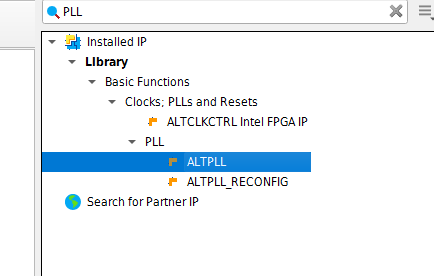
Using Quartus Lite 25.1 and trying to add ALTPLL IP, but still seems to be an issue ? The megawizard window seems to appear for a while and them disappears again. Generation seems to be incomplete since the file .qip file appears empty. I've seem this as an issue earlier, but post was 2 years old so thought I would check again if this is still an issue and if there are some workarounds.Solved8Views0likes3CommentsBidirectional pin USB_RX with a pseudo-differential I/O standard must use the OEIN port of the node
I am trying to make a bidirectional differential line using Cyclone V. In VHDL, I set USB_RX, USB_RXn as INOUT on the top level (they are assigned to a Differential SSTL-II 2.5 pair). I used the ALTIOBUF in differential mode and crated this block: COMPONENT DIFF_IO_BUF PORT ( DATAIN : IN STD_LOGIC; OE : IN STD_LOGIC; OE_B : IN STD_LOGIC; DATAIO : INOUT STD_LOGIC; DATAIO_B : INOUT STD_LOGIC; DATAOUT : OUT STD_LOGIC ); END COMPONENT; It's connected as following: DIFF_RX : DIFF_IO_BUF PORT MAP ( DATAIN => 'Z', OE => '0', OE_B => '1', DATAIO => USB_RX, DATAIO_B => USB_RXn, DATAOUT => iUSB_RX_I ); iUSB_RX_I goes to internal logic. Why am I getting this error? I don't see any OEIN port. I assume it means the OE and OE_B ports, but they are already connected. How can I fix this error? The whole error msg: Error (21168): Bidirectional pin USB_RX with a pseudo-differential I/O standard must use the OEIN port of the node DIFF_IO_BUF:DIFF_RX|DIFF_IO_BUF_iobuf_bidir_iup:DIFF_IO_BUF_iobuf_bidir_iup_component|wire_pseudo_diffa_o Thank you!29Views0likes6Comments
Agilex 7 F Series Transceiver Pins Allowed Voltages During Powerup/When Unpowered
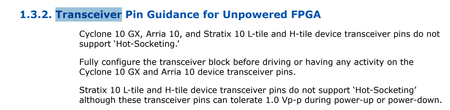
Hello, I would like to confirm the voltages allowed on the Agilex 7 F series Transceiver I/O (the Transceiver Data lanes and the REF_CLK inputs) during power-up or when the Agilex and its transceivers tiles are not powered. For example, I'd like to know if a scenario where Agilex interfaces to an external PCIe host that may drive PCIe clock to the Agilex Transceiver REF_CLK input before it's powered/while it's powering up is acceptable. The requirements for the Agilex GPIO, HPS_IO, and SDM_IO during powerup/when unpowered are clear to me from below documents but not the Transceiver I/O. I don't see any constraints specified for the Transceiver I/O during powerup unless I'm missing it. Can you please confirm this for me, or point me to where this is documented? If it matters, I am interested specifically in F-tile. The A692 Power Sequencing Considerations app note states the below: So it's clear for Cyclone GX, Arria 10, and Stratix 10 L/H tiles that no activity is allowed (with exception of 1.0 Vp-p on Stratix 10) on transceiver I/O during power-up but Agilex is not mentioned in this section. The Agilex 7 General-Purpose I/O User Guide states the following: Table 3: GPIO pin voltage must not exceed VCCIO_PIO or 1.2V, whichever is lower Table 22: HPS I/O pin voltage must not exceed VCCIO_HPS. Table 29: SDM I/O pin voltage must not exceed VCCIO_SDM. I don't see any mention of similar constraint for Transceiver I/O. The Agilex 7 Power Management User Guide states the following: Again, I see all I/O other than Transceiver I/O mentioned. Thanks!Solved56Views0likes9CommentsQuartus Pro simulation libraries for Riviera Pro
Hello, Using Quartus Pro 25.1, when trying to use the simulation library compiler tool to generate simulation libraries for Riviera Pro, the following error appears: Error: # ACOM: Error: COMP96_0001: Cannot find source file "c:/altera_pro/25.1/quartus/eda/sim_lib/altera_syn_attributes.vhd". Checking the folder content, it seems there are several missing files. This scenario has been reproduced in several machines. Could you please help us to solve this?19Views0likes2Comments