jtagserver.exe causing BSOD together with ftdi driver
Dear developers in the same shoe like me, I am facing a strange issue, and would like to ask others whether they have similar problem: Quartus Prime Pro 25.3.0 was installed first and in use with USB Blaster III (evalkit) After some time (probably windows pulled some newer driver components) each time when I plugged in the evalboard it was crashing the system. With WinDBG analyzing the minidump it turned out the responsible was jtagserver.exe calling some unknown function in ftdibus.sys "PROCESS_NAME: jtagserver.exe SYMBOL_NAME: ftdibus+f4d4 MODULE_NAME: ftdibus IMAGE_NAME: ftdibus.sys STACK_COMMAND: .cxr; .ecxr ; kb BUCKET_ID_FUNC_OFFSET: f4d4 FAILURE_BUCKET_ID: 0x139_a_GUARD_ICALL_CHECK_FAILURE_ftdibus!unknown_function OSPLATFORM_TYPE: x64 OSNAME: Windows 10 --> this is windows 11 FAILURE_ID_HASH: {3a7c8e82-5c61-9acf-ceb5-61656fa0b04c}" And here comes the strange part: Reinstalling the driver with dp_inst.exe from Quartus directory helped until next restart or at least for 1-2 hours. Then power cycling evalboard caused a crash again. When I fresh reinstalled driver and plugged in again the evalboard again everything was fine. When I updated to the latest quartus, the driver package in it was causing crash again. And I mean here reinstalling driver from the 25.3.1 quartus version did not change a thing. Anybody facing similar issue: I recommend installing Windows SDK and use WinDBG there for crashdump analysis to confirm this. I am looking forward for any feedback or stable solution idea. Kind regards, PeterSolved105Views0likes6Comments
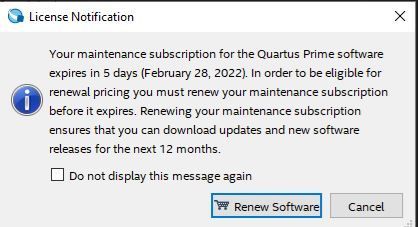
Quartus - Users getting license Notification with new license applied
We've gotten our renewal license and I've downloaded the the file to apply on FlexLM. I've made sure to apply the necessary parameters on the license file. When our users launch the Quartus software they get a licensing notification pop up: Please assist. Our users need to do compilations Thanks3.7KViews0likes11Comments
Quartus Dark Theme on Linux - Solution
I have a solution for setting up a dark theme for Quartus Prime 25 on Linux (Mint) and setup a Github repo. The program modifies the stylesheet using a Rust program. https://github.com/saturn77/quartus-dark-linux This repo allows running Altera Quartus on Linux with a dark theme, providing a modern look while being easy on the eyes for Linux users. There are some dark stylesheets for Windows, but those simply will not work on Linux. Quartus's argument parser intercepts -stylesheet before Qt can process it on Linux. This project uses a small Rust LD_PRELOAD library to hook QApplication::exec() and inject the stylesheet directly via Qt's setStyleSheet() API. Tested with Quartus Prime Pro 25.3.1 (Qt 6.5.7) on Linux Mint 22.3 Cinnamon.22Views0likes2Comments
Quartus 13.1 License
We're forced to maintain an old design that make use of Cyclone III FPGAs, unfortunately locking us to Quartus 13.1 tools. However some features I need access to require a license. Features such as the SignalTap, infinite PCI Megafunction functionality, and .rbf generation. I read that licenses are not issued for this version of the tool anymore. How do I go about to activate those features without a license? -Phil54Views0likes2Comments
Perpetual license Quartus II doesn't allow to build Cyclone V devices anymore.
We have been using Quartus II for certain smaller designs on Cyclone V for nearly 15 years now, but now, after re-generating the license again I can now still run Quartus II, but it gives me the error : Error (119013): Current license file does not support the 5CGTFD9E5F31C7 device. I can also still build all my Arria10 designs using Quartus Prime (for which we have separate licenses), so it's not an issue with the license server or license daemon. Can someone help me with this ?Solved207Views0likes25CommentsI do not get an eMail with the generated license file
My institute has licenses for the altera FPGA tools via the Europractice program. To get a new license file I signed in to the Intel® FPGA Self-Service Licensing Center, I selected the licenses and clicked on Generate License. After confirming the host id I got the message that a license file will be generated and send to me by mail. But I did not get any mail. I checked my spam folder but there is no mail either. What can I do to get new license files? regards, Holger25Views0likes1Comment
Unable to find questa_fe license file
Hello, I installed Quartus Prime 25.3.1 build 100 Pro Edition on Ubuntu 24.04 and the IDE seems to work fine. However, I cannot manage to get questa_fe working. From my understanding, questa_fe is a separate software and I'm initially trying to run it outside Quartus itself (even from Quartus I didn't have any luck). I generated and saved a fixed license file (LR-289450_License.dat). The content of the license file is reported below (some * cover part of it): # Intel Corporation Software and/or Intellectual Property License File # Issued 22 February 2026 # Upgrade to these products will no longer be available after the Maintenance Expiration # date unless licenses are renewed. # Fixed Node License # Primary Machine Name-********** # Primary Machine ID-NIC ID 78AF08436*** # Companion ID-N/A # Companion ID 2-N/A # Product License Summary: # 3 Questa*- FPGA Starter Edition (License: SW-QUESTA), 1 Seat(s) # - Maintenance Expiration of 2027.02 # - License Expires 22-Feb-2027 ################################################################################ # FEATURE START # This is license file for Questasim*-Intel FPGA Starter Edition # Number of seat licenses is 1 # License Expires 22-Feb-2027 DAEMON mgcld path_to_mgcld INCREMENT intelqsimstarter mgcld 2027.01 22-feb-2027 uncounted \ 0F8C7346AFA49755133E VENDOR_STRING=C22E52B3 HOSTID=78af084360ed \ ISSUER=Altera SN=1103017963 SIGN2="0F71 44B7 BF62 8F5A 155B 9D78 DFD6 \ C6C4 D56B 5AA5 E4FB 296C DA68 4A65 0412 152D 1E9E 9B76 B2F8 B30A 0698 \ B49C 7FED 4CF2 A120 **** **** **** **** ****" # FEATURE END ################################################################################ # End of Intel Corporation Software and/or Intellectual Property License File. Issued 02/22/2026 I did 3 different tests adding one by one only one of the following lines to my /etc/environment and rebooted: LM_LICENSE_FILE="/home/****/altera_pro/25.3.1/licenses/questa/LR-289450_License.dat" SALT_LICENSE_SERVER="/home/****/altera_pro/25.3.1/licenses/questa/LR-289450_License.dat" MGLS_LICENSE_FILE=/home/****/altera_pro/25.3.1/licenses/questa/LR-289450_License.dat In each case, the environment variable seems to be correctly set to the path of my license. For example, in the first case: echo $LM_LICENSE_FILE /home/****/altera_pro/25.3.1/licenses/questa/LR-289450_License.dat However, when I run: ./lmutil lmstat I get: lmutil - Copyright (c) 1989-2023 Flexera. All Rights Reserved. Flexible License Manager status on Mon 2/23/2026 21:05 Error getting status: No SERVER lines in license file. (-13,66) and when I try (/altera_pro/25.3.1/questa_fe/linux_x86_64) : ./vsim I get: Unable to checkout a license. Make sure your license file environment variable (SALT_LICENSE_SERVER) is set correctly and then run 'lmutil lmdiag' to diagnose the problem. Unable to checkout a license. Vsim is closing. ** Error: Invalid license environment. Application closing. Any idea about the right way to activate questa_fe using the free license? It seems unreasonably complicated for a license activation. Thanks End note: While trying to experiment with this issue, I managed (for some unknown reason) to have ./lmutil lmstat returning a positive result saying the the license was ok. However, even in that case, I couldn't manage to run ./vsim (same error message reported above).44Views0likes2Comments