Forum Discussion

 New Contributor
Questa FSE can not check out a license even after LM_LICENSE_FILE is set up correctly
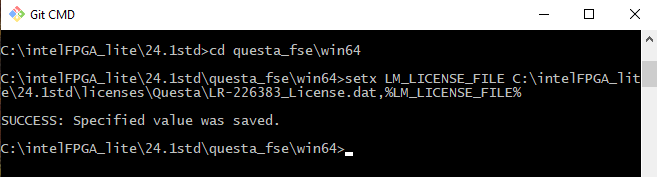
I just installed Quartus lite 24.1 along with questa_fse on a windows 10 computer and generated a license on altera.com, installed the license.dat file in a known location, then updated the LM_LICENSE_FILE environment variable, and followed other online threads, and still get error from questa saying it cant check out a license,
i can run lmutil lmdiag and it tells me uncounted nodelocked license, locked to ethernet address "this is the correct node for this node locked license"
OK, for those that were still searching or looking for an answer, I guess I just solved this on my own as I never got a reply in a timely manner, so the ANSWER is Yes, I attached the license file text above, while the Altera licensing manger only generated one license.dat file, the text inside the actual file has two instances of some kind of license, SO I commented out the first set of data above, (I guess just putting a hash mark # is the comment character) and if I did this then when I start Questa, it does indeed start without error, now I have to go back and add all the other licenses back into my windows environment variable, as I tore all that out to aid in debugging,
7 Replies
 JSLY
JSLYand this is of no help either as downloading and installing an updated siemens license manger gives a similar result
 ShengN_altera
Super Contributor
Hi,
I encountered the same issue. Let me get in touch with internal team and get back to you once any further feedback asap.
Thanks,
Regards,
Sheng
- JSLY
thank you, any idea why the pictures still say virus scan in progress, it has been one whole day, they are picture files that should scan in a matter of seconds? I will try to attach a bmp file and see if it goes through
- ShengN_altera
Hi,
Could you check that whether there's two license files being generated at your side when click generate once? I'm seeing two license files being generated, first one is not working and second one is working.
Thanks,
Regards,
Sheng
- JSLY
I do not understand what you are asking, are you saying that the license manager has created two licenses? I just looked in the license manager and it tells me there is olny one license, L-1257228
and this is the text file license.dat
# Intel Corporation Software and/or Intellectual Property License File
# Issued 25 March 2025
# Upgrade to these products will no longer be available after the Maintenance Expiration
# date unless licenses are renewed.
# Fixed Node License
# Primary Machine Name-Pangor
# Primary Machine ID-NIC ID 008CFA8449E6
# Companion ID-N/A
# Companion ID 2-N/A
# Product License Summary:
# 3 Questa*-Intel® FPGA Starter Edition (License: SW-QUESTA), 1 Seat(s)
# - Maintenance Expiration of 2026.03
# - License Expires 25-Mar-2026
# 3 Questa*-Intel® FPGA Starter Edition (License: SW-QUESTA), 1 Seat(s)
# - Maintenance Expiration of 2023.02
# - License Expires 25-Mar-2026
################################################################################
# FEATURE START
# This is license file for Questasim*-Intel FPGA Starter Edition
# Number of seat licenses is 1
# License Expires 25-Mar-2026
DAEMON mgcld path_to_mgcld
INCREMENT intelqsimstarter mgcld 2026.03 25-mar-2026 uncounted \
CFEAC5394E3D9C95FF36 VENDOR_STRING=9924C506 HOSTID=008cfa8449e6 \
ISSUER=Intel SN=296871664 SIGN2="0469 73E4 4435 6F3B 7A50 94DF 89C4 \
D466 7ED1 D0F7 6130 C6A6 1C19 2B96 06F1 0066 6B48 C742 978E DC17 C4EA \
647C 39D8 36C4 B42B BFED DEEE 2402 3355 EBD3"
# FEATURE END
################################################################################
# FEATURE START
# This is license file for Questasim*-Intel FPGA Starter Edition
# Number of seat licenses is 1
# License Expires 25-Mar-2026
DAEMON mgcld path_to_mgcld
INCREMENT intelqsimstarter mgcld 2026.03 25-mar-2026 uncounted \
CFDAC5394E3D9C95FE36 VENDOR_STRING=9924C506 HOSTID=008cfa8449e6 \
ISSUER=Intel SN=296871665 SIGN2="0382 734B 9DD8 0209 7E24 E9D1 D540 \
188C A046 8DB1 5AC7 2BA6 CAAC 4C93 3A57 1334 1D58 A5D9 F378 2488 A54C \
13D0 0DFE E2FF 5059 8EB5 2EA8 81CC 37B9 4719"
# FEATURE END
################################################################################
# End of Intel Corporation Software and/or Intellectual Property License File. Issued 03/25/2025- JSLY
OK, for those that were still searching or looking for an answer, I guess I just solved this on my own as I never got a reply in a timely manner, so the ANSWER is Yes, I attached the license file text above, while the Altera licensing manger only generated one license.dat file, the text inside the actual file has two instances of some kind of license, SO I commented out the first set of data above, (I guess just putting a hash mark # is the comment character) and if I did this then when I start Questa, it does indeed start without error, now I have to go back and add all the other licenses back into my windows environment variable, as I tore all that out to aid in debugging,
 sstrell
If that's the case, then your file was generated incorrectly. It shouldn't have two sections in a single file for the same feature.