Forum Discussion

 Contributor
File structure difference between Quartus Standard and Pro
Hi all,
I wanted to upgrade the Quartus version of my design from 17.1 Std to 21.3 Pro. The design compiles perfectly on Quartus 17.1 on Ubuntu 20.04.
With this change I wanted to upgrade the Altera IPs to newer versions and reconfigure the DDR4 EMIF to a higher speed bin which doesn't exist in Standard versions of Quartus (the memory device we were using became obsolete and needs a replacement, and the new component operates at higher data rate).
I copied the old design's Quartus folder which included all the files needed for the project on Quartus Std 17.1 and opened the new folder with Quartus Pro 21.3 in order to get the IP upgrade automatically. After upgrading the IP blocks, I wanted to generate HDL and then synthesize the design so that I can test it on the new hardware, but I'm getting errors from the custom IP components that are bought from another company. When I open the project on 17.1 Std, I can see the ports of the bought IP connected to the other blocks in the design, but when I open the Platform Designer on 21.3 Pro, I do not see the generics and the ports of the custom components. I believe the reason of that is because of the errors when I try generating HDL. The errors (same type but for different entities, for simplicity I share only one of them) I see are given below:
Error: max_SOM01_ntl_clk_clock_0: set_parameter_property: Parameter property type cannot be modified after adding the parameter. Please set property type during add_parameter.
The IP itself is already added to the QSYS file (which was copied from the older project as well). I do see one generic for some of these custom IP blocks from all of their generics, but no signals at all.
I'm not sure what is wrong/missing here, any help from you guys would be much appreciated!
Quartus Project menu -> Add/Remove files from project. You may still be pointing to files that don't exist.
7 Replies
 sstrell
Super Contributor
What is your target device? Arria 10 is the only family that is supported in both Standard and Pro.
Easiest solution in these types of situation is to simply delete and re-add the component/ip.
You mention also you are using custom components from another company. If you have the HDL code plus the associated _hw.tcl script file that describes how the components should work in Platform Designer, you should be OK. Do the custom components appear in the IP Catalog of Platform Designer? That makes sure PD is seeing all the files.
 anonimcs
The target device is indeed an Arria10 FPGA.
I cannot remove the IP from the IP catalog, Quartus just doesn't allow me to remove it. So I tried removing the component's source from the ip/ folder. I first removed it and then tried generating HDL, then closed and re-launched PD after copying back the component's source folder into ip/ directory, and then generated HDL once again. The property errors seem to be gone now, but now I have a different error.
Error: max_xcvr_emif_if_0.xcvr_emif_if_0: Component xcvr_emif_if 16.1 not found or could not be instantiated
Error: qsys-generate failed with exit code 3: 1 Error, 15 Warnings
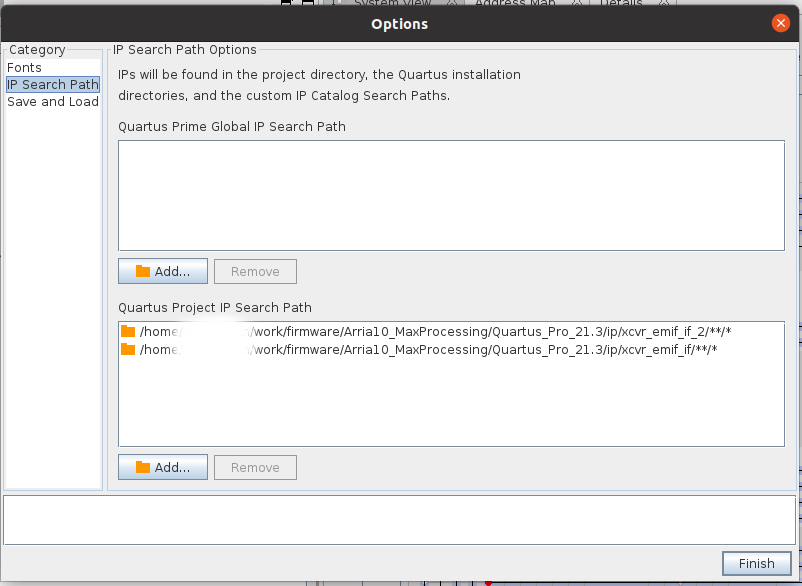
I tried removing & re-adding this IP's source folder into the ip/ folder as well, but seems like it's not the answer for this one. I added the component's source directory into the IP Search Paths and tried changing the version in the _hw.tcl file but both of these changes didn't help. Do you have any clue what might be wrong/missing here ? For your consideration, I added snippets for the first lines of the hw.tcl file and the paths used for the IP search path.
The components from the other company appear in the PD and in its IP Catalog, I have both the source code and _hw.tcl files.
- sstrell
No I meant removing the component from the Platform Designer System View tab and then adding it again from the IP catalog (the off-the-shelf, included IP in the tool which will be up-to-date for the version of Quartus you're using), not manually manipulating all the files. Doing that is a recipe for disaster. When you delete the component, choose the option that appears to delete the component's .ip file as well.
- anonimcs
Yes I removed the .ip file at the first time, but seems like it's not the issue here. There are two versions of one entity in the project directory, and only the latest version is used in the design, namely max_xcvr_emif_if_2_0. The old one is unchecked (disabled and not used) in the System View of the Platform Designer and I removed it from the system view, including the option of removing the .ip file. But the error I gave above for max_xcvr_emif_if_0 is still not gone...
- RichardT_altera
What sstrell is referring to in his first reply is this: If you have the _hw.tcl file, use the 'IP' implementation type. Use 'HDL' implementation type if you have the HDL code for the customer IP. You may checkout this guidelines when creating generic components in Quartus Pro.
3.4. Creating Generic Components in a System
Importing HDL to create Qsys Pro Components:
https://www.youtube.com/watch?v=ATouhNuEx2o
-- "The components from the other company appear in the PD and in its IP Catalog, I have both the source code and _hw.tcl files." --
Since the other company is able to get it done in the PD Pro, I would suggest to consult them directly on how to migrate the custom IP to the PD Pro as they have the visible to the code used.
Regards,
Richard Tan
- sstrell
Quartus Project menu -> Add/Remove files from project. You may still be pointing to files that don't exist.
- RichardT_altera
I'm pleased to know that your question has been addressed.
Now, I will transition this thread to community support. If you have any further questions or concerns, please don't hesitate to reach out.
Thank you and have a great day!
Best Regards,
Richard Tan