Forum Discussion

 New Contributor
remote update module for cyclone 10 GX
I’m working with a Cyclone 10 GX FPGA with Quartus Prime 23.4.0 Build 79 11/22/2023 SC Pro Edition and the Ashling IDE v23.4.1, 3rd Nov 2023
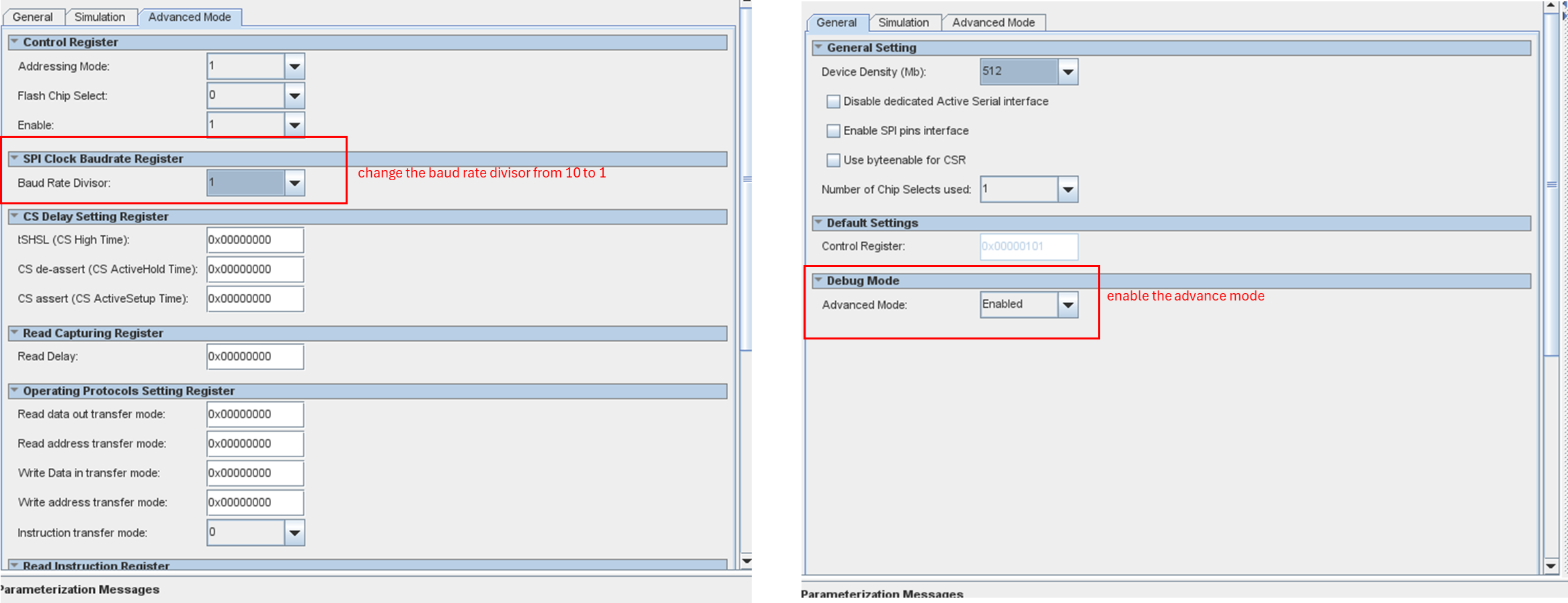
using the remote update module to switch between factory and application images stored in a configuration device (MT25QU512). When generating a .jic file containing both factory and application images, the FPGA reconfiguration process from factory mode to application mode fails if I reduce the DCLK divisor from /32 to /2 (increasing DCLK to 25 MHz). With the original /32 divisor, reconfiguration works, but the configuration time is about 3 minutes. The flash memory supports DCLK frequencies up to 90 MHz, and the watchdog timer is set to its maximum value (0xFFF). The FPGA works correctly when the .jic file contains only one image (either factory or application).
The issue seems to be related to timing during the reconfiguration process at higher DCLK frequencies. Has anyone encountered similar issues or have insights on resolving this?
8 Replies
 Paul83
Hi All,
I’ve attempted to change the ALTERA_RU_WATCHDOG_TIMEOUT value from 0x00000FFF to 0x00000001. This adjustment seems to allow the system to transition from the factory image to the application image.
Would a larger timeout value provide a safer transition to application mode? Does anyone know why this change works?
Thanks
Paul
IOWR_ALTERA_RU_CONFIG_MODE (REMOTE_UPDATE_BASE, ALTERA_RU_RECONFIG_MODE_APP); //write 1 in application page
IOWR_ALTERA_RU_PAGE_SELECT (REMOTE_UPDATE_BASE, start address); //start address
IOWR_ALTERA_RU_WATCHDOG_TIMEOUT (REMOTE_UPDATE_BASE, 0x00000001); //set the watch down timeout
IOWR_ALTERA_RU_WATCHDOG_ENABLE (REMOTE_UPDATE_BASE, ALTERA_RU_WATCHDOG_ENABLE); //enable the watchdog
IOWR_ALTERA_RU_RECONFIG (REMOTE_UPDATE_BASE, 0x01); //trigger the reconfiguration
 NurAiman_M_Intel
Super Contributor
Hi,
- I assume you have follow the remote update IP userguide? https://www.intel.com/content/www/us/en/docs/programmable/683695/19-4-19-1-0/and-devices.html
- Can you provide us the scopeshot for before and after the clk speed is increase?
Regards,
Aiman
- Paul36
Hi Aiman,
Sorry for the late response as my company block this page and i try to use another account to reply.
Regarding the DCLK on the configuration device: before increasing the clock speed, the default setting of the clock divisor is 0x10 (which corresponds to a division by 32), resulting in a DCLK frequency of 1.5625 MHz. After changing the divisor to 0x1 (which corresponds to a division by 2), the DCLK frequency increased to 25 MHz, given that the input clock to the generic serial flash module is 50 MHz. This output appears to be as expected.
As for my understanding of the remote update module:
In the application image code, we can set the timeout value by writing to the RU_WATCHDOG_TIMEOUT parameter. Afterward, we enable the watchdog by setting the RU_WATCHDOG_ENABLE parameter to 1. To prevent the system from reconfiguring to the factory image, we need to periodically reset the timer by writing a value to RU_RESET_TIMER.
However, it seems that the watchdog does not function as intended, even though it is enabled and the timer is not being reset. Could you help me verify if I have misunderstood any of these functions?
Thanks
Paul
- NurAiman_M_Intel
Hi,
-What is the result of time out parameter?
-What is the value that you set to the reset timer?
-Please provide scopeshot as per my previous response.
Regards,
AIman
- Paul36
Hi Alman,
-What is the result of time out parameter?
In the application program, I set the following registers:
IOWR_ALTERA_RU_CONFIG_MODE(REMOTE_UPDATE_BASE, 0x00); //Configures the factory image.
IOWR_ALTERA_RU_PAGE_SELECT(REMOTE_UPDATE_BASE, 0x20);//Starts at address 0x20 for the factory image.
IOWR_ALTERA_RU_RESET_TIMER(REMOTE_UPDATE_BASE, 0x00);//Does not reset the timer.
IOWR_ALTERA_RU_WATCHDOG_TIMEOUT(REMOTE_UPDATE_BASE, 0x0A);//Sets the timeout value to 0x0A.
IOWR_ALTERA_RU_WATCHDOG_ENABLE(REMOTE_UPDATE_BASE, 0x01);//Enables the watchdog.
After enabling the timer, the main loop continues to read back the watchdog timeout parameter, which same as the value I set with change in the timeout value:
IORD_ALTERA_RU_WATCHDOG_TIMEOUT(REMOTE_UPDATE_BASE, 0x0A); //Reads back the timeout value of 0x0A.
IORD_ALTERA_RU_WATCHDOG_ENABLE(REMOTE_UPDATE_BASE, 0x01); //Ensures the watchdog is enabled.
I expected that setting the timeout and enabling it without resetting the timer would trigger a reconfiguration after timeout value reduce to zero, but it did not (even the timeout value do not reduce). Please let me know if I misunderstood something.
-What is the value that you set to the reset timer?
To reset the timer, I set the value to 0 (IOWR_ALTERA_RU_RESET_TIMER(base, 0x0)) because I did not want to reset the timer and aimed to trigger the reconfiguration.
-Please provide scopeshot as per my previous response.
The reconfiguration process at higher DCLK frequencies has been resolved. The existing issue is with the watchdog timer not behaving as expected. I will return to the office next week and capture the waveform for your reference.
Thanks
Paul
- NurAiman_M_Intel
Hi,
Do you have the scopeshot?
Regards,
Aiman
- NurAiman_M_Intel
Hi,
Afterward, we enable the watchdog by setting the RU_WATCHDOG_ENABLE parameter to 1. To prevent the system from reconfiguring to the factory image, we need to periodically reset the timer by writing a value to RU_RESET_TIMER.
However, it seems that the watchdog does not function as intended, even though it is enabled and the timer is not being reset.
-What do you mean it is not functioning as intended? What is the result of not functioning? Is the factory image automatically loaded or somethings else happened? What is the impact?
Regards,
Aiman
- NurAiman_M_Intel
As we do not receive any response from you on the previous question/reply/answer that we have provided. Please login to ‘ https://supporttickets.intel.com’, view details of the desire request, and post a feed/response within the next 15 days to allow me to continue to support you. After 15 days, this thread will be transitioned to community support. The community users will be able to help you on your follow-up questions.