Forum Discussion

Altera_Forum Honored Contributor
15 years agoHonored Contributorprintf does not display in the console
Hi All,
I am trying to get the cycloneiii_3c25_start_niosii_standard reference design files to run on the cyclone iii starter kit. The problem that i have is that once the Nios ii project is built and run on the board printf does not display anything to the console. The code is as simple as can be:
# include <stdio.h>
int main()
{
   printf ("hello from Nios II!\n");
  return 0;
}
15 Replies
 Altera_Forum
You might just need to wait for the output to happen.
It isn't 100% clear what happens when main returns! (Well there is code to close stdout etc - but I don't understand why!) Try adding for (;;); at the bottom of your function.- Altera_Forum
Hi dsl, i tried that and it made no difference.
Do you how i can find alt_main() from my project/workspace - i think its worth adding a few break points and attempting to debug from there. Incidentally i just tried some example code from the tutorial but with the printf statement commented out.
This is meant to make the LED's on the board blink. This didnt work either - so the problem is not neccessarily specific to printf Many thanks.# include <stdio.h> # include "system.h" # include "altera_avalon_pio_regs.h" int main() { //printf("Hello from Nios II!\n"); int count = 0; int delay; while(1) { IOWR_ALTERA_AVALON_PIO_DATA(LED_PIO_BASE, count & 0x01); delay = 0; while(delay < 2000000) { delay++; } count++; } return 0; } - Altera_Forum
As you main() function is the entry point of your project, everything outside of it is also outside of your project directory. But your project is started through a BSP, which should have been generated when you generated your project.
With this in mind, you should be able to find alt_main() in <BSP-Project>/HAL/src/alt_main.c Are you using Jtag-uart or altera_uart driver an stdin/out/err? - Altera_Forum
Go to Run menu and select Debug...
Select your target hardware on the left Select the Debugger tag in the right pane Usually the option "Break at main()" is selected by default; select "Break at alt_main()", too. Start Debug: processor should halt at the very beginning of alt_main() Step inside the function: probably code hags somewhere during system initialization - Altera_Forum
Thanks for feedback.
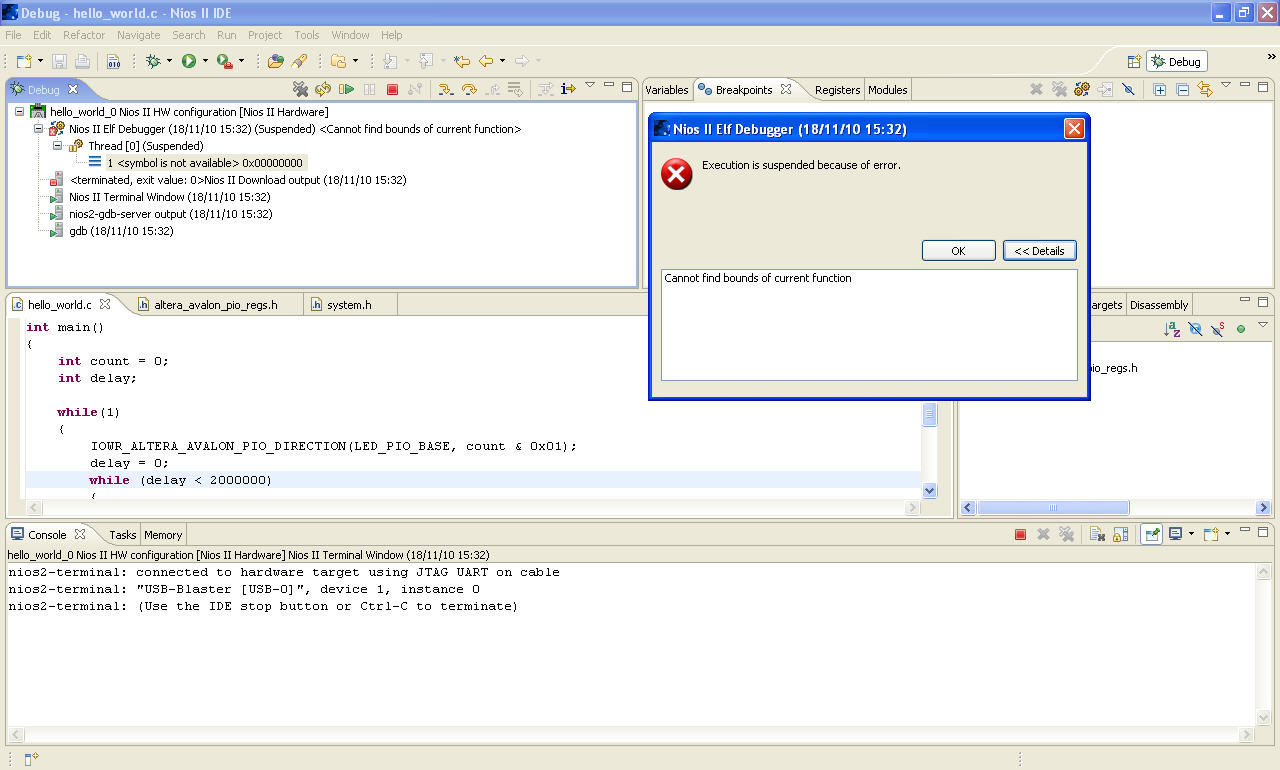
mcr42 i am using a jtag_uart from SOPC builder. Cris, i debugeed as you suggested, when i break at alt_main() the debugger starts running and deosnt actually allow for me to step into any code, it displays an error stating remote communication error: software caused connection abort. If i break at program entry point it runs to a thread at location 0x0000000000. If i step into the next instruction i get the following error: cannot find bounds of current function. I have attached a screenshot of my debug panel. even when tested individually neither the code to driver the leds or the printf work. hmmmmmmmmmm - Altera_Forum
Open sopc builder and Nios II properties.
Look where Nios reset vector is located. This must be a valid and initialized memory area. - Altera_Forum
reset vector ext_flash 0x00000000
exception vector ext_ssram 0x01000020 - Altera_Forum
Here is a screen shot of my SOPC design.
I managed to get the LED's flashing with the same code on a small footprint design using only on chip RAM and nothing external. I could not use a Jtag debug module in this case and so just flashed the .hex into the FPGA by buidling the C code and then compiling the quartus project. this makes me think the problem is associated to one of the external memory components. The SOPC design is from an altera example for my kit - i didnt produce it myself and so do not completely understand the requirment for all of the components. I really want to have a SOPC design that can handle larger footprint Nios projects up and running. Any ideas would be welcome. Ade - Altera_Forum
I just tried to debug on the same SOPC design using the count binary template in Nios II.
When trying to break at main() i got the following error: Nios II Elf Debugger (18/11/10 17:15) (Suspended) <Warning: Cannot insert breakpoint 1. Error accessing memory address 0x20003b8: Unknown error 4294967295. > Thread [0] (Suspended) 1 <symbol is not available> 0x00000000 I think there is definetly a problem with the memory configuration with my SOPC design. Problem being i am not sure where. Cheers. - Altera_Forum--- Quote Start --- I could not use a Jtag debug module in this case and so just flashed the .hex into the FPGA by buidling the C code and then compiling the quartus project. --- Quote End --- I never worked with such a configuration. I think that if you don't have the jtag debug module inside Nios you can't debug anything. Try to change something in system library configuration, for example mapping you code into a different memory.