Forum Discussion

 Honored Contributor
Configuring TSE & Nichestack
I have Quartus&SBT 11.1, and a board with PHY 83848.
I cannot bring up the eth interface with simple socket example. SOPC configuration is good (i hope), but i can't initialize the software: Your Ethernet MAC address is 00:07:ed:ff:d7:52 prepped 1 interface, initializing... [tse_mac_init] Error opening TX SGDMA init error -22 on net[0] mctest init called IP address of : 0.0.0.0 DHCP timed out, going back to default IP address(es) With a (long) debug session, i saw that tse_mac_device[maxnets] global variable is not properly setted. How can i add a phy profile?39 Replies
 Altera_Forum
No it should be
Altera chose a very misleading name. It should have been mdio_oe_n_from_the_tse_mac or mdio_oen_n_from_the_tse_mac to reflect better that it is an active low signal.phy_mdio_io <= mdio_out_from_the_tse_mac when (mdio_oen_from_the_tse_mac = '0') else ('Z');- Altera_Forum
Ok thanks, but another problem appear :(
If i set DHCP client then it stucks at
with this loopINFO : TSE MAC 0 found at address 0x0a013000 INFO : PHY National DP83848C found at PHY address 0x01 of MAC Group INFO : PHY - Automatically mapped to tse_mac_device INFO : PHY - Restart Auto-Negotiation, checking PHY link... INFO : PHY - Auto-Negotiation PASSED INFO : PHY - Restart Auto-Negotiation, checking PHY link... INFO : PHY - Auto-Negotiation PASSED
whern i disable DHCP:while ( (IORD_ALTERA_AVALON_SGDMA_STATUS(dev->base) & ALTERA_AVALON_SGDMA_STATUS_BUSY_MSK) );
but it didin't response when i tried to connect. Wireshark see nothing came from eth.INFO : TSE MAC 0 found at address 0x0a013000 INFO : PHY National DP83848C found at PHY address 0x01 of MAC Group INFO : PHY - Automatically mapped to tse_mac_device INFO : PHY - Restart Auto-Negotiation, checking PHY link... INFO : PHY - Auto-Negotiation PASSED INFO : PHY - Restart Auto-Negotiation, checking PHY link... INFO : PHY - Auto-Negotiation PASSED INFO : PHY - Checking link... INFO : PHY - Link established INFO : PHY - Speed = 100, Duplex = Full OK, x=0, CMD_CONFIG=0x01000000 MAC post-initialization: CMD_CONFIG=0x05000203 RX descriptor chain desc (1 depth) created mctest init called IP address of et1 : 192.168.2.37 Created "Inet main" task (Prio: 2) Created "clock tick" task (Prio: 3) Simple Socket Server starting up Simple Socket Server listening on port 30 Created "simple socket server" task (Prio: 4) - Altera_Forum
It looks like the SGDMA is stuck, possibly because its memory mapped master isn't connected to the memory that holds the packet contents.
If you didn't do any modification to ipport.h then the packet contents buffers are allocated from the heap, and the SGDMA masters must be connected to the memory used for heap. - Altera_Forum
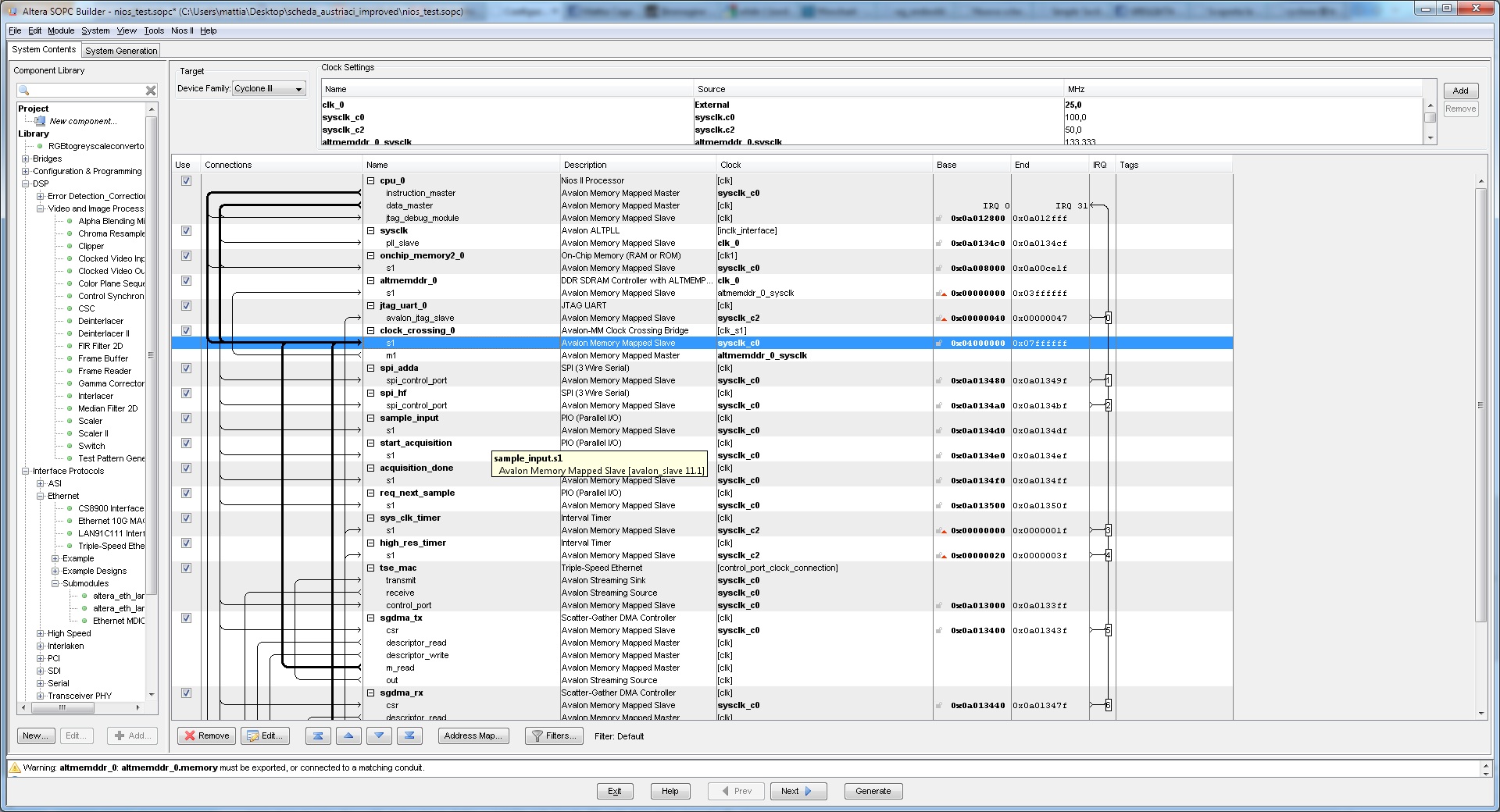
Mmmh, pratically i'm using only one memory in my design, and is attached to the cpu & sgdmas. All code is placed in this memory (ddr memory)
- Altera_Forum
Ok then the reason will be more difficult to pinpoint. I suggest to put signaltap probes on all the interfaces around the SGDMAs to try and figure out what it is trying to do when it is stuck.
Did you connect all 6 SGDMA masters directly to the memory, without pipeline bridges? What frequency are you using for the system clock? Does your design meet timing requirements? When I run a design at 100MHz I have a hard time meeting timing requirements with 8 masters (6 from the DMAs, 2 from the Nios) connected to the RAM directly and I have to use 1 or 2 pipeline bridges. - Altera_Forum
The simple socket server example bundled with Quartus 11.1 refers only to lan91c111 mac, and not TSE MAC.
May this is the problem? - Altera_Forum
Are you really sure? AFAIK support for the lan91c111 was dropped by Altera ages ago. The examples use the Interniche TCP/IP stack, which has a driver for the TSE.
- Altera_Forum
- Altera_Forum--- Quote Start --- Are you really sure? AFAIK support for the lan91c111 was dropped by Altera ages ago. The examples use the Interniche TCP/IP stack, which has a driver for the TSE. --- Quote End --- The readme file say: DESCRIPTION: A Simple Socket Server that controls development board LEDs. Requirements: -RTOS Type - MicroC/OS-II -Software Component - NicheStack TCP/IP Stack - Nios II Edition -Period System Timer - SYS_CLK_TIMER PERIPHERALS USED: This example exercises the following peripherals: - Ethernet MAC (named "lan91c111" in SOPC Builder) - PIO, 8-bit output (named "led_pio" in SOPC Builder) - PIO, 16-bit output (named "seven_seg_pio" in SOPC Builder) - STDOUT device (UART or JTAG UART) It doesnt' say anything about TSE
- Altera_Forum
It looks like the readme file is a bit old! But as long as the example uses the Nichestack TFCP/IP stack it doesn't really matter what ethernet MAC is used. You just need a driver for the NicheStack, and the TSE has one.
From your SOPC screenshot I see that the descriptor read/write masters are going down. Are you using a special memory for the descriptors? In that case IIRC you need to indicate it by using the TSE_SYSTEM_EXT_MEM_NO_SHARED_FIFO variant (and not the INT_MEM), check that the name for the descriptors memory component is correct, and that both the SGDMAs and the Nios data master are connected to that memory. Another alternative is to use the TSE_SYSTEM_INT_MEM_NO_SHARED_FIFO variant and connect all the SGDMA descriptor masters to the main RAM instead of a dedicated component. If this doesn't help then you really need to see what is going on with SignalTap.