Forum Discussion

 Contributor
AshlingRISCFree IDE Build system: 'source directory does not appear to contain CMakeLists.txt"
Hello Altera Gurus,
I am now having much trouble building my projects with the AshlingRISCFree IDE using a NIOSV/m processor on a MAX10 FPGA targeted at a MAX10 Development kit. I am using Quartus Standard edition 25.1 on a Windows 10 PC.
The process i am following is this:
- I created an FPGA top level System Verilog file for a new MAX10 Project.
- created a Qsys Platform which has a NIOSV/m processor connected to a onchip RAM for program storage and a onchip RAM for the DMA data.
- Added one mSGDMA engine for transmit data operations
- Added a second mSGDMA engine for receivedata operations
- Added two RAM onchip memories for the DMA decsriptors and wired up everything
- created the address map and interrupt mapping
- saved and generated the Qsys platform
- In the top level SV file is loopback the Tx -> RX for the two mSGDMAs
- Used the niosv-bsp-editor in a niosv console to created a BSP using the Qsys sopcinfo file
- Generated the BSP, created a simple C main application to configure the mSGDMAs and NIOSV/ m processor etc.
- Imported both the HAL_BSP and HAL_APP folders using: 'Import NIOS-V CMake Project...
- In the AshlingRSICFree IDE i can successfully run a 'Build all' and compile the HAL_BSP.
- BUT When i select the hal_app folder and try to build the Project i get these error messages:
17:37:20 Buildscript generation: hal_app::Default in D:\VAREX_mSGDMA_Eval\software\hal_app\build\Default
cmake -DCMAKE_EXPORT_COMPILE_COMMANDS:BOOL=ON -G "Unix Makefiles" "D:\\VAREX_mSGDMA_Eval\\software\\hal_app"
CMake Warning:
Ignoring extra path from command line:
"D:\VAREX_mSGDMA_Eval\software\hal_app"
CMake Error: The source directory "D:/VAREX_mSGDMA_Eval/software/hal_app" does not appear to contain CMakeLists.txt.
Specify --help for usage, or press the help button on the CMake GUI.
Problems :Description Resource Path Location Type
CMake Error: The source directory "D:/VAREX_mSGDMA_Eval/software/hal_app" does not appear to contain CMakeLists.txt. hal_app de.marw.cdt.cmake.core.internal.CMakeErrorParser CMake Problem
cmake exited with status 1. See CDT global build console for details. hal_app de.marw.cdt.cmake.core.internal.BuildscriptGenerator Buildscript Generation Problem
- Looking at the hal_bsl folder i can see the CMakeLists.txt is present, it is not present (automatically anyway) in the hal_app folder. I assume it would be if it was part of the BSP generate flow, but it ins't there so i assumed it shouldn't be there (in the hal_app folder i mean). Even if i add it manually then try to do a project build again i then see an error message saying the CmakeCache.txt file has not been created.
- This seems like a big tools flow mess to me. The Project is automatically setup to use a CMake Compile and CMake Build flow. But its not working.
- I am trying to use the AshlingRISC IDE GDB Debugger to load my ELF file to the NIOSV processor to allow me to debug my project, but of course because i can't even build it this is impossible.
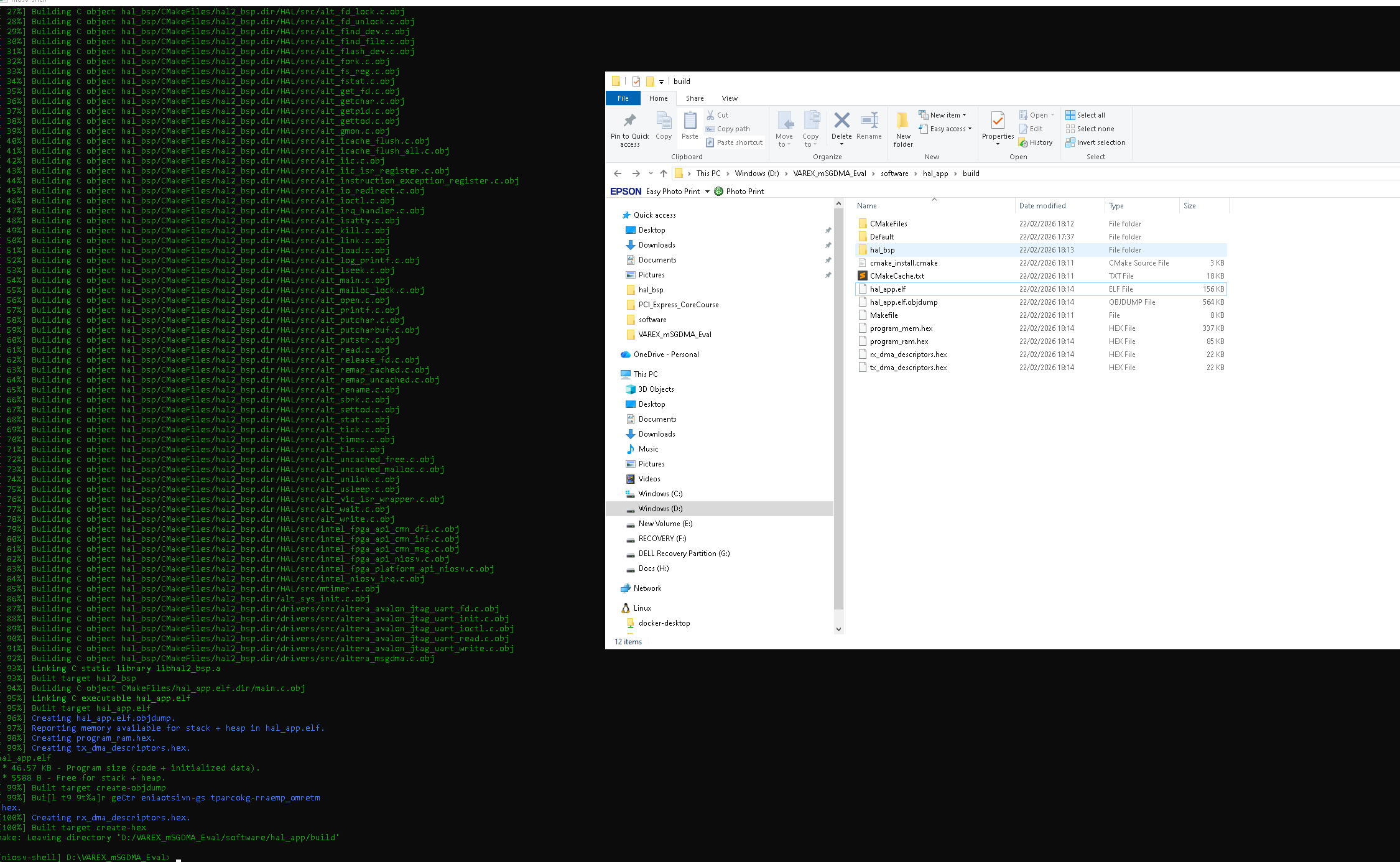
- I have tried using niosv cli commands to build my ELF file ...and they seem to work, which means the AshlingRISC IDE is the culprit in the failed IDE build process:
Here are my NIOSV cli commands :mSGDMA Test:
$ niosv-app --bsp-dir=D:/VAREX_mSGDMA_Eval/software/hal_bsp --app-dir=D:/VAREX_mSGDMA_Eval/software/hal_app --srcs=D:/VAREX_mSGDMA_Eval/software/hal_app/msgdma_loopback.c
$ cmake -S D:/VAREX_mSGDMA_Eval/software/hal_app -B D:/VAREX_mSGDMA_Eval/software/hal_app/build -G "Unix Makefiles" -DCMAKE_BUILD_TYPE=Debug
$ make -j4 -C D:/VAREX_mSGDMA_Eval/software/hal_app/build
After i try and fail to do a project build i can also no loner clean this project, it gets stuck in red with the same error. The only way i can get it back to the start state is : File -> Restart ...this is not great !!
- Does anybody know why i get these errors and how to fix them please ? :
Here i have also linked to an older post here in the knowledge base Claiming that "This problem is fixed starting with the Intel® Quartus® Prime Pro Edition Software version 21.4. and later". This appears to be NOT the case though :)
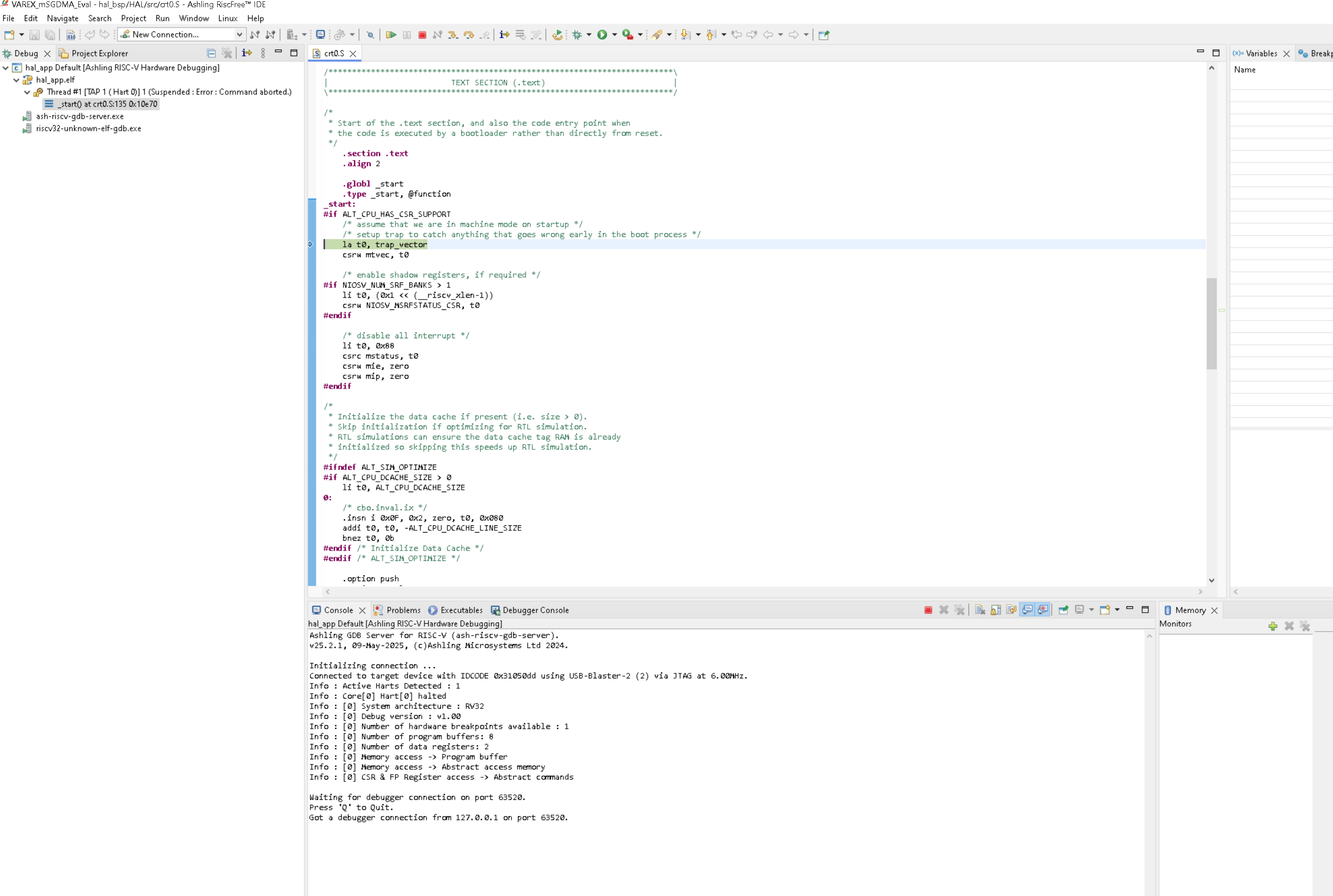
NOTE: I have attached 3 screenshots, 2 show the output from the NIOSV CLI when i run the 3 compile commands. The third one shows what happens when i try to load the ELF file which was created after the 3 Compilation steps run to completion. It looks like the GDB debugger detects the NIOSV/m processor (the 1 hard message) and then promptly crashed during part of the boot process. Does anybody have any ideas about why that might be and what is going on please ?
Thanks for any help,
Dr Barry H
9 Replies
 LiangYuG_Altera
Hi drbarryh
This post is referring to your second post about your experience with AN985.
although it usually involved some manual hacking to add paths to be able to get the Ashling IDE to be able to locate the gcc toolchain and a couple of header files for example.
I also needed to add a reference to the BSP from the APP so that the project gets glued together correctly.
I believe you are encountering this issue, which the gcc toolchain & BSP header file is not found. Here is the related KDB - Why does Ashling* RiscFree* IDE for Altera* FPGA software reports unresolved inclusion warnings, despite a successful build of Nios® V processor software project? | Altera Community - 349936
the tutorial is not using the niosv-app step
It is found in Step 4 of the link - https://docs.altera.com/r/docs/784468/current/an-985-nios-v-processor-tutorial/creating-an-application-project-files
Can you share the link of the document without Step 4 - niosv-app?a) cannot find the GCC compiler tools
Can you share a picture of the error? Will bring this to Ashling for improvement.
Although I didn't have a full picture of the error, I think this workaround might help - run the IDE in niosv-shell.b) cannot find many of the header files in the main C application.
I believe it is referring to the first issue in this post.
Regards,
Liang Yu- LiangYuG_Altera
Hi drbarryh
This post is referring to your first post about your design with mSGDMA IP.
CMake Error: The source directory "D:/VAREX_mSGDMA_Eval/software/hal_app" does not appear to contain CMakeLists.txt.
This is likely caused by missing niosv-app step between step 10 & 11.
The BSP CMakeLists.txt is generated automatically by BSP Editor, while the APP CMakeLists.txt is generated by niosv-app command.10. Generated the BSP, created a simple C main application to configure the mSGDMAs and NIOSV/ m processor etc.
<<<< Need to run niosv-app HERE
11. Imported both the HAL_BSP and HAL_APP folders using: 'Import NIOS-V CMake Project...Even if i add it manually then try to do a project build again i then see an error message saying the CmakeCache.txt file has not been created.
I see. I will replicate this behavior, and bring this to Ashling.
The quick workaround is to delete the "build" folder, and Build again.
(For your use case, it will be the D:/VAREX_mSGDMA_Eval/software/hal_app/build folder.)Here i have also linked to an older post here in the knowledge base Claiming that "This problem is fixed starting with the Intel® Quartus® Prime Pro Edition Software version 21.4. and later". This appears to be NOT the case though :)
Agree with your findings. The KDB is incorrect. I will correct the KDB immediately.
The valid resolution is to identify whether it is BSP CMakeLists.txt or APP CMakeLists.txt.- If it is BSP CMakeLists.txt, then it is likely that the user didn't run BSP Editor to generate the bsp folder.
- If it is APP CMakeLists.txt, then it is likely that the user didn't run niosv-app.
Once we get back the CMakeLists.txt, then proceed with subsequent cmake & make.
I have tried using niosv cli commands to build my ELF file ...and they seem to work, which means the AshlingRISC IDE is the culprit in the failed IDE build process:
The difference is niosv-app. Nevertheless, it is good to hear that you can proceed with CLI.
It looks like the GDB debugger detects the NIOSV/m processor (the 1 hard message) and then promptly crashed during part of the boot process. Does anybody have any ideas about why that might be and what is going on please ?
We can see that the Ashling GDB Debugger is reporting "Command Aborted". That should be the failing signature.
- If you run "niosv-download -g" in CLI, do you receive similar "Command Aborted" message?
(This taps in & out of the processor. It is to understand if the debug module is already faulty before debugging, or turns faulty during debugging.) - If Action 1 is successfully done without Command Aborted, next is "niosv-download -g <your_file>.elf".
(This taps in, download elf & out of the processor. Catching whether the download is causing the "command aborted") - Would you be able to simplify your code to simple "Hello World printf" and debug it?
Regards,
Liang Yu  RaduB_Altera
Occasional Contributor
Hi Barry,
I've found the document AN 985: Nios V Processor Tutorial. Please take a look especially at Chapter 3. Hello World on MAX 10 FPGA 10M50 Evaluation Kit and see whether you are missing anything from the steps.
There is also the document Nios V Processor Software Developer Handbook especially section 4.2.1. Building Single Application and Single BSP that should cover the same thing.From what I can tell, you need to run both the following tools, before being able to import into Ashling RIscFree:
- niosv-bsp → generates the BSP CMakeLists.txt
- niosv-app → generates the Application CMakeLists.txt
Did you run both apps?
Thanks a lot,
Radu drbarryh
Hi Radu,
Thanks for your reply and information. Yes i have followd AN 985 and i have managed to get a working hello world project running on a MAX10 development board, although it usually invloved some manual hacking to add paths to be able to get the Ashling IDE to be able to locate the gcc toolchain and a couple of header files for example. I also needed to add a refernce to the BSP from the APP so that the project gets glued together correctly.
There are quite a lot of documents for the NIOS V from Altere, but i don't remember seeing the second document you pointed out, but i probably have seen it before (NIOSV Processor Software Developers Handbook). Actually if you look at the steps involved using the ALTERA NIOSV Tutorial AN-985 and compare them to the steps mentioned to create a single application using the Software Developers Handbook, they use a slighlty different approach, the tutorial is not using the niosv-app step but instaed instructs you to create a software directory and then to create hal_bsp and hal_app directories manually and then also the tutorial mentions creating a hellowordl.c application manually in the hal_app directory. The two appraoches are a bit different and a better tutorial should probably use the staps mentioned in the NIOSV Processor Software Developers Handbook.
I will read that new document and go through the steps it mentions in the same ordering and see if that helps me create a compoilable and working project in thsi AshlingRISCFRee IDE. In my experience with this IDE it does not create a working project and instead i end up with a project which a) cannot find the GCC compiler tools and b) cannot find many of the header files in the main C application. To solve these problems i had to resort to adding paths to the GCC tools from the Altera Quartus install manually and add paths to the include files manually.But maybe the approach shown in the "NIOSV Software Developers Handbook" will work better !
I have been using the niosv command shell to create and compile my projects because i found the Ashling RISCFRee IDE to be too buggy ! But i do use the Aashling IDE to download my ELF file to my MAX10 board and then i can run the gdb debugger through the GUI.
Thanks for your help, Dr Barry H tehjingy_Altera
Regular Contributor
- RaduB_Altera
Hi Barry,
I am not familiar with the area yet, but let me install the tools, give it a try and get back to you.
Thank you,
Radu