Forum Discussion

 New Contributor
ModelSim-Intel FPGA Starter Edition 18.1 exits with code 211 when pressing Restart button

 Contributor
Hi matsu,
Thank you for the details. Based on the transcript, it looks good without any error and warnings.
To help us investigate this issue further, could you please provide the following information?
1. Is this issue happening every time when pressing the Restart button, or only sometimes?
2. Does the problem happen only with this project, or also with others project?
3. Could you help us check whether there are any differences in the antivirus or endpoint security software between the affected PC and the working PC? Does another success PC also have Trend Micro Apex One being installed?
4. Can you also share the msim_transcript from the success PC for comparison?
5. When the issue happens, does it fail only when clicking the GUI Restart button, or does it also fail if you type restart -f manually in the Transcript window?
6. Could you please help capture a fresh ModelSim transcript from launch until after pressing the GUI Restart button? If possible, it would be helpful to include with the Fatal error messages associated with exit code 211.
7. If ModelSim is run as Administrator on the affected PC, does the same restart failure still occur?
Thank you for your time and support!
Regards,
ZiYingE_Altera
 New Contributor
a { text-decoration: none; color: #464feb; } tr th, tr td { border: 1px solid #e6e6e6; } tr th { background-color: #f5f5f5; }
Hi ZiYing,
Thank you for your reply.
Please find my answers below.
Question1: Is this issue happening every time when pressing the Restart button, or only sometimes?
Answer1: It happens every time when I press the Restart button once the issue has occurred.
After restarting the PC, the issue is temporarily resolved. However, the issue occurs again the next day.
また、家に帰る前にPCをシャットダウンせずに電源を入れたままにしてみました。その場合、翌朝には問題は発生しませんでしたが、同じ日の正午以降に再び発生し始めました。PCを再起動すると、問題は再び解決しました。
質問2:この問題はこのプロジェクトだけに起きているのでしょうか、それとも他のプロジェクトでも起こるのでしょうか?
回答2:この問題は特定のプロジェクトだけでなく、どのプロジェクトでも起こります。
質問3:影響を受けたPCと正常に動作するPC間で、ウイルス対策ソフトやエンドポイントセキュリティソフトに違いがあるかどうか確認するのを手伝ってもらえますか?他に成功しているPCにTrend Micro Apex Oneもインストールされているのでしょうか?
回答3:Trend Micro Apex Oneは当社のすべてのPCにインストールされており、影響を受けたPCも動作中のPCも含まれます。
質問4:成功したPCのmsim_transcriptも比較のために共有してもらえますか?
回答4:はい。動作中のPCからのトランスクリプトファイルを「msim_transcript_OK PC.txt」として添付しました。
質問5:この問題が起きたとき、GUIの再起動ボタンをクリックしたときだけ失敗しますか?それともトランスクリプトウィンドウで手動でrestart -fを入力しても失敗しますか?
回答5:トランスクリプトウィンドウで手動でrestart -fと入力しても失敗します。
質問6:GUI再起動ボタンを押すまでの新しいModelSimトランスクリプトを、起動からGUI再起動ボタンまで記録するのを手伝ってもらえますか?可能であれば、出口コード211に関連する致命的なエラーメッセージを含めると助かります。
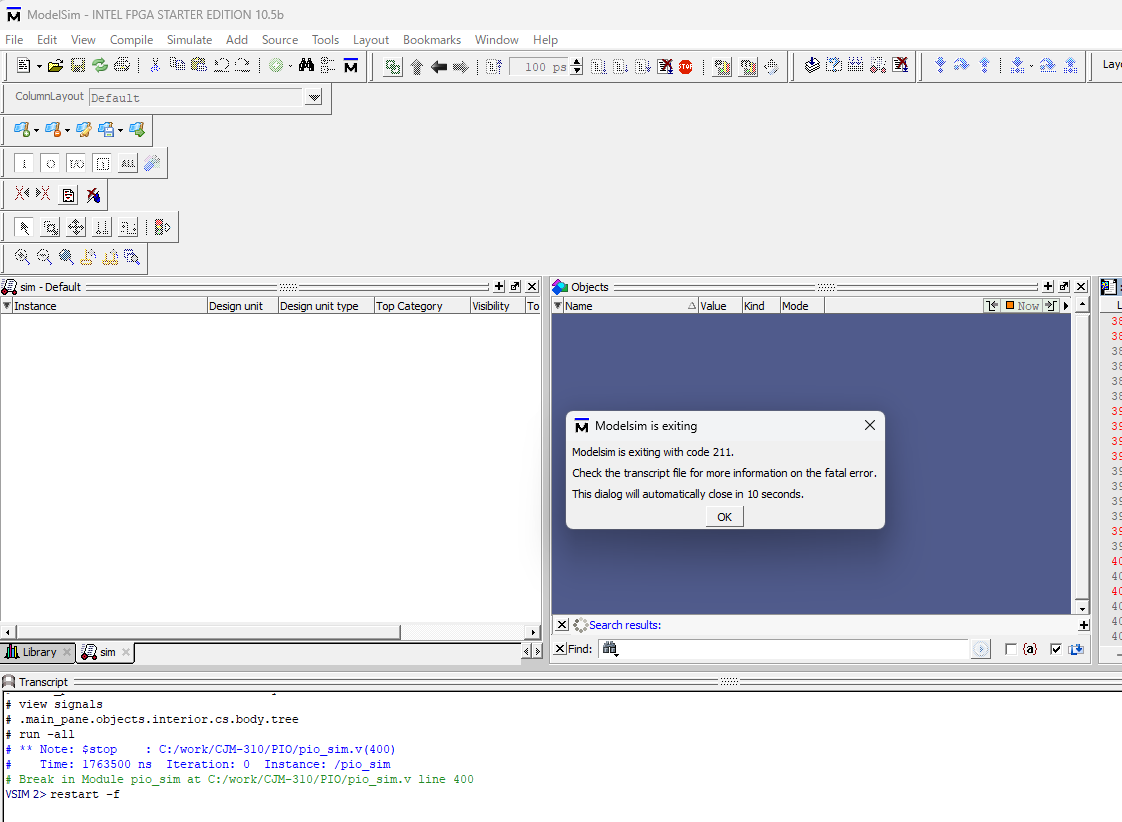
回答6:問題が発生した際に撮影したスクリーンショットを添付しました。
質問7:影響を受けたPCでModelSimを管理者として実行した場合、同じ再起動失敗は発生しますか?
回答7:これは会社管理のPCなので、「管理者として実行」でModelSimを明示的に起動することはできません。しかし、通常は管理者権限で使用されます。
敬具
松
- ZiYingE_Altera3 months ago
Hi matsu,
Thank you for your detailed answers.
I noticed that you mentioned attaching the transcript file "msim_transcript_OK PC.txt" and a screenshot taken when the issue occurred. However, it appears that these attachments were not included.
Could you please resend them when you have a chance?
Thank you!
Regards,
Zi Ying- matsu3 months ago
a { テキスト装飾: なし;color: #464feb; } tr th, tr td { border: 1px solid #e6e6e6; } tr th { 背景色: #f5f5f5; }
こんにちは、紫英さん。
教えてくれてありがとうございます。
添付ファイルが前回の返信に含まれていなかったことをお詫びします。
改めて以下のファイルを添付しました。
- msim_transcript_OK PC.txt
- 問題が発生した時にキャプチャしたスクリーンショット
それでもアクセスできない場合は教えてください。
敬具、
松