Forum Discussion

 Contributor
Ethernet blaster cyclone V
Hello,
I use a cyclone V using the USB blaster without probem.
Then I wanted to use the ETHERNET Blaster , it is ok on the network and I can access it, as well as the server web page.
I can add it in the blaster list to program the Cyclone V, but when doing an auto detect the Cyclone V is not recognized.
Is there a possible firmware update that allows to handle the Cyclone V?
I have attached 3 pictures for more details.
Note: The status is GREEN and when I do an auto detect it briefly blinks.
Kind Regards,
Alex.
14 Replies
 Ash_R_Altera
Regular Contributor
Can you check board connection to the Ethernet Blaster. If you have a verified working one, you could try on the board and see if the behavior is same or not.
If same issue persists, then it could be a board connection issue.
Regards
 AEsqu
AEsquHi,
I won't use the old ethernet blaster 1, I'll stick to the version 2 which is working fine for a week now.
IP address has been re-assigned to the new MAC address so I cannot test the old one without assigning a new IP address to it.
- AEsqu
Ethernet blaster II was ok last 24 hours, hourra.
- AEsqu
Changing Lan speed to 100 Mbps/full duplex and disabling STP portfast on LAN Port switch solves this issue for now, tested for about 1h, Ethernet Blaster II is still alive.
- Ash_R_Altera
Hi,
Here is a page for upgrading the Ethernet Blaster II firmware for different Windows versions:
Regards
- AEsqu
Link says product not supported anymore. But I don't need a firmware update.
- AEsqu
I tested with Quartus std 18.1.0 instead of Quartus std 22.1.0 and so far the Ethernet blaster II does not crash.
I saw other people complaining about ILA crash with Quartus 22.1.0, something to investigate perhaps.
Edit: Ethernet blaster II did not respond after some time, neither from Quartus ILA neither from a PING.
- Ash_R_Altera
The LED is purple, means the firmware is upgrading. To correctly upgrade the firmware, follow steps mentioned in section 2 -> Upgrading the Firmware of the user guide.
Upgrading properly could resolve your issue.
Regards
- AEsqu
Hi,
We bought a Ethernet Blaster II and it was failing to do the DHCP IP addressing on 1 Gbps network but got it working by setting the ethernet switch to 100 Mbps.
It is working, I can use it for ILA.
Is there any firmware upgrade for the Ethernet Blaster II ? The link on the Ethernet Blaster II webserver page points to altera not exisitng webpage.
After a first ILA acquisition, the Ethernet blaster connection is lost under windows 10, but it stays connected under linux, good enough.
Edit: also looses connection after some ILA grabs under Linux...
Alex.
- AEsqu
Well, the blaster is working better Today, it almost worked till the end prog (failed on CONF_DONE pin check).
After that the ethernet blaster cannot be connected anymore, so it seems ethernet side is un-stable.
If I disconnect the ethernet cable and connect it back, still not found (connecting).
If I close Quartus programmer and re-detect the ethernet blaster, same issue.
If I power cycle the ethernet blaster (and keep Quartus open and the ethernet cable in),
then it works.
Seems like the ethernet blaster crashes.
LED is purple when it crashes at the config done check time.
- Ash_R_Altera
Please check if you have condition mentioned in the following link:
Regards
- Ash_R_Altera
Hi,
As per the Ethernet Blaster II user guide, it supports Cyclone V. Refer: https://www.intel.com/content/dam/www/programmable/us/en/pdfs/literature/ug/ethernetblasterii.pdf
Are you using a development kit or is it your custom board?
Few suggestions to debug the issue:
1) Give a try with another cable, if you have.
2) Check the MSEL settings on the board.
3) Check other jumper settings etc. and make sure the JTAG chain is enabled properly.
4) What is the default state of the LED on Ethernet blaster? What color do you see after GREEN blink?
Regards
- AEsqu
Hello,
Are the MSEL settings done via jumpers?
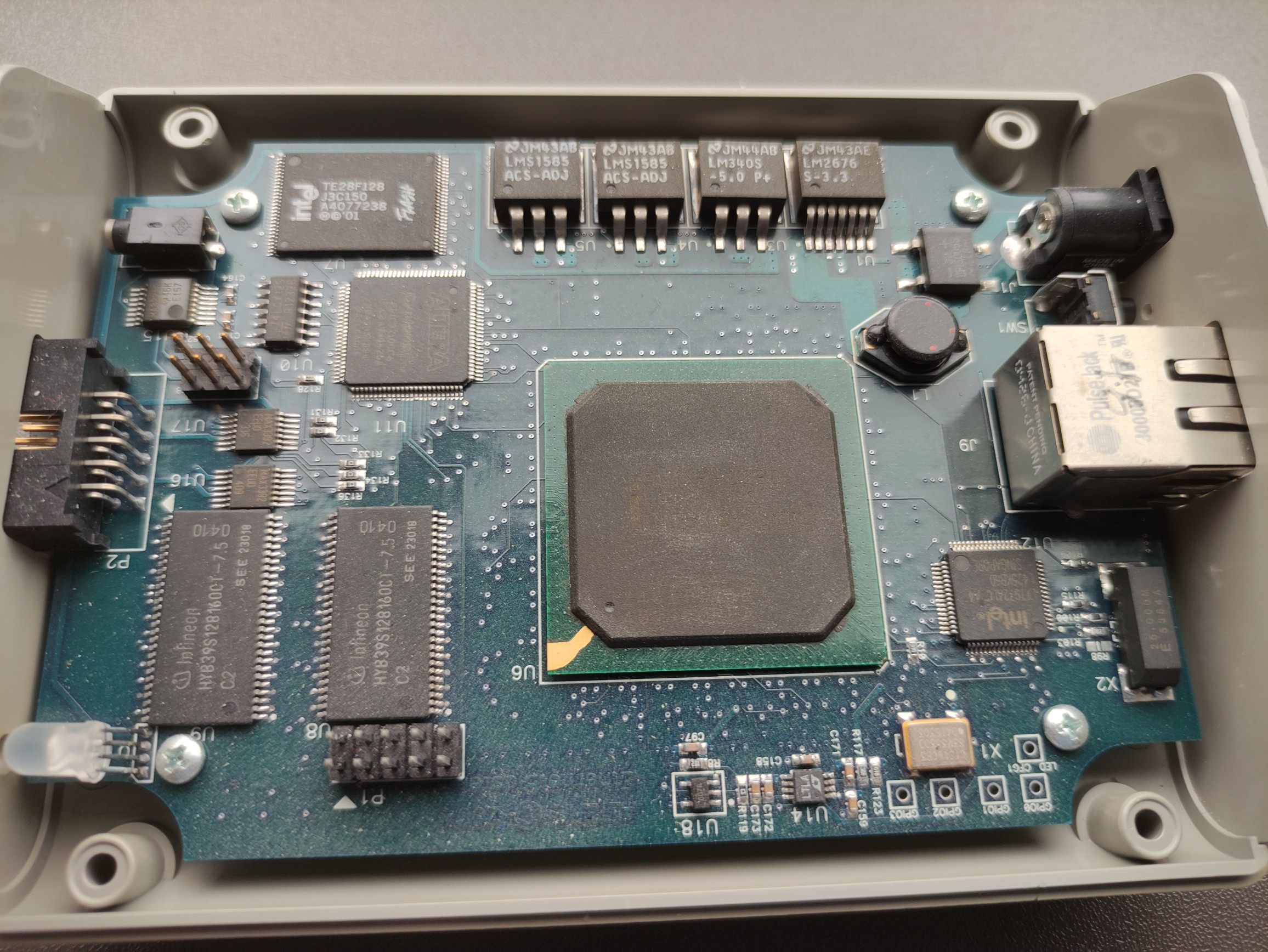
I have attached a photo of the PCB of the Ethernet blaster 1.
LED briefly blicks Blue when trying to auto detect the FPGA.
As for the cable, it is like that, see photo 2.
We use our own boards with Cyclone 5 and stratix 3 without issue with the USB blaster.
- AEsqu
The Ethernet (1) blaster also fails to auto detect our Cyclone III and stratix III board using quartus prime 12.1.0 std,
maybe that the blaster is dead?
Is the new Ethernet blaster II working with the Cyclone V fpga?