Forum Discussion

 New Contributor
DE1-SOC Simulation Model Generation Failed on MegaWizard
Hello,
I'm trying to start a project with DE1-SoC and started from its own documentation.
https://fpgacloud.intel.com/devstore/platform/13.1.4/Standard/de1-soc-my-first-hps/
On the My First FPGA documentation, there is an IP package added via MegaWizard. I'm following the steps described in the document but when MegaWizard generates the core, an error occurs. It says: Error, Simulation model generation failed. I've tried the steps on different computers and different versions of Quartus but each one gives the same error. How can I solve that problem? Attached the model generation screenshot from the MegaWizard error.
Hello again,
@ShengN_Intel thank you for your support to solve my problem. I've solved the problem by changing the character group. When compiling the projects or IP cores, Quartus tries to compile with system language. Anyone facing this problem in future can change the character set and solve the problem. We can mark the topic as solved.
10 Replies
 akdrs
akdrsHello again,
@ShengN_Intel thank you for your support to solve my problem. I've solved the problem by changing the character group. When compiling the projects or IP cores, Quartus tries to compile with system language. Anyone facing this problem in future can change the character set and solve the problem. We can mark the topic as solved.
 ShengN_altera
Super Contributor
Appreciate for your sharing. It'll be great if you can mark it as solution for better future reference.
- akdrs
Yes, I am following that manual (My_First_Fpga). I also tried on Quartus v13 and the result was the same. As sstrell said, I don't need the simulation file for this tutorial I think. But I don't know how to disable the simulation file generation.
- ShengN_altera
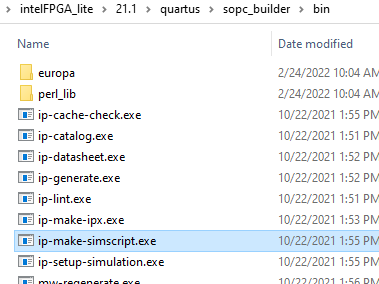
Make sure .../17.0/quartus/sopc_builder/bin file exists in quartus installed directory and ip-make-simscript.exe exists as well in the bin file. The file is attached below just in case you need it. Or you can try reinstall the whole quartus.
I got something like yours if ip-make-simscript.exe is missing or removed. (Quartus Lite v17.0)
- akdrs
- akdrs
Hello again,
Thank you for your answer. I don't need the simulation file generation for this study. Just I'm applying the steps shown in the getting started guide. How can I disable the simulation file generation?
And yes, I say the two slashed at the report but I couldn't find the reason for that. In each version of Quartus, it's the same, the path after the Quartus folder has two slashes. Also, how can I correct this path? I've checked for the windows path environment but there's no slash there.
- ShengN_altera
You are following this manual http://www.ee.ic.ac.uk/pcheung/teaching/E2_experiment/My_First_Fpga.pdf right?
I notice that you use Quartus v17.0 for the steps. Make sure to use Quartus v13.1 instead.
 sstrell
Do you need to generate simulation files for this? Make sure simulation file generation is disabled. I don't see in the project you linked to where this instruction is to generate this, but maybe I'm missing something.
Also, for some reason there are two slashes (//) in the middle of your path. Not sure if that has anything to do with the issue.