Forum Discussion

 New Contributor
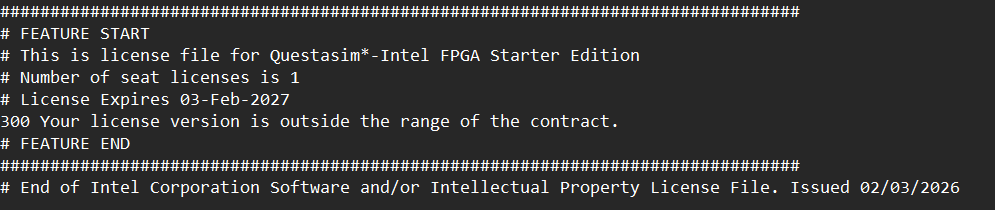
300 Your license version is outside the range of the contract
Hello,
I am receiving "Error 300" when generating a license file for "Questa-Intel FPGA Starter Edition" in the SSLC.
I have attempted the following troubleshooting steps:
1. Created a "New Computer" in SSLC to generate a fresh seat.
2. Generated a new file.
3. The resulting .dat file still contains the error text: "300 Your license version is outside the range of the contract" instead of the INCREMENT lines.
My maintenance date is valid (expires 2027), but the generator is failing to write the keys.
Update: For everyone that downloaded the license in the month of February, the Intel FPGA servers are currently bugged, so generating new licenses will not work until a contributor can prove me wrong. If you are doing an assignment that requires simulations with waveforms, the legacy version works just as fine. Please go to
https://www.altera.com/downloads/simulation-tools/modelsim-fpgas-standard-edition-software-version-20-1-1
Select "Simulation Tools" > "ModelSim-FPGAs Standard" > "20.1.1 Latest" > Operating System(Windows/Linux)
Please download the Windows version which is 1.2 GB.
This requires no license but can still simulate like Quartus/Questa/waveforms.
17 Replies
 milkuff
Thank you!!!
- milkuff
Thank you very much. I am new to the software. Then, given I have .v file of Verilog code and some test benches, both can be loaded and run to model logic gates correct? Thanks again.
- milkuff
A bettter question is, sorry, if I have a .v file, how do I simulate that in a Questa waveform (say I have a .v file and test bench cases). I may have this figured this out by the time anybody responds, but I am just putting this out in there just in case because I am trying to resolve this as fast as possible due to deadlines. Thank you for any help!
 KentLam
Quartus uses Questa to simulate the waveform, ModelSim does not require "Questa", you can simulate it by opening the file, compiling it, and opening up a new "Wave" file which is different than a so called "University Waveform". The interface with this older model looks different but it should run the same.
- milkuff
After downloading, how can Questa work again? What is the name of the program that I can open to allow for Questa simulations? Thank you for the solution by the way.
- KentLam
Update: For everyone that downloaded the license in the month of February, the Intel FPGA servers are currently bugged, so generating new licenses will not work until a contributor can prove me wrong. If you are doing an assignment that requires simulations with waveforms, the legacy version works just as fine. Please go to
https://www.altera.com/downloads/simulation-tools/modelsim-fpgas-standard-edition-software-version-20-1-1
Select "Simulation Tools" > "ModelSim-FPGAs Standard" > "20.1.1 Latest" > Operating System(Windows/Linux)
Please download the Windows version which is 1.2 GB.
This requires no license but can still simulate like Quartus/Questa/waveforms. MKS_Alt
This modelsim is too slow to load a waveform. Has anyone seen the same issue with this modelsim? Is there any other tool we could use?
- KentLam
ModelSim should work like Questa, are you simulating logic gates through a test bench?
Which part of the program is slow, when you press Run All?
- RichardT_altera
Super Contributor
Hi All,
The Altera team is aware of this issue, and it should be fixed soon.
Sorry for the inconvenience caused, and we appreciate your patience while this is being addressed.
Regards,
Richard Tan tahiyattasdic
Do you have any idea when it will be fixed? Because this thing is very much needed in my Lab assignments. I know someone recommended ModelSim-FPGAs Standard, but still asking.
- RichardT_altera
Our team is still working on the fix, and at the moment we don’t have a confirmed completion date. Could you please try retrieving the license again in about two days? If the issue is resolved earlier, I will notify you right away.
Thank you for your patience and understanding.
Regards,
Richard Tan
 AntonioRangel
I still have this issue since yesterday(Tuesday 2026 February 4th), please update here if somebody gets a fix
- bwwal
I am having the same issue. Intel support is useless and refers everyone here. How is this issue going to be addressed.
- milkuff
Yes, I have the same issue. I believe the Intel Self-Service Learning CEtner is down and Intel is giving out false licenses. How do we solve this?
- Jay
Hello,
I also have the same problem for Questa license with outside the range of contract issue in these two days.