User Profile

UserID4331231
 Occasional Contributor
Joined 1 year ago


User Widgets
Contributions
Re: RX Mac segmented interface detailed information
Some Follow-up question I am using 400Gbe configuration, so far my assumption is that in a given cycle there can be either 1 sop and 1 eop - i.e complete frame in mac_data 1 sop or - i.e frame started and mac_data contains partial data 1 eop or - i.e frame ended and mac_data contains partial data 1 eop, 1 sop - i.e frame ended and mac_data contains partial previous frame data and a new frame has started can contains partial data I feel that above scenarios are valid as per waveform given in Figure 44. Receiving Data Using the RX MAC Client Interface. can you confirm if my above assumptions are true or false? My question are following scenarios valid? When rx_mac_valid == 1 can Inframe bits have 2 or more SOP 2o or more EOP I am using 400Gbe configuration so 16 inframe bits and 1024 (128 bytes) data bits are there. There can be small (ethernet frames like ARP which are 60 bytes). So theoretically its possible that one RX mac segmented interface cycle could have 2 or more complete frames. But from IP point of view can you tell me if these scenarios are possible or not? I am finding RX mac segmented interface very complex. lets say if "RX maximum frame size" is set to default value of 1518 bytes. Max RX frame size can not be more than 1518*8 =12,144 bits. Do you have a example verilog code to extract out valid ethernet frames out of RX mac segmented interface? Once frames are extracted out I have my user logic in place to process the frames and use Tx mac interface to send out Tx response frames6Views0likes1CommentRX Mac segmented interface detailed information
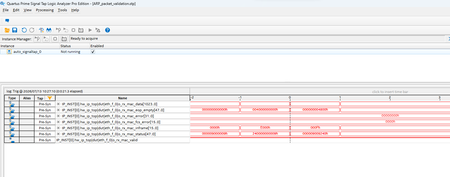
I am using Ftile ethernet hard IP (400G configuration) . I complied the example test design with signal tap to monitor RX mac segmented interface and loaded on MA2700 . The kit is connected to a host with 400G capable NIC in it. I am using ping command and via wireshark I can see that host sends ARP request packet to the kit. As the ARP request packets are sent to the kit, I triggered STP and capture I have attached screenshot. you can see all data in the capture other than rx_mac data. rx mac data on clock -1 and 0 are as following -1 -> E39001000406000801000608AAEB6A17E390FFFFFFFFFFFFD5555555555555FB070707070707070707070707070707070707070707070707070707070707070707070707070707070707070707070707070707070707070707070707070707070707070707070707070707070707070707070707070707070707070707070707 0 -> 070707070707070707070707070707070707070707070707070707070707070707070707070707070707070707070707070707070707070707070707070707070707070707070707070707070707070707070707070707FDE831AB370000000000000000000000000000000000006501A8C0000000000000C801A8C0AAEB6A17 From wireshark I can see this ARP packet is 60bytes and all the fields matches with what I see in the o_rx_mac_data. Now I am trying to make sense of Rx mac segmented interface and I have following questions. rx mac inframe values are E000h and 000Fh meaning total 7 bits are 1 (logic high) indicating 56 byte packet but from payload is 60 bytes. So how do I equate for remining 4 bytes? in user guide o_rx_mac_eop_empty [47:0] signal is explained as "Indicates the number of empty bytes on the RX data signal, starting from the most significant byte (MSB). Valid only on EOP segments." I dont understand this statement completely so please help; as per signal tap waveform clock 0 is where packet ends and the value of bus is 4800h. I am not sure if and how this value can help equates for missing 4 bytes. Figure 44. Receiving Data Using the RX MAC Client Interface is little help- and small explanation below it (has typos i think) is not much help. Do you have more details and example for MAC segmented interface which you can share with me so that I can learn exact details on how to use this interface to receive incoming packets from Ftile. Using above signaltap screenshot and o_rx_mac_data values for clock -1 and 0; how do i detect sop? how do i use rx mac_sengemented interface to detect eop ? how do i use rx mac_sengemented interface detect exact length of ethernet frame which is being supplied during clock -1 and 0.65Views0likes4CommentsQuesta-sim waveform- How to export to CSV?
I am using Questasim for doing waveform debug. I want to dump current waveform as CSV to apply some analytics on it. When I go to FIle > Export option "waveform" option is greyed out and is not available. I see "Image" option which I dont want; and "VCD" option is also greyed out. please help me on how can i export waveforms I see into CSV format.298Views0likes3CommentsF-Tile Ethernet Hard IP Design Example - Testbench
I have a question regarding this Ftile Ethernet hard IP example Design. I am able to generate this example design for 400gbe. I am able to load this design (sof) to MA2700Kit. I was able to run tcl script and internal loopback test was successful. I was also able to run testbench basic_avl_tb_top.sv and VSIM run was successful. I have following questions and areas where I need help. At line 144 and 145 in basic_avl_tb_top.sv I can see that Tx outputs are assigned Rx input pins. I would like to understand reason for doing this? I mean shouldn’t the RX lines driven by tasks/function to simulate incoming packets over the ethernet link? I want to modify the testbench to simulate Receiving of a particular 98 byte ethernet frame, and check how mac segmented interface is behaving to communicate this frame; So i can write my custom RTL block to receive it properly. I need help developing tasks/function to simulate incoming packets over the ethernet link. Thank you109Views0likes3CommentsF-tile-ethernet-hard-ip TX/RX MAC Segmented Client Interface
https://docs.altera.com/r/docs/683023/25.1.1/f-tile-ethernet-hard-ip-user-guide/tx-mac-segmented-client-interface "i_tx_mac_inframe" signal is explained as " Indicates valid data in each segment for specific rate. Along with the previous segment's inframe signal, this signal indicates the SOP and EOP location." i dont understand the underlined part of explanation. how does i_tx_mac_inframe indicates start of packer (SOP) and end of packet (EOP). can someone please elaborate on this with a couple of examples also another question is how to interpret i_tx_mac_data signals if i_tx_mac_valid == 1'b1 and i_tx_mac_inframe [15:0] == 16'h0 ?105Views0likes3CommentsRe: JTAG timing violations
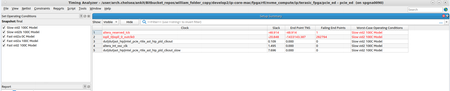
I have created another SDC file with "JTAG Signal Constraints" template added. The original SDC already have create_clock -name {altera_reserved_tck} -period 30 [get_ports {altera_reserved_tck}] set_clock_groups -asynchronous -group {altera_reserved_tck} still getting JTAG path violation as aseen in the screenshot. the slack increased to -48.914 as Data Required Time of ~44 was added Vs the last run.19Views0likes0CommentsRe: JTAG timing violations
I added another SDC file containing JTAG signal Constraints template but I still have JTAG violation the first SDC have create_clock -name {altera_reserved_tck} -period 30 [get_ports {altera_reserved_tck}] set_clock_groups -asynchronous -group {altera_reserved_tck} and the second SDC have JTAG Signal Constraints as generated by steps mentioned above. the slack increased to -48.914 as it added Data required time -44.688 Vs in previous run it was reported as 0.15Views0likes0CommentsJTAG timing violations
Hello Following are my project details LAST_QUARTUS_VERSION "25.1.0 Pro Edition" DEVICE AGIB027R29A1E2VC "Agilex 7" in SDC file - I have create_clock -name {altera_reserved_tck} -period 30 [get_ports {altera_reserved_tck}] set_clock_groups -asynchronous -group {altera_reserved_tck} I am getting timing violation in JTAG path (n/a domain). Lets ignore IOPLL domain violations for this thread. Attached is the timing compilation results for "n/a" path. I need your help in resolving JTAG timing violations. I tried to refer earlier threads on the "JTAG violations" but its not quite helping so opening this thread. thanks122Views0likes6Comments