User Profile

zhangxianyu
 New Contributor
Joined 1 year ago


User Widgets
Contributions
- 471Views0likes1Comment
trouble with tse ip
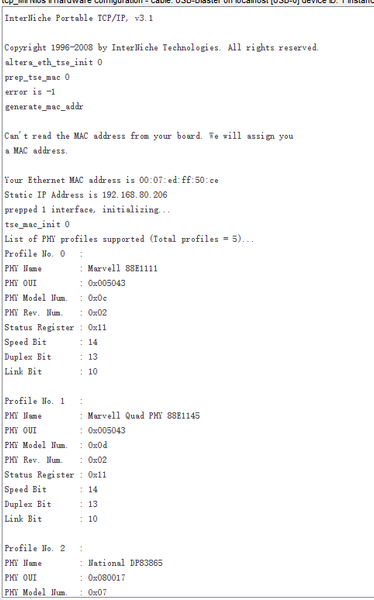
I am currently facing a problem where I read two PHY IDs on one PHY, which caused my chip's self negotiation to fail why? why?why? i am crazy I'm confused log is here: InterNiche Portable TCP/IP, v3.1 Copyright 1996-2008 by InterNiche Technologies. All rights reserved. altera_eth_tse_init 0 prep_tse_mac 0 Can't read the MAC address from your board. We will assign you a MAC address. Your Ethernet MAC address is 00:07:ed:ff:50:ce Static IP Address is 192.168.80.206 prepped 1 interface, initializing... tse_mac_init 0 List of PHY profiles supported (Total profiles = 5)... Profile No. 0 : PHY Name : Marvell 88E1111 PHY OUI : 0x005043 PHY Model Num. : 0x0c PHY Rev. Num. : 0x02 Status Register : 0x11 Speed Bit : 14 Duplex Bit : 13 Link Bit : 10 Profile No. 1 : PHY Name : Marvell Quad PHY 88E1145 PHY OUI : 0x005043 PHY Model Num. : 0x0d PHY Rev. Num. : 0x02 Status Register : 0x11 Speed Bit : 14 Duplex Bit : 13 Link Bit : 10 Profile No. 2 : PHY Name : National DP83865 PHY OUI : 0x080017 PHY Model Num. : 0x07 PHY Rev. Num. : 0x0a Status Register : 0x11 Speed Bit : 3 Duplex Bit : 1 Link Bit : 2 Profile No. 3 : PHY Name : National DP83848C PHY OUI : 0x080017 PHY Model Num. : 0x09 PHY Rev. Num. : 0x00 Status Register : 0x00 Speed Bit : 0 Duplex Bit : 0 Link Bit : 0 Profile No. 4 : PHY Name : Intel PEF7071 PHY OUI : 0x355969 PHY Model Num. : 0x00 PHY Rev. Num. : 0x01 Status Register : 0x00 Speed Bit : 0 Duplex Bit : 0 Link Bit : 0 INFO : TSE MAC 0 found at address 0x42005000 INFO : Multi Channel = No INFO : MDIO Shared = No INFO : MAC Type = 10/100/1000 Ethernet MAC INFO : MAC Address = 0x42005000 INFO : MAC Device = tse_mac_device[0] WARNING : Unknown PHY found at PHY address 0x00 of MAC Group[0] WARNING : Please add PHY information to PHY profile INFO : PHY OUI = 0x000732 INFO : PHY Model Number = 0x11 INFO : PHY Revision Number = 0x5 INFO : PHY[0.0] - Explicitly mapped to tse_mac_device[0] INFO : PHY[0.0] - Advertisement of 1000 Base-T Full Duplex set to 1 Created "Inet main" task (Prio: 2) INFO : PHY[0.0] - Advertisement of 1000 Base-T Half Duplex set to 1 INFO : PHY[0.0] - Advertisement of 100 Base-T4 set to 0 INFO : PHY[0.0] - Advertisement of 100 Base-TX Full Duplex set to 1 INFO : PHY[0.0] - Advertisement of 100 Base-TX Half Duplex set to 1 INFO : PHY[0.0] - Advertisement of 10 Base-TX Full Duplex set to 1 INFO : PHY[0.0] - Advertisement of 10 Base-TX Half Duplex set to 1 INFO : PHY[0.0] - Restart Auto-Negotiation, checking PHY link... Created "clock tick" task (Prio: 3) INFO : PHY[0.0] - Auto-Negotiation PASSED INFO : Applying additional user PHY configuration MARVELL : Mode changed to RGMII/Modified MII to Copper mode MARVELL : Enable RGMII Timing Control MARVELL : PHY reset WARNING : Unknown PHY found at PHY address 0x01 of MAC Group[0] WARNING : Please add PHY information to PHY profile INFO : PHY OUI = 0x000732 INFO : PHY Model Number = 0x11 INFO : PHY Revision Number = 0x5 WARNING : PHY[0.X] - Mapping of PHY to MAC failed! Make sure the PHY address is defined correctly in tse_mac_device[] structure, and number of PHYs connected is equivalent to number of channel WARNING : MAC Group[0] - Number of PHY connected is not equal to the number of channel, Number of PHY : 2, Channel : 1 INFO : PHY[0.0] - Checking link... INFO : PHY[0.0] - Link established WARNING : PHY[0.0] - PHY not found in PHY profile INFO : PHY[0.0] - Speed = 100, Duplex = Full TSEMAC SW reset bit never cleared! OK, x=10002, CMD_CONFIG=0x00002000 MAC post-initialization: CMD_CONFIG=0x04000200 [tse_msgdma_read_init] RX descriptor chain desc (9 depth) created mctest init called IP address of et1 : 192.168.80.206 Simple Socket Server starting up [sss_task] Simple Socket Server listening on port 30 Created "simple socket server" task (Prio: 4)699Views0likes4Commentstse simple soket server,please help
Hello experts, I am currently facing a problem where I am using TSE+SGDMA to run the Soket Server in Quartus13.1, which ping is ok . However, I am currently using Quartus18.1, which requires TSE+MSGDMA, and I am unable to ping it It's very strange that all the printing did not cause any errors, but the ping was not working. However, the Quartus13.1 project is pinging and working585Views0likes3Comments