User Profile

Shihang
 New Contributor
Joined 2 years ago


User Widgets
Contributions
Re: JTAG chain broken after FPGA configuration
We were able to restore the JTAG chain by switching SW8.2, which disables the FPGA on the JTAG chain. Once we do that, we were able to restore the max10 device using the factory recovery steps as described in the files that came with the board.1.4KViews0likes0CommentsRe: JTAG chain broken after FPGA configuration
Thanks for your reply! I have tried the factory recovery approach: this results in a "Flash Loader IP not loaded on device 2" error on Quartus. While I've seen this error on the forum, I wasn't able to find any post that was similar to my situation and/or had fixes that worked on my end.1.5KViews0likes0CommentsJTAG chain broken after FPGA configuration
Hi there, I am using an Agilex 7 I-series Development Kit (DK-DEV-AGI027R1BES, AGIB027R29A1E2VR3), and Quartus 24.1 on Linux. After programming the device with a CXL Type 3 Example Design and restarting the server, the FPGA's JTAG chain is no longer operational. When I run `jtagconfig --debug`, I see: ``` 1) AGI FPGA Development Kit [1-1] (JTAG Server Version 24.1.0 Build 115 03/21/2024 SC Pro Edition) Unable to read device chain - JTAG chain broken Captured DR after reset = () Captured IR after reset = () Captured Bypass after reset = () Captured Bypass chain = () JTAG clock speed auto-adjustment is enabled. To disable, set JtagClockAutoAdjust parameter to 0 JTAG clock speed 24 MHz ``` I used `quartus_pgm` to program the FPGA (configuration file passed via `-c`, copied below). This should use the on-board USB blaster, as opposed to an external blaster. These steps worked well in an internal project built on top of the Type 3 example design. However, when I used this config on a newly generated Type 3 example design project and ran it, the JTAG issue occurred. ``` /* Quartus Prime Version 24.1.0 Build 115 03/21/2024 SC Pro Edition */ JedecChain; FileRevision(JESD32A); DefaultMfr(6E); P ActionCode(Ign) Device PartName(AGIB027R29A) MfrSpec(OpMask(0)); P ActionCode(Ign) Device PartName(1_BIT_TAP) MfrSpec(OpMask(0)); P ActionCode(Ign) Device PartName(10M50DAF256) MfrSpec(OpMask(0) SEC_Device(QSPI_2GB) Child_OpMask(3 1 1 1) PFLPath("./intel_rtile_cxl_top_0_ed/hardware_test_design/output_file.pof")); ChainEnd; AlteraBegin; ChainType(JTAG); Frequency(16000000); AlteraEnd; ``` Thanks in advance for your help.Solved1.9KViews0likes6CommentsLong Placement Optimization Time
My current project's placement optimization phase is long (more than 20 hours). Is there a way to speed this up by using more CPU cores? I noticed Quartus (v24.1) is configured to use only 25% of my CPU cores, even though I selected to use all cores under the "Parallel Compilation" setting.693Views0likes3CommentsQuartus synthesis internal error
When I synthesized a project I'm working on, Quartus encountered an internal error (log copied below). This error only occurred after I re-cloned the repository under a different directory. Quartus was able to compile an identical project under its original directory. Thanks in advance. Help is much appreciated. Problem Details Error: Internal Error: Sub-system: SCL, File: /quartus/synth/scl/scl_wysiwyg_atom_factory.cpp, Line: 2763 ::scl_alloc_wys_atom_for_nadder(): Cannot read hex file: /mnt/sda1/projs/cxl_tm2/intel_rtile_cxl_top_0_ed/hardware_test_design/common/mc_top/emif_ip/emif_cal_two_ch/altera_emif_cal_iossm_274/synth/emif_cal_two_ch_altera_emif_cal_iossm_274_psjm22a_code.hex Stack Trace: Quartus 0x7b993: scl_alloc_wys_atom_for_falconmesa(CDB_SGATE_WYSIWYG*, CGA_INTERFACE*, ATOM_NETLIST_NODE_ADDER&) + 0x1307 (synth_scl) Quartus 0x7e90a: SCL_WYSIWYG_ATOM_FACTORY_IMPL::alloc_wys_atom(CDB_SGATE_WYSIWYG*, CDB_ATOM_NETLIST&) + 0x18ca (synth_scl) Quartus 0x338e9: FTM_ATOM_BUILDER::map_wys_sgate(CDB_SGATE_WYSIWYG*) + 0x39 (synth_atm_build) Quartus 0x7785b: FTM_GENERIC_ATOM_BUILDER::build_atom_network_v() + 0x57b (synth_atm_build) Quartus 0x2fd02: FTM_ATOM_BUILDER::build_atom_network(CDB_SGATE_NETLIST*, SCL_WYSIWYG_ATOM_FACTORY*) + 0x12 (synth_atm_build) Quartus 0x8f22c: FTM_ROOT_IMPL::build_atoms() + 0x42c (synth_ftm) Quartus 0x8f6d2: FTM_ROOT_IMPL::start_atom_builder() + 0x52 (synth_ftm) Quartus 0x8f8df: FTM_ROOT::start_atom_builder(CDB_SGATE_NETLIST*, SCL_WYSIWYG_ATOM_FACTORY*) + 0x8f (synth_ftm) Quartus 0x8af16: SCL_SYN_HIER::do_atom_build(CDB_SGATE_NETLIST*) + 0x16c (synth_scl) Quartus 0x36aef: scl_run_ftm_atom_build(CMP_FACADE*, SAM_FACADE*, CDB_SGATE_HIERARCHY*, CDB_SGATE_NETLIST*) + 0x72 (synth_scl) Quartus 0x2d267e: SYNTH::QIS::SYNTHESIS_FLOW::ftm_atom_building_cdb() + 0x42 (synth_qis) Quartus 0x2d3847: SYNTH::QIS::SYNTHESIS_FLOW::ftm_atom_building() + 0x1f (synth_qis) Quartus 0x2e0822: SYNTH::QIS::SYNTHESIS_FLOW::run_current_phase() + 0x332 (synth_qis) Quartus 0x2e0e94: SYNTH::QIS::SYNTHESIS_FLOW::run_full_flow(std::__cxx11::basic_string<char, std::char_traits<char>, std::allocator<char> > const&, bool, bool, QIS_RTL_STAGE::FLOW) + 0x468 (synth_qis) Quartus 0x1ac604: QIS_RTL_STAGE::IMPL::synthesize(QHD_PARTITION&, bool, bool, QIS_RTL_STAGE::FLOW) + 0x508 (synth_qis) Quartus 0x1ac914: QIS_RTL_STAGE::synthesize(QHD_PARTITION&, bool, bool, QIS_RTL_STAGE::FLOW) + 0x12 (synth_qis) Quartus 0xc8a59: qis_synthesize + 0x302 (synth_qis) Quartus 0x4bb47: TclNRRunCallbacks + 0x67 (tcl8.6) Quartus 0x4cf29: TclEvalEx + 0x599 (tcl8.6) Quartus 0xf40fe: Tcl_FSEvalFileEx + 0x21e (tcl8.6) Quartus 0xf4246: Tcl_EvalFile + 0x26 (tcl8.6) Quartus 0x2708e: qexe_evaluate_tcl_script(std::__cxx11::basic_string<char, std::char_traits<char>, std::allocator<char> > const&) + 0x388 (comp_qexe) Quartus 0x29dec: qexe_do_tcl(QEXE_FRAMEWORK*, std::__cxx11::basic_string<char, std::char_traits<char>, std::allocator<char> > const&, std::__cxx11::basic_string<char, std::char_traits<char>, std::allocator<char> > const&, std::__cxx11::list<std::__cxx11::basic_string<char, std::char_traits<char>, std::allocator<char> >, std::allocator<std::__cxx11::basic_string<char, std::char_traits<char>, std::allocator<char> > > > const&, bool, bool) + 0x71b (comp_qexe) Quartus 0x2afa5: qexe_run_tcl_option(QEXE_FRAMEWORK*, char const*, std::__cxx11::list<std::__cxx11::basic_string<char, std::char_traits<char>, std::allocator<char> >, std::allocator<std::__cxx11::basic_string<char, std::char_traits<char>, std::allocator<char> > > >*, bool) + 0x8a5 (comp_qexe) Quartus 0x77f9d: QCU::DETAIL::intialise_qhd_and_run_qexe(QCU_FRAMEWORK&, FIO_PATH const&, std::__cxx11::basic_string<char, std::char_traits<char>, std::allocator<char> > const&, std::__cxx11::basic_string<char, std::char_traits<char>, std::allocator<char> > const&, char const*, std::__cxx11::list<std::__cxx11::basic_string<char, std::char_traits<char>, std::allocator<char> >, std::allocator<std::__cxx11::basic_string<char, std::char_traits<char>, std::allocator<char> > > >*, bool) + 0x99 (comp_qcu) Quartus 0x78290: qcu_run_tcl_option(QCU_FRAMEWORK*, char const*, std::__cxx11::list<std::__cxx11::basic_string<char, std::char_traits<char>, std::allocator<char> >, std::allocator<std::__cxx11::basic_string<char, std::char_traits<char>, std::allocator<char> > > >*, bool) + 0x286 (comp_qcu) Quartus 0x40730e: qsyn2_tcl_process_default_flow_option(ACF_VARIABLE_TYPE_ENUM, char const*) + 0x4b5 (quartus_syn) Quartus 0x2fb9a: qexe_standard_main(QEXE_FRAMEWORK*, QEXE_OPTION_DEFINITION const**, int, char const**) + 0x7dd (comp_qexe) Quartus 0x406d4c: qsyn2_main(int, char const**) + 0x123 (quartus_syn) Quartus 0x43f80: msg_main_thread(void*) + 0x10 (ccl_msg) Quartus 0x44a00: msg_thread_wrapper(void* (*)(void*), void*) + 0x8c (ccl_msg) Quartus 0x1fcfd: mem_thread_wrapper(void* (*)(void*), void*) + 0x9d (ccl_mem) Quartus 0xe168: err_thread_wrapper(void* (*)(void*), void*) + 0x1e (ccl_err) Quartus 0x44929: msg_exe_main(int, char const**, int (*)(int, char const**)) + 0xd3 (ccl_msg) Quartus 0x406c22: main + 0x26 (quartus_syn) System 0x29d90: (c) System 0x29e40: __libc_start_main + 0x80 (c) Quartus 0x406b49: _start + 0x29 (quartus_syn) End-trace Executable: quartus Comment: None System Information Platform: linux64 OS name: Ubuntu OS version: 22 Quartus Prime Information Address bits: 64 Version: 24.1.0 Build: 115 Edition: Pro EditionSolved711Views0likes1CommentRe: JTAG error after programming device
The provided board link is correct. I'm not sure what the official fix is, but here's what we tried (and worked): 1. Flip SW2 on the board from AVSTx8 (the default setting according to board user guide) to JTAG 2. Power cycle the server and the board 3. Launch Quartus Programmer: the board should be detectable via JTAG 4. Program the board again with a bitstream that is known to work (one of the factory recovery bitstreams) 5. Flip SW2 back to AVSTx8 We suspect the cause of this error is an invalid bitstream. We may have programmed the board with a bitstream generated for another device. Would love to learn what the recommended fix from Intel is.1.5KViews0likes0CommentsJTAG error after programming device
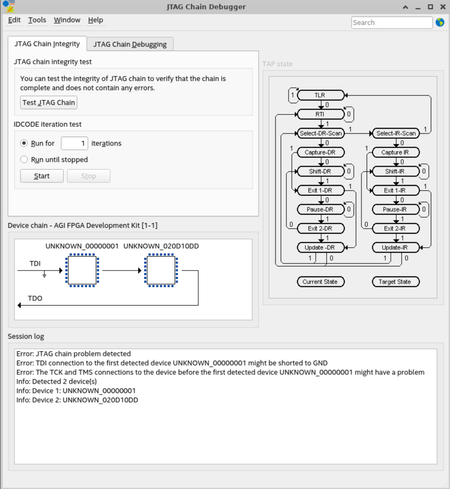
Hi, After programming my Agilex 7 I-series DevKit (DK-DEV-AGI027RBES), Quartus no longer recognizes its JTAG chain. When I ran the JTAG Chain Debugger, I found the following error: Could someone explain the error encountered here and suggest potential fixes? Thanks.1.7KViews0likes7CommentsRe: Intel Agilex 7 FPGA I-Series Development Kit: BTS cannot detect device
I figured out that the cause is BTS didn't know where the Quartus installation was. Setting QUARTUS_ROOTDIR fixed it. According to the BTS's README, opening Quartus should've configured QUARTUS_ROOTDIR directly. That was not the case on my server. I am using Quartus Prime Pro 24.1.1.4KViews1like1CommentIntel Agilex 7 FPGA I-Series Development Kit: BTS cannot detect device
Hi, I'm running through the user guide of Intel Agilex 7 FPGA I-Series Development Kit. When launching the BTS (user guide sec. 4), it reports "Error when scanning hardware - no devices!". However, Quartus was able to detect the board, and I have programmed the board with a sof file before launching BTS (user guide sec. 3). Context: System: Linux 5.15 Error output from BTS: **************************************** * BOARD TEST SYSTEM * **************************************** Board Test System starting... ES2 Prism: Error - GLX extension is not supported GLX version 1.3 or higher is required Success! Starting application on Linux... Apr 06, 2024 1:37:48 AM com.psg.bts.CommandShell checkJtagConfig SEVERE: java.io.IOException: Cannot run program "null/bin/jtagconfig": error=2, No such file or directory Thanks in advance.1.6KViews0likes3Comments