soft embedded processors
18 Topics
Why does Nios® V processor design fail to compile during Analysis & Synthesis when the QSYS file is added into the Quartus® Prime project instead of the QIP file?
Description In the Quartus ® Prime Standard Edition software version 25.1, any Nios ® V processor designs might fail to compile during Analysis & Synthesis when the QSYS file is added into the Quartus ® Prime project. Here are the possible error messages that you might receive: Error (10170): Verilog HDL syntax error at niosv_cpp_fsm.sv(1418) near text: "'"; expecting ":", or "?", or binary operator. Error (10355): SystemVerilog Enumeration Type Declaration error at riscv.pkg.sv(1163): encoded value for element "MXL32" has width 32, which does not match the width of the enumeration's base type (2) Error (10835): SystemVerilog error at riscv.pkg.sv(149): no support for unions Error (16950): Verilog HDL error at : decimal constant 00000000000000010000000000000000 is too large, using 1874919424 instead Error (16814): Verilog HDL error at ... : unknown literal value 00000000000000010000000000000000 for parameter ... ignored This is because the Quartus ® Prime Standard Edition software version 25.1 has been updated to adhere to the software requirements below. This requirement is not mandatory in prior versions of the Quartus ® Prime Standard Edition software. Resolution To work around this problem in the Quartus ® Prime Standard Edition Software version 25.1, Remove the QSYS file from the project using the Remove Files in Project function. Add the QIP file to the project using the Add Files in Project function. Related Articles ERROR building simple NIOS® V Compact project Nios® V Synthesis Fails with Quartus® Prime 25.1 Lite205Views0likes0CommentsWhy does the Nios® V processor that applies fast JTAG UART driver stop (stuck in a loop) when the JTAG UART terminal is not active?
Description Due to a problem in the Board Support Package Editor of Quartus ® Prime software, the JTAG UART driver for fast implementation might get stuck in a loop for any Nios ® V processor designs, when JTAG UART terminal is not active. This problem has been present since: Quartus ® Prime Pro Edition software version 21.3 Quartus ® Prime Standard Edition software version 22.1 It is because the JTAG UART IP is initialized before the Nios ® V processor initialization in alt_sys_init.c. For example: void alt_sys_init( void ) { ALTERA_AVALON_JTAG_UART_INIT (JTAG_UART, jtag_uart); INTEL_NIOSV_M_INIT (NIOS, nios); } Resolution To work around this problem, update the alt_sys_init.c to initialize the Nios ® V processor first. void alt_sys_init( void ) { INTEL_NIOSV_M_INIT (NIOS, nios); ALTERA_AVALON_JTAG_UART_INIT (JTAG_UART, jtag_uart); } This problem is currently scheduled to be resolved in a future release of the Quartus ® Prime software. Additional Information Refer to Embedded Peripherals IP User Guide [titled as JTAG UART Core - Driver Options: Fast vs. Small Implementations] for more information about the JTAG UART driver for fast (non-blocking) and slow (blocking) implementation. Related Article NIOSV firmware stuck when juart-terminal is not open for the print messages.204Views0likes0Comments
Why does the Nios® V processor force Configuration Scheme with Memory Initialization for MAX® 10 FPGA?
Description Due to a problem in the Quartus® Prime Standard Edition Software version 23.1 and 24.1, you may see an error below when using Dual Compressed Image as the Internal Configuration mode for Nios® V Processor Design on MAX® 10 FPGA, Error (16031): The current Internal Configuration mode does not support memory initialization or ROM. Select Internal Configuration mode with ERAM. Note: Assuming that memory initialization is disabled in every on-chip memory. Resolution To work around this problem, Download and install the patches below for the Quartus® Prime Standard Edition Software version 24.1. Quartus® Prime Stardand Edition Software v24.1 Patch 0.01std for Windows (.exe) Quartus® Prime Stardand Edition Software v24.1 Patch 0.01std for Linux (.run) Readme for Quartus® Prime Stardand Edition Software v24.1 Patch 0.01std (.txt) Download and install the patches below for the Quartus® Prime Standard Edition Software version 23.1. Quartus® Prime Stardand Edition Software v23.1 Patch 0.03std for Windows (.exe) Quartus® Prime Stardand Edition Software v23.1 Patch 0.03std for Linux (.run) Readme for Quartus® Prime Stardand Edition Software v23.1 Patch 0.03std (.txt) The problem has been fixed starting with Quartus® Prime Standard Edition software version 25.1,199Views0likes0CommentsWhy does Ashling* RiscFree* IDE for Altera® FPGAs fail to debug a Nios® V processor C++ software project in Windows?
Description Due to a problem with the Ashling* RiscFree* IDE for Altera ® FPGAs software, debugging a Nios ® V processor software project may fail when it is written in the C++ language. This is because there is a bug in the processor toolchain from the Ashling* RiscFree* IDE for Altera ® FPGAs software. C projects are not affected by this issue. You might receive the following error messages. Error Messages How is RISC-V GDB executed? Error in services launch sequence: GDB prompt not read From Ashling* RiscFree* IDE for Altera software ../../../gdb/gdb/cp-name-parser.y:192: internal-error: fill_comp: Assertion ‘i’ failed. Executing riscv32-unknown-elf-gdb commands in the command-line interface The affected Ashling* RiscFree* IDE for Altera ® FPGAs software versions are: 24.3.1 (version dated 9 th Aug 2024) 24.4.0 (version dated 27 th Sep 2024) 25.1.1 (version dated 31 st Jan 2025) Note that: This problem only affects Windows environments. C projects are not affected by this problem. Resolution This problem is fixed beginning with the Ashling* RiscFree* IDE for Altera ® FPGAs software version 25.2.1 (version dated 9 th May 2025). You can download Ashling* RiscFree* IDE for Altera ® FPGAs software version 25.2.1 (version dated 9 th May 2025) separately from Quartus® Prime Pro Edition Installer for software version 25.1.1. Follow these steps: Go to the Quartus® Prime Pro Edition Installer for software version 25.1.1 download link. Select Windows as the Operating System. Download the Quartus® Prime Pro Edition Installer for software version 25.1.1. Launch the installation. Select the following files to install: Add-ons and Standalone Software > Ashling* RiscFree* IDE for Altera Add-ons and Standalone Software > Quartus ® Prime Pro Edition Programmer and Tools Note: Refrain from using the Quartus® Prime Pro Edition Installer for software version 25.3 to resolve this problem. The installer contains the older version of the Ashling* software (Software version 25.1.1).143Views0likes0CommentsWhy are the peripherals under 2GB Peripheral Region still cached by the Nios® V/g processor?
Description Due to a problem in the: Quartus® Prime Pro Edition Software version 23.1, 23.2, 23.3, 23.4, 24.1, 24.2, 24.3, 24.3.1, 25.1 Quartus® Prime Standard Edition Software version 23.1, 24.1 The Nios® V/g processor still caches the peripherals if they are placed under a Peripheral Region that is configured to 2GB, regardless of the Base Address. This is due to a problem in the processor RTL failing to correctly implement the 2GB Peripheral Region. Other Peripheral Region sizes are not affected; only 2GB is affected. Resolution To work around this problem, please select other Peripheral Region sizes except 2GB. The Nios® V/g processor still offers Peripheral Region sizes ranging from 64KB to 1GB. The 2GB Size option for Nios® V/g processor Peripheral Region is removed beginning with the Quartus® Prime Pro Edition Software version 25.1.1 and Quartus® Prime Standard Edition Software version 25.1. Related Article NIOS V/g - peripherals under 2GB Peripheral Region | Altera Community - 350829100Views0likes0CommentsWhy does Nios® V processor system simulation fail with no print-out message and multiple “x” values along the processor’s signals?
Description This problem may be seen in the Synopsys* VCS* and VCS* MX simulators when simulating the Nios® V processor system generated from Quartus® Prime Pro Edition Software version 23.1 to 23.4, or Quartus® Prime Standard Edition Software version 23.1std This is due to the X-propagation support in the simulators. Resolution To workaround this problem, follow these steps: Switch off the X-propagation feature on the processor core, Generate testbench system from the Platform Designer. Navigate into the Synopsys* simulator directory. $ cd <Project>/sys_tb/sys_tb/sim/synopsys Append -xprop=xpropconfig into the shell script in the vcs or vcsmx folder. For example: USER_DEFINED_ELAB_OPTIONS=”-xprop=xpropconfig” Create a file named xpropconfig in the vcs or vcsmx folder (beside the shell script). Copy the following text into xpropconfig, and change the processor entity name. tree {<Nios V processor HDL entity name>} {xpropOff}; Run the simulator. This problem is currently scheduled to be resolved in Quartus® Prime Pro Edition Software version 24.1 and later.99Views0likes0CommentsWhy is Agilex® 5 and Agilex® 3 FPGA External Memory Interfaces (EMIF) IP missing from the BSP Linker when the Nios® V processor Board Support Package is generated?
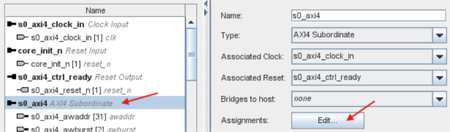
Description Due to a problem in the Quartus ® Prime Pro Edition starting since software version 24.1, the Agilex ® 5 and Agilex ® 3 FPGA EMIF IP is missing from the BSP Linker when generating the Board Support Package. This might occur for Nios ® V processor designs targeting Agilex 5 FPGA or Agilex 3 FPGA, that uses EMIF IP. This is because Agilex 5 and Agilex 3 FPGA EMIF IP are missing the isMemoryDevice agent information. Refer to Nios® V Processor Software Developer Handbook - Memory-Mapped Slave Information (PDF) for information about isMemoryDevice agent information. Refer to External Memory Interfaces (EMIF) IP User Guide Agilex® 5 FPGAs and SoCs (PDF) for information Agilex ® 5 FPGA EMIF IP. Refer to External Memory Interfaces (EMIF) IP User Guide Agilex® 3 FPGAs and SoCs (PDF) for information Agilex ® 3 FPGA EMIF IP. Resolution To work around this problem in the Quartus ® Prime Pro Edition in all the affected software version, apply either one of the following workarounds: Workaround 1: Manually add isMemoryDevice to the EMIF IP (in Platform Designer only) Select the s*_axi4 signal (mainband AXI4 from fabric to controller) that connects to the Nios ® V processor’s instruction/data manager. Right-click, and click Edit Component Instantiation ... Select s*axi4 and edit the Assignments. Enter new Key as embeddedsw.configuration.isMemoryDevice, and Value as 1. Save the new assignment. Generate a new BSP. Workaround 2: Manually define EMIF IP linker memory device Refer to the Nios V Embedded Processor Design Handbook - Defining Address Span Extender Linker Memory Device. The example demonstrates how to manually define Address Span Extender linker memory device. For this problem, apply the same procedure but on the EMIF IP directly. This problem is currently scheduled to be resolved in a future release of the Quartus ® Prime Pro Edition Software. Related Articles LPDDR4 not available in NIOS® V/g linker script - Agilex® 5 FPGA, Quartus® 26.1 Pro Issue with BSP Creation for Nios® V/m Using LPDDR4 on Agilex® 5 FPGA (Quartus® 24.1 & 24.3.1)98Views0likes0CommentsWhy does Board Support Package (BSP) Editor in Quartus® Prime Pro Embedded Edition fails to generate Nios® V processor BSP project from .vds file?
Description Due to a problem in the Quartus® Prime Pro Embedded Edition Software version 26.1 and 26.1.1, the BSP Editor fails to generate Nios® V processor BSP project from .vds file. This issue is not affecting BSP project generation: From .qsys file using BSP Editor in Quartus® Prime Pro Embedded Edition software, or Using BSP Editor in Quartus® Prime Pro Edition software. This issue is caused by a software bug in the BSP Editor of Quartus® Prime Pro Embedded Edition software. Refer to Nios V Embedded Processor Design Handbook - Recommended Tools from Quartus Prime Installer (PDF) for more information on the difference between Quartus® Prime Pro Edition and Quartus® Prime Pro Embedded Edition software. Resolution To work around this problem in the Quartus® Prime Pro Embedded Edition Software version 26.1 and 26.1.1, apply either one of the workarounds below: Switch from .vds to .qsys file Use BSP Editor in Quartus® Prime Pro Edition software version 26.1 or 26.1.1 This problem is currently scheduled to be resolved in a future release of the Quartus® Prime Pro Embedded Edition Software.97Views0likes0CommentsWhy does downloading ELF file into Nios® V/g processor fail when disabled branch prediction, while enabled instruction cache?
Description Due to a problem in the Quartus ® Prime Pro Edition Software version 25.3.1, downloading ELF file into Nios ® V/g processor might fail when both the conditions below are fulfilled. Branch prediction is disabled, and Instruction cache is enabled The niosv-download command returns the error message below. Unexpected vCont reply in non-stop mode: E30 ERROR: GDB failed. This is because there is an RTL bug in the instruction cache related to its reset state. Resolution To work around this problem in the Quartus ® Prime Pro Edition Software version 25.3.1, Either enable branch prediction, Or disable instruction cache This problem is scheduled to be fixed in a future release of the Quartus ® Prime Pro Edition Software version 26.1.97Views0likes0CommentsWhy does the Nios® V processor fail to generate HDL with an add_fileset_file error message in Quartus® Prime Standard Edition from Windows* OS?
Description Due to a problem in the Quartus® Prime Standard Edition Software versions 22.1, 23.1, and 24.1, the Nios® V processor might fail to generate HDL with an error message about add_fileset_file. This issue is present only on Windows OS. Example error message: Error: add_fileset_file: No such file <Nios V processor SystemVerilog file> while executing “add_fileset_file $current_sim/<Nios V processor SystemVerilog file> SYSTEM_VERILOG PATH $current_sim/<Nios V processor SystemVerilog file> $attr” This is because the Nios® V processor hw.tcl is calling add_fileset_file on an unsupported simulator. These unsupported simulators are referring to simulators that are not supported in Windows* OS - Cadence Simulator and Synopsys VCS* and VCS MX. Resolution To work around this problem in the Quartus® Prime Standard Edition Software version 24.1, download and install the patches below. The problem has been fixed starting with Quartus® Prime Pro Edition software version 25.1.1 and Quartus® Prime Standard Edition software version 25.1. Additional Information For information on the simulators’ supported platforms, refer to the Quartus® Prime Standard Edition User Guide: Third-party Simulation - Supported Simulators.96Views0likes0Comments