quality|reliability
64 Topics
Unable to Generate Valid PAM4 Eye Diagram and BER Measurements on Stratix 10 SI E-Tile Native PHY
Hardware Intel Stratix 10 Development Kit E-Tile Native PHY IP Single SMA TX and RX channel SMA-to-SMA cable (50 Ω) Software Quartus Prime Pro 18.1 Intel Transceiver Toolkit Configuration PAM4 operation Line rate: 51 Gbps One TX channel connected directly to one RX channel through an SMA cable Design compiles successfully and programming is successful. Problems Encountered 1. PAM4 Eye Detection Failure Transceiver Toolkit reports: "PAM4 eye could not be detected, check lock status and run RX adaptation." 2. RX Adaptation Questions One-time adaptation completes successfully, but: Eye detection still fails. BER measurements do not produce a usable eye diagram. Questions: Should continuous adaptation be used instead? Is there a recommended adaptation sequence before running Eye Viewer? 3. Eye Diagram Parameters Undefined After running Eye Viewer: Eye Width = Undefined Eye Height = Undefined i.e. ratio = (0/0) The heatmap returns with full RED and no eye diagram. The eye diagram is not generated even though the receiver reports lock. 4. BER Test Issues I am unsure: How many bits are required before Eye Viewer can successfully generate a PAM4 heat map. Whether there is a minimum BER sample count required for a valid eye diagram at 51 Gbps. Whether insufficient captured bits can cause "Undefined" eye width/height. 5. TX Pattern Currently transmitting a repeating user-defined pattern, for example: .tx_parallel_data({20{40'b0, 40'h0F0F0F0F0F, 40'b0, 40'h0F0F0F0F0F}}) Questions: Is this pattern suitable for PAM4 eye measurements? Would PRBS13 or PRBS31 be required instead? 6. Signal Integrity Questions: Can a 50 cm SMA cable (Pasterneck PE3CA1035) reliably carry a 51 Gbps PAM4 signal? Is additional equalization or TX pre-emphasis typically required even for short SMA connections? 7. Transceiver Toolkit Configuration I would appreciate guidance on: Recommended Eye Viewer settings. Auto Sweep configuration. Vertical and horizontal ranges. TX FIR tap values. RX CTLE/DFE settings. Required number of bits before starting the eye scan. What are the common reasons for "PAM4 eye could not be detected" despite PLL/CDR lock? What checks should be performed before running Eye Viewer? PRBS as well as USER sequence, both generate complete RED heatmap, why? How many bits should be accumulated before generating an eye diagram at 51 Gbps? Are there recommended TX FIR, CTLE, and DFE settings for a direct SMA-to-SMA connection? Has anyone successfully generated a PAM4 eye using the Stratix 10 E-Tile Native PHY over SMA? If so, could you share the required configuration or debugging steps?Solved999Views0likes8Comments
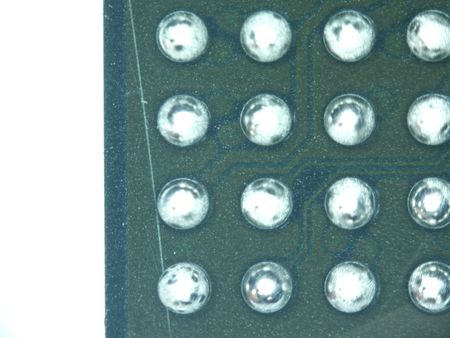
There are distinct scratches on the BGA substrate, extending beneath the solder balls.
I would like to ask a question. There is an issue with this BGA product, model number EP4CE30F23C8N: there are scratches on the bottom substrate that have penetrated the solder balls. Could this be a quality issue? I would be grateful if you could provide a reply. Many thanks! I have attached the image,Thank you.511Views0likes5Comments
Updated .brd file for Stratix 10 GX dev kit
Referencing this post: EK-10M08E144 PCB .brd file corrupted | Altera Community - 302242 The .brd file that comes in the documentation at: https://www.altera.com/products/devkit/po-3028/stratix-10-gx-signal-integrity-development-kit-h-tile ...was done in Allegro, prior to version 16.6. The only available Allegro viewer gives an error because it was done prior to version 16.6, and you need the DB Doctor utility to update the file. The only way to get the DB Doctor utility is to install Allegro. If I had Allegro...I would not be installing the Allegro viewer. Altera: As mentioned in the post above (well over a year ago), it would make sense for you to update your files so customers can view the board of their $10K+ development board. How do we make that happen? Thanks!499Views0likes4Comments
Agilex 7 R-Tile RBES FPGA – CXL Device Enumeration Failure with CXL IP Design Example
1. What is the failure symptom? Please elaborate on the failure symptoms in detail. The CXL device fails to enumerate when using the CXL Type-3 IP design example. • lspci -vvv | grep 0ddb does not detect the CXL device • numactl -H does not report a CXL NUMA node The issue persists across multiple system reboots and bitstream rebuilds. A factory reset was attempted but did not resolve the issue. 2. When did the failure happen? When did you buy the part, and when did you receive it? The device failed at some point around October 2025. 3. How did you discover the failure? Please describe it in detail. We found OS failed to find the CXL device and confirmed the issue after factory recovery. 4. In which part of your process did you find the issue (Lab, production, quality, etc.)? Lab environment.4.1 Was the device already in the field? How many times has it been used? No. The device has only been used in a controlled lab environment for bring-up and testing. 5. How many units failed and how many units were used/tested by you? Which is the production code? • Failed units: 1 • Units tested: Multiple Agilex FPGA boards • Production code: Not available Only this unit exhibits the failure. 6. How did you determine the failure? Please elaborate on the procedures. Multiple bring-up attempts were conducted using known-good hardware, software, and bitstreams. • 6.1 Internal Debug: No internal physical failure analysis was performed. • 6.2 Device Swap: Yes. Replacing the board with a known-good FPGA resolves the issue. 7. Was the failing unit ever working before the failure? Yes. The device was functioning correctly before the failure. 8. How did you rule out electrical overstress (EOS) or electrostatic discharge (ESD)? There is no visible physical damage on the FPGA or PCB. The board has been handled according to standard ESD-safe lab procedures. 9. What are your expectations from this failure analysis? Identify the root cause of the failure and restore proper CXL IP functionality, or provide a replacement device. 10. Have you re-balled your device? If yes, was it lead-free reballing? No. The device has not been re-balled, and no third-party rework was performed. 11. Please add pictures of the device from the top and the bottom. See attached. 12. Is there any other relevant information that could assist in the failure analysis? No additional information at this time. 13. Are there any known changes to the process, materials, or design that could have contributed to the failure? No.262Views0likes13Comments
Quartus Programmer 21.1: JTAG Server Error Code 82 – Port 1309 Cannot Be Bound
Hello Altera Community, I am working on an FPGA project using a Cyclone IV FPGA development board and an Altera USB-Blaster. I am currently unable to program the FPGA because Quartus Programmer cannot access the JTAG server. System details: - OS: Windows 11 64-bit - Software: Quartus Programmer 21.1 - Installation path: C:\intelFPGA\21.1\qprogrammer - Programmer: Altera USB-Blaster - FPGA: Cyclone IV development board The USB-Blaster is detected by Windows Device Manager and the driver is installed. The USB-Blaster also powers on normally. However, Quartus Programmer gives: "Attempted to access JTAG server -- internal error code 82 occurred" When I run: jtagconfig I get: Error when scanning hardware - Server error Sometimes it also hangs at: Connecting to server(s) [...] I checked the JTAG server using: jtagserver --status It reports: Installed JTAG server is 'C:\intelFPGA\21.1\qprogrammer\bin64\jtagserver.exe' Server is stopped Remote clients are disabled I tried reinstalling the JTAG server: jtagserver --install jtagserver --start But the server immediately stops. I also tried: net start "Altera JTAG Server" The result was: The Altera JTAG Server service could not be started. The service did not report an error. NET HELPMSG 3534. I then ran: jtagserver.exe --foreground and received: Unable to bind changedetect socket: 10048 Can't bind to TCP port 1309 - exiting I checked the port using: netstat -ano | findstr 1309 and found that TCP port 1309 was being used/listened to by another process, for example PID 12888. I tried terminating the process using: taskkill /F /PID 12888 but Windows reported: ERROR: The process with PID 12888 could not be terminated. Reason: There is no running instance of the task. I also tried stopping the JTAG server, reinstalling it, and restarting it. In addition, I already tried the following: 1. Disabled PCI Express → Link State Power Management. 2. Disabled USB Root Hub power saving ("Allow the computer to turn off this device to save power"). 3. Stopped the Print Spooler service. 4. Closed Quartus/Programmer-related applications. 5. Reinstalled the JTAG Server. 6. Restarted the computer. 7. Tried starting the JTAG server manually. 8. Checked TCP port 1309 using netstat. The problem still remains. My main questions are: 1. Why is Quartus Programmer 21.1 unable to start the JTAG Server? 2. What is causing TCP port 1309 to remain occupied? 3. Is there a known issue with Quartus Programmer 21.1 and Windows 11? 4. Is there a recommended patch, driver, or newer Quartus Programmer version for this problem? 5. Is it possible to configure the JTAG server to use another TCP port? 6. What is the correct way to completely remove and reinstall the JTAG Server on Windows 11? 7. Is there anything else I should check before reinstalling Quartus Programmer? I would appreciate any guidance on how to get the JTAG Server running so that jtagconfig can detect my USB-Blaster and FPGA. Thank you.230Views0likes5CommentsEP4CE30F23C8N scratches
Hello Guys, I would like to ask a question. There is an issue with this BGA product, model number EP4CE30F23C8N: there are scratches on the bottom substrate that have penetrated the solder balls. Could this be a quality issue? I would be grateful if you could provide a reply. Many thanks!200Views0likes0CommentsAgilex 7 R-Tile RBES FPGA – Board Fails to Power On and JTAG Not Detected
1. What is the failure symptom? Please elaborate on the failure symptoms in detail. The FPGA power LED does not turn on, and Quartus fails to detect the JTAG interface. Debugging steps performed: • Board Test System (BTS) attempted • JTAG detection fails in BTS as well A factory reset was attempted but did not resolve the issue. 2. When did the failure happen? When did you buy the part, and when did you receive it? The failure occurred around early August 2025. The device was received approximately one year ago. 3. How did you discover the failure? Please describe it in detail. Quartus failed to detect the JTAG device, and the FPGA power LED was observed to remain off. 4. In which part of your process did you find the issue (Lab, production, quality, etc.)? Lab environment. 4.1 Was the device already in the field? How many times has it been used? No. The device has only been used in a controlled lab environment for bring-up and testing. 5. How many units failed and how many units were used/tested by you? Which is the production code? • Failed units: 1 • Units tested: Multiple Agilex FPGA boards • Production code: Not available Only this unit exhibits the failure. 6. How did you determine the failure? Please elaborate on the procedures. Multiple bring-up attempts were conducted using known-good hardware, software, and bitstreams. • 6.1 Internal Debug: The device was sent to a university repair shop; however, the issue could not be resolved. • 6.2 Device Swap: Yes. Replacing the board with a known-good FPGA resolves the issue. 7. Was the failing unit ever working before the failure? Yes. The device was functioning correctly before the failure. 8. How did you rule out electrical overstress (EOS) or electrostatic discharge (ESD)? There is no visible physical damage on the FPGA or PCB. The board has been handled according to standard ESD-safe lab procedures. 9. What are your expectations from this failure analysis? Identify the root cause of the failure and restore proper CXL IP functionality, or provide a replacement device. 10. Have you re-balled your device? If yes, was it lead-free reballing? Yes. The device was re-balled by a university repair facility. 11. Please add pictures of the device from the top and the bottom. See attached. 12. Is there any other relevant information that could assist in the failure analysis? No additional information at this time. 13. Are there any known changes to the process, materials, or design that could have contributed to the failure? No.200Views0likes8Comments
To INTEL - Request for Compliance Data from your customer
Dear Sir/Madam, GreenSoft Technology, a leading provider of environmental compliance data management services and software for the global electronics industry (http://www.greensofttech.com), has been contracted by your customer to collect compliance data on parts purchased from your company or request the latest update on the data you previously submitted due to recent regulatory changes. Please note that your custom might not purchase directly from your company but via a reseller or distributor. In addition, you may need to collect material or compliance documents from your suppliers to fulfill this request. Your support to your customer is highly appreciated. Please refer the below part number: P/N: 10M50DAF484I7G Description: FPGA - Field Programmable Gate Array non-volatile FPGA, 360 P/N: 5M2210ZF256C4N Description: IC CPLD 1700MC 7NS 256FBGA P/N: 10AS057N2F40I2LG Description: Dual ARM® Cortex®-A9 MPCore™ with CoreSight™ System On Chip If you think we reach out to you by mistake, please let us know right away so we will stop contacting you. Data requirements EU RoHS Directive 2011/65/EU as amended by (EU) 2015/863 • REACH SVHC per Article 33 of EU Regulation 1907/2006 • Part Weight and Unit of Measurement. • Full Material Disclosure (FMD), MSDS, steel/metal grade, or similar documents in your standard format if available. • Lifecycle Status (part is Active in selling or has become Obsolete or in the EOL process) If there is any data you can’t provide at this time, please just fill “Unknown”. If you have any questions, please visit our suppliers' page at https://www.greensofttech.com/suppliers/. You may contact us by phone at +1 323-254-5961 x 2, and our Support Engineers will help you with your questions. If no one is available, please leave a voice mail with your name, company's name, questions about the request, and the best number to reach you. If you need to contact me directly, please email me at the email address listed below.199Views0likes2Comments