ai suite
20 TopicsAI Suite - How to interpret these graphs in Model Analyzer GUI
Hello Altera Community What can I learn from these subgraphs? I'm not sure how to connect it to the dla layer device file. The compiler told me: [ INFO ] The input graph is split into 9 subgraph(s), FPGA:3 CPU:6. (unsupported_layer_chains.dot) There are 9 nodes with "Transpose does not precede an FC layer." and 2 nodes with "Interpolation input not in NCDHW layout" (hetero_subgraphs_TensorFlow_Frontend_IR_3.dot) Why is there a node for device subgraph? Thanks in advance.Solved212Views0likes3Comments
Any date for the release of the Docker image alterafpga/fpgaaisuite-quartus-v2026.1.1?
The FPGA AI Suite Handbook v2026.1.1 refers to docker images alterafpga/fpgaaisuite-quartus-v2026.1.1 and alterafpga/fpgaaisuite-v2026.1.1 but docker desktop stops at alterafpga/fpgaaisuite-v2025.3. Could anyone give a best guess as to when it will become available? Best wishes, Jeremy206Views0likes3Comments
AI Suite System Throughput Issue
When using AI Suite, we are seeing a significant gap between IP throughput and achieved system throughput on Agilex 5. I am using the following: Hardware: Agilex™ 5 FPGA and SoC E-Series Modular Development Kit (ES silicon) Software: Quartus Prime Pro + AI Suite 25.3.1 SD Image: agx5_soc_s2m coredla-image-agilex5_mk_a5e065bb32aes1.wic Architecture and Bitstream: AGX5_Performance Using MobileNetV2 (Open Model Zoo 2024.6.0) compiled using AGX5_Performance architecture gives the following results through dla_benchmark IP throughput per instance: ~151 FPS Estimated throughput (200 MHz): ~178 FPS System throughput: nireq=1 → 41 FPS nireq=4 → 54 FPS Why is there such a big delta between IP Performance and System Throughput and how can we improve the system throughput? For more details please see the append log showing the commands that I run to do the benchmark Any pointers or help would be highly appreciated. Thanks ===================================================================== 1. Using mobilenet v2 from model zoo ===================================================================== Commands used to download and compile model: git clone https://github.com/openvinotoolkit/open_model_zoo.git cd open_model_zoo git checkout 2024.6.0 omz_downloader --list omz_downloader --name mobilenet-v2-pytorch --output_dir $COREDLA_WORK/demo/models/ omz_converter --name mobilenet-v2-pytorch --download_dir ../demo/models/ --output_dir ../demo/models/ cd $COREDLA_WORK/demo/models/public/mobilenet-v2-pytorch/FP32 dla_compiler --march $COREDLA_ROOT/example_architectures/AGX5_Performance.arch --network-file ./mobilenet-v2-pytorch.xml --foutput-format=open_vino_hetero --o $COREDLA_WORK/demo/mobilenet-v2-pytorch_dla.bin --batch-size=1 --fanalyze-performance --fassumed-fmax-core 200 Executing performance estimate ---------------------------------------------------------------- main_graph_0 reported throughput: 178.617 fps TOTAL DDR SPACE REQUIRED = 16.9756 MB DDR INPUT & OUTPUT BUFFER SIZE = 0.781738 MB DDR CONFIG BUFFER SIZE = 0.0986328 MB DDR FILTER BUFFER SIZE = 15.3296 MB DDR INTERMEDIATE BUFFER SIZE = 0.765625 MB NOTE: THIS ESTIMATE ASSUMES 1x I/O BUFFER. THE COREDLA RUNTIME DEFAULTS TO 5 TOTAL DDR TRANSFERS REQUIRED = 18.7003 MB DDR FILTER READS REQUIRED = 16.2124 MB DDR FEATURE READS REQUIRED = 1.62164 MB DDR FEATURE WRITES REQUIRED = 0.767578 MB NUMBER OF DDR FEATURE READS = 9 MINIMUM AVERAGE DDR BANDWIDTH REQUIRED = 3340.19 MB/s ASSUMED DDR BANDWIDTH PER IP INSTANCE = 6400 MB/s ---------------------------------------------------------------- Performance Estimator Throughput Breakdown Arch: kvec64xcvec32_i12x1_fp12agx_sb32768_xbark32_actk32_poolk4 Number of DLA instances = 1 Number of DDR Banks per DLA instance = 1 CoreDLA Target Fmax = 200 MHz PE Target Fmax = 200 MHz Batch Size = 1 PE-only Conv Throughput No DDR = 186 fps PE-only Conv Throughput = 185 fps Overall Throughput Inf PE Buf Depth (zero MPBW) = 185 fps Overall Throughput Zero PE Buf Depth (zero MPBW) = 183 fps Overall Throughput Inf PE Buf Depth = 184 fps Overall Throughput Zero PE Buf Depth = 182 fps ---------------------------------------------------------------- FINAL THROUGHPUT = 178.617 fps FINAL THROUGHPUT PER FMAX (CoreDLA) = 0.893086 fps/MHz FINAL THROUGHPUT PER FMAX (PE) = 0.893086 fps/MHz Running the model on dev kit: ./dla_benchmark -b=1 -cm $compiled_model -d=HETERO:FPGA,CPU -i $imgdir -niter=8 -plugins ./plugins.xml -arch_file $archfile -api=async -groundtruth_loc $imgdir/ground_truth.txt -perf_est -nireq=1 -bgr -nthreads=1 [Step 11/12] Dumping statistics report count: 8 iterations system duration: 191.3784 ms IP duration: 52.7551 ms latency: 23.4076 ms system throughput: 41.8020 FPS number of hardware instances: 1 number of network instances: 1 IP throughput per instance: 151.6441 FPS IP throughput per fmax per instance: 0.7582 FPS/MHz IP clock frequency measurement: 200.0000 MHz estimated IP throughput per instance: 178.6172 FPS (200 MHz assumed) estimated IP throughput per fmax per instance: 0.8931 FPS/MHz ./dla_benchmark -b=1 -cm $compiled_model -d=HETERO:FPGA,CPU -i $imgdir -niter=8 -plugins ./plugins.xml -arch_file $archfile -api=async -groundtruth_loc $imgdir/ground_truth.txt -perf_est -nireq=4 -bgr -nthreads=4 [Step 11/12] Dumping statistics report count: 8 iterations system duration: 147.8426 ms IP duration: 52.7619 ms latency: 69.8254 ms system throughput: 54.1116 FPS number of hardware instances: 1 number of network instances: 1 IP throughput per instance: 151.6246 FPS IP throughput per fmax per instance: 0.7581 FPS/MHz IP clock frequency measurement: 200.0000 MHz estimated IP throughput per instance: 178.6172 FPS (200 MHz assumed) estimated IP throughput per fmax per instance: 0.8931 FPS/MHz200Views0likes5CommentsAI Suite - Spatial IP outputs wrong value
Hello Altera Community When looking at my Spatial IP in Signal Tap, I can see that it outputs a wrong value. Please help me identify where this mistakes happen. Below is the Signal Tap result of my test: 3D903C90 - 3D9C3D87 -BD983E38 However from my golden_output_sink_port_0.txt I'm expecting this value: 3D12BC8D - 3DA43E1E - 3DABBE18 Below is the Singal Tap of my input I'm inserting the values I got from input_vlogkw.txt from the DLA_COMPILER. Here is a list of warnings I got from Quartus, but they are from proteced sv files that I can't acess: Warning(16761): VHDL warning at spatial_first.vhd(146): actual for formal port "reset_reset" is neither a static name nor a globally static expression Warning(13469): Verilog HDL assignment warning at dot_core_controller.sv(381): truncated value with size 6 to match size of target (5) Warning(16788): Net "out[0][31]" does not have a driver at dsp_sum_of_2n_bf16xbf16.sv(118) Warning(13469): Verilog HDL assignment warning at dot_core_controller.sv(381): truncated value with size 6 to match size of target (5) Warning(21620): Design Assistant Results: 1 of 1 High severity rules issued violations in snapshot 'partitioned'. Please refer to DRC report 'C:/Users/mads/Desktop/test/quartus/output_files/spatial_first.drc.partitioned.rpt' for more information Warning(25315): Some pins are missing drive strength (current strength), termination and/or slew rate assignments. Refer to the I/O Assignment Warnings report for details. Warning(332158): Clock uncertainty characteristics of the A5EB013BB23BE4SR1 device are preliminary Warning(18291): Timing characteristics of device A5EB013BB23BE4SR1 are preliminary Warning(332060): Node: altera_reserved_tck was determined to be a clock but was found without an associated clock assignment. Warning(332158): Clock uncertainty characteristics of the A5EB013BB23BE4SR1 device are preliminary Warning(21620): Design Assistant Results: 3 of 34 High severity rules issued violations in snapshot 'final'. Please refer to DRC report 'C:/Users/mads/Desktop/test/quartus/output_files/spatial_first.tq.drc.signoff.rpt' for more information Attached is Netlist viewer of my Spatial IP.Solved161Views0likes5Comments
Error faced while executing on Agilex FPGA board....
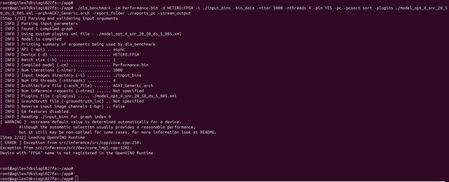
Hi team, I have been implementing and trying to port python model on Agilex 7- FPGA I series - board I have successfully installed Open vino (2024.6) and FPGA AI suit (2025.3) in my host pc Using Openvino I am able to create IR files and compiled graphs using FPGA AI suit. My next step is I copied files into SD card and i am trying to run on FPGA. I am using below command to check performance of my Python model in FPGA... ./dla_benchmark -cm Performance.bin -d HETERO:FPGA -i ./input_bins -bin_data -niter 1000 - nthreads 4 -pin YES -pc -pcsort sort -plugins=./model_opt_4_snr_20_50_ds_5_805.xml -report_folder ./reports_pc -stream_output Please check the screenshot attached for the error... Request you to suggest me for the solution117Views0likes4CommentsDoes anyone actually use the FPGA AI Suite?
Hello Altera Community My question today is: does anyone actually use the ai suite, and is able to profit from it? I am thinking of vibe coding a micro service with the docker image, such that one can try the compiler and have the output presented nicely. That way they dont have to read the entire manual to try it out. However it does not make sense for me to make it, if nobody will use it. I only know 3 people who have used it, myself, fpga zealot, and one guy on linkedin. Thanks in advance.Solved113Views0likes4CommentsAI Suite - Various Questions
Hello Altera Community I have a few questions about the AI Suite 1. Estimating whether a model will fit on an FPGA using a formula Suppose I have a neural network with x amount of layers and y amount of neurons in each layer. Then say I have a baord with an amount of DSP/ALMs/LUTs What could be an approximating formula (It does not need to be accurate). And what are the typical limiting factors? 2. Impact of the enable_parameter_rom parameter Is it correctly understood that this parameter determines whatever the mif (Memory initialization files) containing the weights are put inside a rom or external memory? Does this actually impact the speed? I would assume that the external memory might be faster than some of the bottleneck components in the AI IP block. 3. Any architecture options for the Spatial IP? My model uses a 16bf * 6 input, so I think it would make sense to increase the input stream size so it matches. But I don't know if the same options from the sequential IP also applies to the spatial IP, since the example is just two lines.Solved100Views0likes1CommentAI Suite - Is it possible to simulate the AI IP?
Hello Altera Community I have a spatial IP setup, where the dla compile gave me a single test and the corresponding output. I want to try and simulate this test in modelsim/questa, however some of the files are protected. ChatGPT have made me believe that it is possible to simulate it, as long as you do it through Quartus. I made a quartus project to test this, enabling the settings that generate simulation files. Now then I do tool -> run RTL simulation it succesfully starts questa, however questa gives the errors listed below. Before I spend anymore time on this, I want to ask if it is actually possible to simulate an AI IP? This is my first time working with other peoples IP, so I don't have the ability to tell when ChatGPT is telling me something wrong. C:/Users/mads/Desktop/test/quartus/ip/spatial/spatial_spatial_ai_ip_1/altera_spatial_ai_ip_10/sim/top_level.sv(232): Module 'dot_bf16' is not defined. # For instance 'inst_2' at path 'spatial_tb.u_spatial_first.u0.spatial_ai_ip_1.spatial_ai_ip_1.top_inst.spatial_ip' # ** Error: C:/Users/mads/Desktop/test/quartus/ip/spatial/spatial_spatial_ai_ip_1/altera_spatial_ai_ip_10/sim/top_level.sv(200): Module 'relu' is not defined. # For instance 'inst_4' at path 'spatial_tb.u_spatial_first.u0.spatial_ai_ip_1.spatial_ai_ip_1.top_inst.spatial_ip' # ** Error: C:/Users/mads/Desktop/test/quartus/ip/spatial/spatial_spatial_ai_ip_1/altera_spatial_ai_ip_10/sim/top_level.sv(181): Module 'dot_bf16' is not defined. # For instance 'inst_1' at path 'spatial_tb.u_spatial_first.u0.spatial_ai_ip_1.spatial_ai_ip_1.top_inst.spatial_ip'Solved100Views0likes1CommentAI Suite - Why does the Sequential IP not take a model argument?
Hello Altera Community Why does the Sequential IP not take a model argument? When targeting the Spatial IP, there is an argument where you can input your model, which is an xml file (and a bin file), exported using OpenVino. Then it will convert these weights and such to .mif files for the FPGA to load. This is easy to understand. The Sequential IP is a lot harder to understand. I get that the architecture file does all the fpga block related configuration. But I don't understand how it will know which weights to use. Does the Sequential IP only work for the pre defined example graphs?Solved99Views0likes4Comments
Is Spatial IP ready for LLM / transformer inference?
I am using FPGA AI Suite 2026.1.1 (with the new spatial compiler). Most of the FPGA AI Suite handbook examples I see are classical CNN / vision flows (ResNet-style) on PCIe, hostless JTAG, and SoC. Is transformer / LLM inference (attention layers, variable sequence lengths, large KV-cache activations, etc.) something we can target today with dla_compiler + Spatial IP, or is Spatial still aimed primarily at CNN-like graphs, or is custom RTL expected? And if yes, are there any LLM examples, guides, recommended flows, or known limitations? Thanks,99Views0likes3Comments