Forum Discussion

 New Contributor
FPGA Monitor Program 18.1 Tutorial: Could not query JTAG Instance IDs. Please ensure the FPGA has be
Greetings,
I have been following the instructions in "Intel FPGA Monitor Program
Tutorial for ARM.pdf" with "Intel FPGA Monitor Program" version 18.1 to work with the board DE10-Nano.
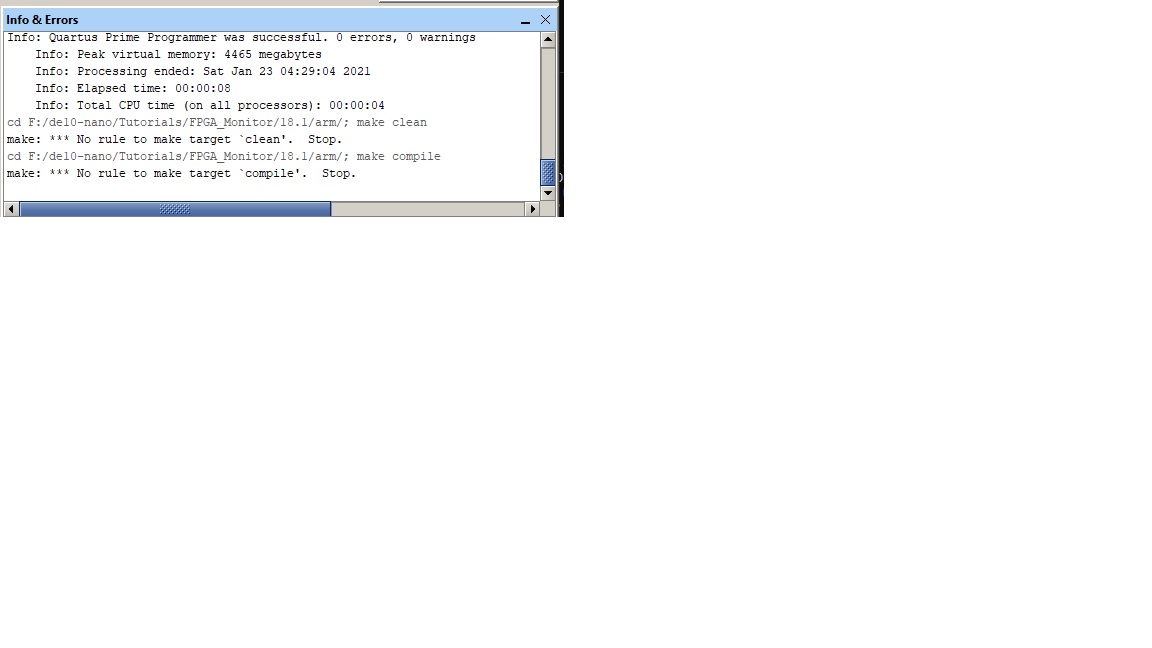
The result was not successful. Please find appended below the transcript of the "Info&Errors".
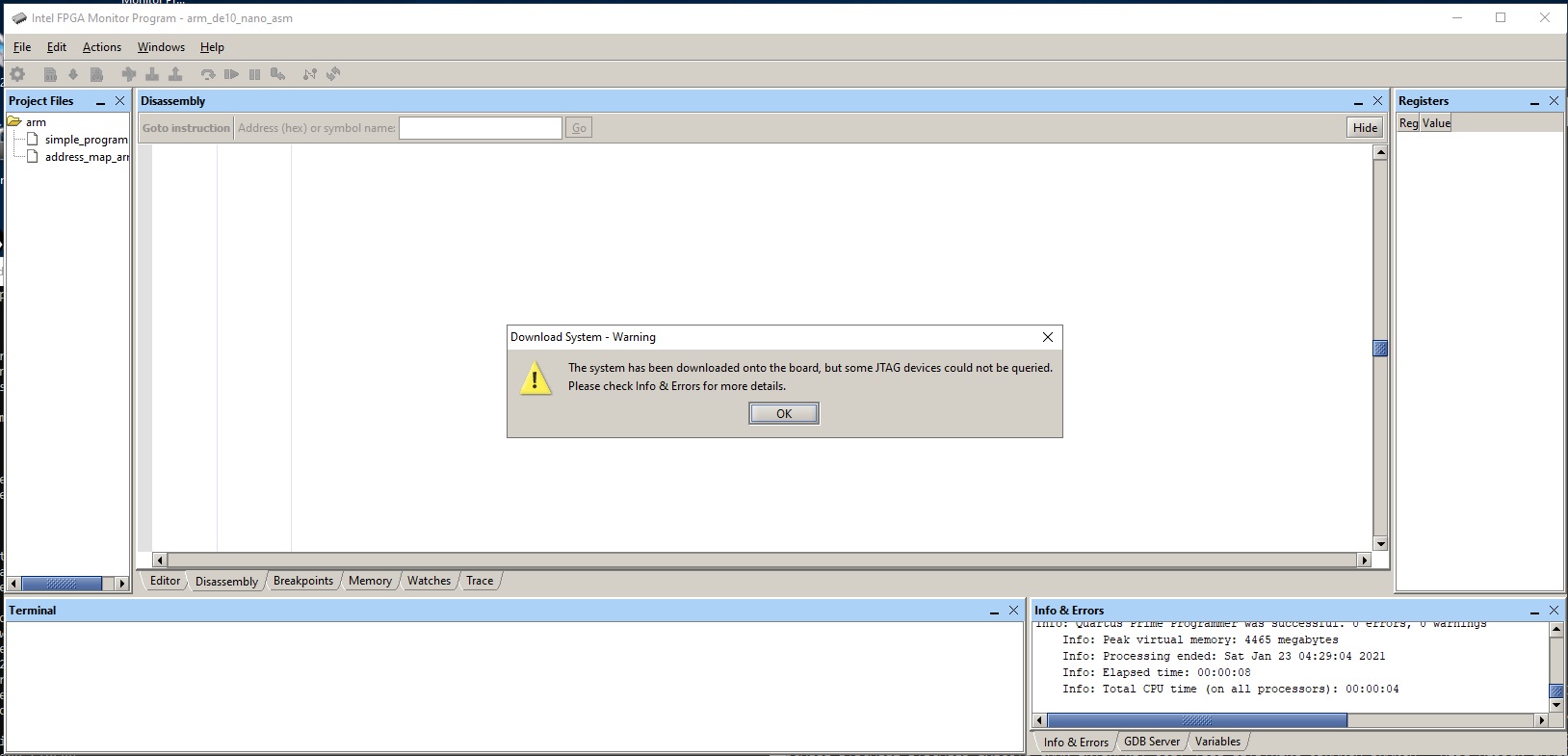
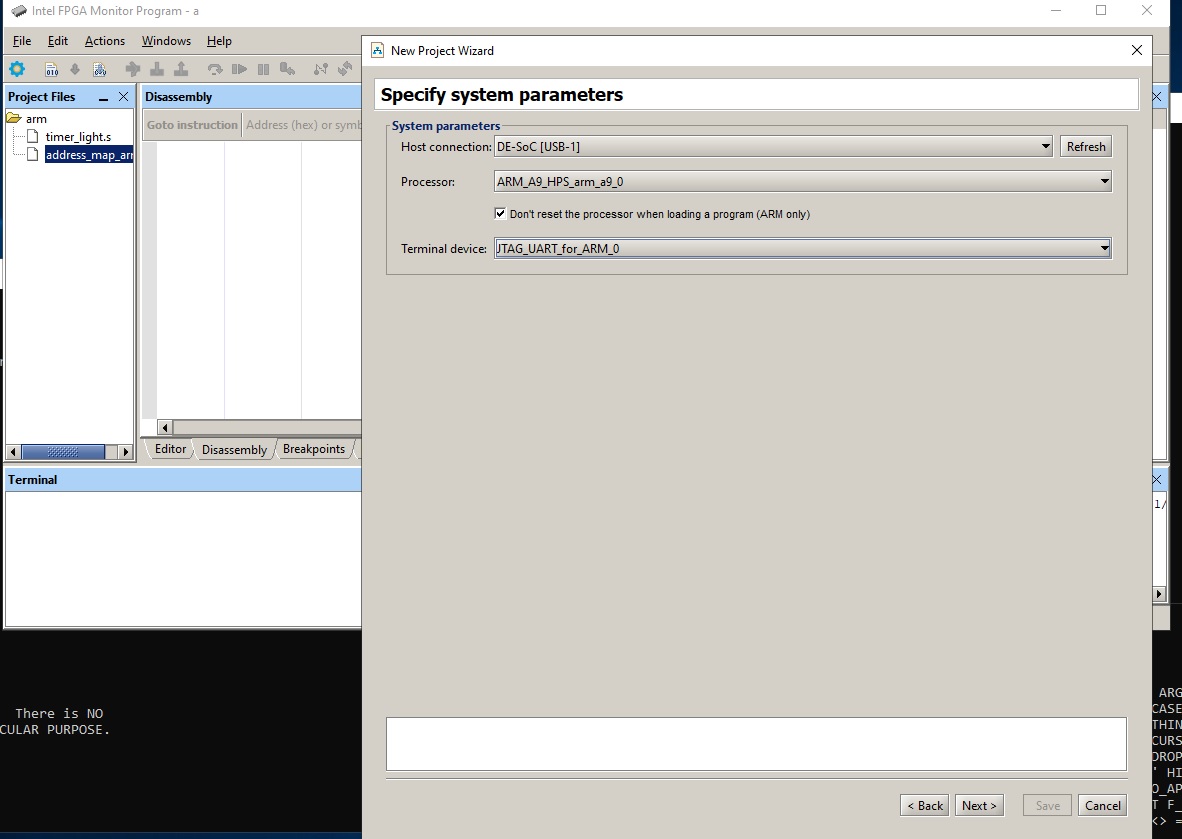
Please also find attaches a series of screen capture of the process following the instructions from the above said tutorial documentation.
Please advise if I missed something. Please advise if you need more screen captures.
Regards,
phiho
Writing the makefile: F:/de10-nano/Tutorials/FPGA_Monitor/18.1/arm/makefile
cd F:/de10-nano/Tutorials/FPGA_Monitor/18.1/arm/; make clean
make: *** No rule to make target `clean'. Stop.
Writing the makefile: F:/de10-nano/Tutorials/FPGA_Monitor/18.1/arm/makefile
cd F:/de10-nano/Tutorials/FPGA_Monitor/18.1/arm/; make clean
make: *** No rule to make target `clean'. Stop.
G:/intel/FPGA/Lite/18.1/quartus/bin64/quartus_pgm -c "DE-SoC [USB-1]" --auto
1) DE-SoC [USB-1]
4BA00477 SOCVHPS
02D020DD 5CSEBA6(.|ES)/5CSEMA6/..
Info: *******************************************************************
Info: Running Quartus Prime Programmer
Info: Version 18.1.1 Build 646 04/11/2019 SJ Lite Edition
Info: Copyright (C) 2019 Intel Corporation. All rights reserved.
Info: Your use of Intel Corporation's design tools, logic functions
Info: and other software and tools, and any partner logic
Info: functions, and any output files from any of the foregoing
Info: (including device programming or simulation files), and any
Info: associated documentation or information are expressly subject
Info: to the terms and conditions of the Intel Program License
Info: Subscription Agreement, the Intel Quartus Prime License Agreement,
Info: the Intel FPGA IP License Agreement, or other applicable license
Info: agreement, including, without limitation, that your use is for
Info: the sole purpose of programming logic devices manufactured by
Info: Intel and sold by Intel or its authorized distributors. Please
Info: refer to the applicable agreement for further details, at
Info: https://fpgasoftware.intel.com/eula.
Info: Processing started: Sat Jan 23 04:28:56 2021
Info: Command: quartus_pgm -c "DE-SoC [USB-1]" -m jtag -o P;G:/intel/FPGA/Lite/18.1/University_Program/Computer_Systems/DE10-Nano/DE10-Nano_Computer/verilog/DE10_Nano_Computer.sof@2
Info (213045): Using programming cable "DE-SoC [USB-1]"
Info (213011): Using programming file G:/intel/FPGA/Lite/18.1/University_Program/Computer_Systems/DE10-Nano/DE10-Nano_Computer/verilog/DE10_Nano_Computer.sof with checksum 0x0B07E6FB for device 5CSEBA6U23@2
Info (209060): Started Programmer operation at Sat Jan 23 04:29:01 2021
Info (209016): Configuring device index 2
Info (209017): Device 2 contains JTAG ID code 0x02D020DD
Info (209007): Configuration succeeded -- 1 device(s) configured
Info (209011): Successfully performed operation(s)
Info (209061): Ended Programmer operation at Sat Jan 23 04:29:04 2021
Info: Quartus Prime Programmer was successful. 0 errors, 0 warnings
Info: Peak virtual memory: 4465 megabytes
Info: Processing ended: Sat Jan 23 04:29:04 2021
Info: Elapsed time: 00:00:08
Info: Total CPU time (on all processors): 00:00:04
cd F:/de10-nano/Tutorials/FPGA_Monitor/18.1/arm/; make clean
make: *** No rule to make target `clean'. Stop.
cd F:/de10-nano/Tutorials/FPGA_Monitor/18.1/arm/; make compile
make: *** No rule to make target `compile'. Stop.
cd F:/de10-nano/Tutorials/FPGA_Monitor/18.1/arm/; make compile
make: *** No rule to make target `compile'. Stop.
Could not query JTAG Instance IDs.
Please ensure the FPGA has been configured using the correct .sof file.
17 Replies
 phiho
phihoGreetings,
It looks like "Intel FPGA University Program" community has migrated elsewhere.
I am going to cross post this question to "Programmable-Devices" in the hope that someone over there could help.
Regards,
phiho
- phiho
UPDATE with further info
Dear Intel Community,
The board is now run with the SD image coming with "FPGA Monitor Program 18.1" the contents described in the README.txt:
"This SD card image contains the UBoot preloader and bootloader. The preloader initializes the hardware, then launches the bootloader. The bootloader looks at the FAT32 partition of the SD card, for the following files:
fpga.rbf
program.bin
setup_environment.bin
set_vbar.binThe fpga.rbf file is the FPGA programming file, generated by the Intel FPGA Monitor Program (or Quartus).
The bootloader automatically programs the FPGA using this file.program.bin is the binary of the baremetal program to be executed.
Upon programming the FPGA, the bootloader loads this binary into memory and executes it.setup_environment.bin is a file generated by the Intel FPGA Monitor Program.
This file tells the bootloader some details about the program like the entry point to the program and whether to program the FPGA (not all projects use the FPGA).set_vbar.bin is a program that is executed by the bootloader before the user baremetal program.
This program sets the vector base address register to correspond to the location of the vector table in the baremetal program.
Note that as of 16.0, Intel FPGA Monitor Program forces the vector table to be at location 0x0 in memory."This exercise ended with a dialog box:
"The system has been successfully downloaded onto the board, but HPS components could not be configured"
The reasons for the failure:
ARM_A9_HPS_arm_a9_0 will be halted upon running the preloader. Skip halting.
ARM_A9_HPS_arm_a9_1 will be halted upon running the preloader. Skip halting.
Halting operation timed out while halting Nios2_2nd_Core
Failed to halt Nios2_2nd_Core
Halting operation timed out while halting Nios2
Failed to halt Nios2
/usr/bin/bash: quartus_hps: command not found
Timed out while waiting for preloader to finish
Preloader failed to run. HPS components may not have been configured.
Possible causes for the failure:
1. Linux SD card is inserted and Linux is running.
2. FPGA-side components are accessing HPS memory.The full contents of the "Info & Error messages" is appended below.
I am looking forwards for your advice.
Regards,
phiho
Info & Error messages:
G:/intel/FPGA/Lite/18.1/quartus/bin64/quartus_pgm -c "DE-SoC [USB-1]" --auto
1) DE-SoC [USB-1]
4BA00477 SOCVHPS
02D020DD 5CSEBA6(.|ES)/5CSEMA6/..
Info: *******************************************************************
Info: Running Quartus Prime Programmer
Info: Version 18.1.1 Build 646 04/11/2019 SJ Lite Edition
Info: Copyright (C) 2019 Intel Corporation. All rights reserved.
Info: Your use of Intel Corporation's design tools, logic functions
Info: and other software and tools, and any partner logic
Info: functions, and any output files from any of the foregoing
Info: (including device programming or simulation files), and any
Info: associated documentation or information are expressly subject
Info: to the terms and conditions of the Intel Program License
Info: Subscription Agreement, the Intel Quartus Prime License Agreement,
Info: the Intel FPGA IP License Agreement, or other applicable license
Info: agreement, including, without limitation, that your use is for
Info: the sole purpose of programming logic devices manufactured by
Info: Intel and sold by Intel or its authorized distributors. Please
Info: refer to the applicable agreement for further details, at
Info: https://fpgasoftware.intel.com/eula.
Info: Processing started: Thu Feb 04 07:48:38 2021
Info: Command: quartus_pgm -c "DE-SoC [USB-1]" -m jtag -o P;G:/intel/FPGA/Lite/18.1/University_Program/Computer_Systems/DE10-Nano/DE10-Nano_Computer/verilog/DE10_Nano_Computer.sof@2
Info (213045): Using programming cable "DE-SoC [USB-1]"
Info (213011): Using programming file G:/intel/FPGA/Lite/18.1/University_Program/Computer_Systems/DE10-Nano/DE10-Nano_Computer/verilog/DE10_Nano_Computer.sof with checksum 0x0B07E6FB for device 5CSEBA6U23@2
Info (209060): Started Programmer operation at Thu Feb 04 07:48:43 2021
Info (209016): Configuring device index 2
Info (209017): Device 2 contains JTAG ID code 0x02D020DD
Info (209007): Configuration succeeded -- 1 device(s) configured
Info (209011): Successfully performed operation(s)
Info (209061): Ended Programmer operation at Thu Feb 04 07:48:46 2021
Info: Quartus Prime Programmer was successful. 0 errors, 0 warnings
Info: Peak virtual memory: 4465 megabytes
Info: Processing ended: Thu Feb 04 07:48:46 2021
Info: Elapsed time: 00:00:08
Info: Total CPU time (on all processors): 00:00:04
ARM_A9_HPS_arm_a9_0 will be halted upon running the preloader. Skip halting.
ARM_A9_HPS_arm_a9_1 will be halted upon running the preloader. Skip halting.
Halting operation timed out while halting Nios2_2nd_Core
Failed to halt Nios2_2nd_Core
Halting operation timed out while halting Nios2
Failed to halt Nios2
/usr/bin/bash: quartus_hps: command not found
Timed out while waiting for preloader to finish
Preloader failed to run. HPS components may not have been configured.
Possible causes for the failure:
1. Linux SD card is inserted and Linux is running.
2. FPGA-side components are accessing HPS memory. Blair
BlairHello,
For your second issue, the monitor program cannot be used when using an SD Card to boot linux. Either use the SD Card and boot linux, then connect to linux via the instructions in the tutorial "Use Linux on Terasic DE-Series Boards" (found on 'https://software.intel.com/content/www/us/en/develop/topics/fpga-academic/materials-tutorials.html') or use the monitor program.
Kind regards,
Blair
- phiho
Hello,
<quote>
For your second issue, the monitor program cannot be used when using an SD Card to boot linux. Either use the SD Card and boot linux, then connect to linux via the instructions in the tutorial "Use Linux on Terasic DE-Series Boards" (found on 'https://software.intel.com/content/www/us/en/develop/topics/fpga-academic/materials-tutorials.html') or use the monitor program.
</quote>
You lost me here. BTW, this is a broken link :
https://software.intel.com/content/www/us/en/develop/topics/fpga-academic/materials-tutorials.html
Regards,
phiho
 Hazlina_R_Intel
Contributor
Hi,
Thanks for continuing to update this thread with the information of your issue.
FYI I have assigned this case to the team who developed the FPGA monitor program. But they are currently tied up and is not able to respond. I will ping them again, but please do continue to update us as you progress.
-Hazlina
- phiho
Greetings,
Thank you so much for your help.
Now that the team has your attention, would you please ask if they have any intention to update this tool, FPGA Monitor Program. Quartus latest version is now at 20.4
If no new release is planned, would they consider open source it under "altera-opensource"
Best regards,
phiho
- Blair
Hello,
We will not be releasing the monitor program for 20.4. We are working with FPGAcademy to release an open source monitor program via github in mid 2021.
Kind regards,
Blair
- Blair
Hello,
Responding to your original post. Is the monitor program installed on a different drive versus the project which seems to be on the F: drive? It may be that there is an issue with the monitor program handling of this scenario.
Kind regards,
Blair
- phiho
Hi,
> Is the monitor program installed on a different drive versus the project which seems to be on the F: drive?
> It may be that there is an issue with the monitor program handling of this scenario.
It is assumed that you were able to reproduce the problem. Please confirm that you successfully finish the task with the project and the FPGA Monitor program on the same drive (which drive).
Please also advise if you used the default boot micro SD card comes with the board or the SD card with boot image from the installation of the FPGA Monitor program and how did you connect the micro and mini USB ports to the computer.
Regards,
phiho