Forum Discussion

 New Contributor
USB Blaster II Problem

 Occasional Contributor
From your update, does that mean it is now working as expected (no workarounds needed)?
 lkarp13 months ago
For a moment, it worked - I was able to unplug and plug it back in successfully. But now the same problem has returned.
Starting and stopping jtagserver is only a workaround, but I can live with it for now.
 FakhrulA_altera3 months ago
Regular Contributor
Hi lkarp1,
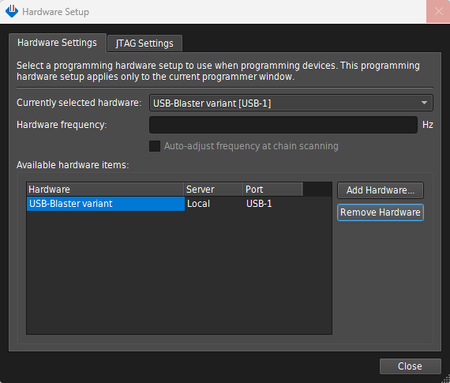
Thank you for the update.Based on similar reports, this behavior can happen when the USB-Blaster II is plugged in while jtagserver.exe is already running. In that case, the cable may appear as "USB-Blaster variant" and the TCK frequency field is not available. A known workaround is to stop jtagserver.exe first, then plug in the cable, and open Programmer again. [1](https://community.altera.com/discussions/quartus-prime/usb-blasterii-mounts-as-usb-blaster-variant/337405)[2](https://www.intel.com/programmable/technical-pdfs/683039.pdf)
Please also check the following:
1. In Device Manager, confirm the driver is installed from:
<Quartus installation>\drivers\usb-blaster-ii
2. Set the Altera JTAG Server service to Manual, or reinstall the JTAG server from the Quartus version you are using with:
jtagserver --uninstall
jtagserver --install3. Try using the standalone Quartus Programmer or the latest available programmer package for your flow, so the driver and jtagserver versions match. (https://community.altera.com/discussions/quartus-prime/usb-blasterii-mounts-as-usb-blaster-variant/337405)(https://community.altera.com/discussions/boards-and-dev-kits/instructions-for-driver-installation-usb-blaster-iii-step-1-/89496)
Since the cable works on other machines, this points more to a host-side driver or service issue on this PC rather than a hardware issue with the programmer itself. (https://community.altera.com/discussions/quartus-prime/usb-blasterii-mounts-as-usb-blaster-variant/337405)
If the issue still persists, please share:
- Quartus edition and version
- Windows version
- Output of jtagconfig when the cable shows as "USB-Blaster variant"Regards,
Fakhrul- FakhrulA_altera3 months ago
As we haven't received a response to our previous notification, this thread will be transitioned to community support. We hope all your concerns have been addressed. If you have any new questions, please feel free to open a new thread to receive support from Altera experts. Otherwise, community users will continue to assist you here. Thank you.


