Forum Discussion

yanrui New Contributor
3 years agoNew ContributorUnable to run simulation
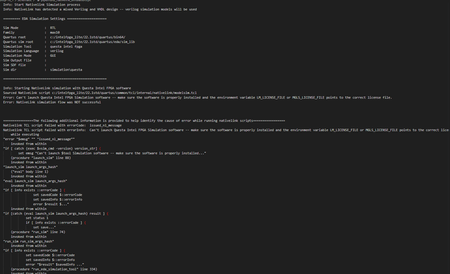
I am trying to run a questa simulation on quartus prime 22.1, but keep on getting a license error. This is the nativelink rpt screenshot: which is weird since i already specified my license fi...

RichardT_altera Super Contributor
3 years agoSuper ContributorYou may check the link below on how to fix MSVCR120.dll error.
There are a few troubleshooting steps that you can do:
1. Try disabling any antivirus or firewall software temporarily, as they may be interfering with Quartus.
2. Uninstall and re-install with Administrator privileges.
3. Try restarting Quartus and your computer. This can help clear any temporary issues that may be causing the error.
4. Run Quartus as administrator.
Best Regards,
Richard Tan
p/s: If you find any answers from the community or Intel Support to be helpful, we encourage you to mark them as the best answer or rate them 4/5 in the survey.


