Forum Discussion

 New Contributor
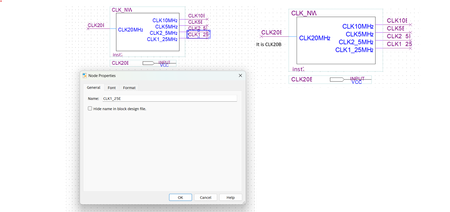
Issue in Quartus 16.1 with Windows 11 Pro
 1 year ago
Hi,
As mentioned, version 16.1 is not supported in Window 11.
Thanks,
Regards,
Sheng

 Super Contributor
It's almost a 10 year old version of the software. It is not supported in Windows 11. As such, there's no guarantee that anything will work correctly. You should use a more recent version of Quartus.
 New Contributor
Hi sstrell,
Thanks for reply.
I am checking the same file to open in Quartus II 9.1 sp2, it is still okay when open in Windows 11 pro.
- FvM1 year agoIt's apparently a problem with text scaling, I'm not even sure if it's directly related to Windows 11 versus Windows 10. There are probably ways to tune text display, e.g. changing resolution or text size in Windows.
But as stated, there's no guaranteed Windows 11 support for old Quartus Versions. I'd not specifically worry about V16.1, rather about V9.0, V13.0 and V13.1 that are required to maintain legacy device and e.g. Cyclone to Cyclone III designs. Fortunately they basically work under Windows 11, although not even Windows 10 is officially supported. If you rely on specific functionality of a certain version that doesn't work under Windows 11, you should consider a virtual machine.- PiyushM1 year ago
Hi FvM,
Thanks for reply.
There is no issue with Window 10 OS, when working in Quartus 16.1, 13 or 9.1.
For solving the text scaling issue with Windows 11, I already tried with the option of changing screen resolution, change text setting in Quartus 16.1.
I am still trying to get the solution with Windows 11, meanwhile Virtual Machine is the good solution.