Forum Discussion

 Occasional Contributor
questa_fse cannot simulate design: Module not found
I created a design in which my own custom Avalon MM Master sends commands to the On-chip Flash Intel FPGA IP csr interface, which is an Avalon MM Slave. In this design the Dual Configuration Intel FPGA IP is also included. In short: this design should be able to erase one of the 2 CFM regions, depending on the state in an input button.
When uploading the design to my MAX10 FPGA, it seemed not to work. As this is the first time I come into contact with Avalon MM and it has been a long time since I worked with VHDL, this is no surprise. So I thought "let's simulate this and see where it goes wrong". Hence I created a small testbench, followed the steps detailed in https://www.intel.com/content/dam/www/programmable/us/en/pdfs/literature/hb/qts/qts_qii53014.pdf and https://www.intel.com/content/www/us/en/docs/programmable/703090/21-1/view-signal-waveforms.html to set up a simulation through the "Native Link flow" using Queste FSE.
When I hit "Tools -> Run Simulation Tool -> RTL Simulation", the Questa Intel Starter FPGA Edition-64 2021.2 starts up, outputs a whole bunch of statements to end up with an "Error Loading Design". It gives me 2 errors, both concerning the Intel IP and both being "Module not found" errors.
The first one being:
Error: /home/jensvkb/Documents/Max10RemoteSystemUpdates/BasicProject_4LEDBlink/db/ip/dualBootFlashMaster/submodules/altera_dual_boot.v(41): Module 'alt_dual_boot_avmm' is not defined.
# For instance 'alt_dual_boot_avmm_comp' at path 'LEDBlinkAll_TB.dut.dbfm.dual_boot'
The second being
Error: /home/jensvkb/Documents/Max10RemoteSystemUpdates/BasicProject_4LEDBlink/db/ip/dualBootFlashMaster/submodules/altera_onchip_flash.v(309): Module 'altera_onchip_flash_block' is not defined.
# For instance 'altera_onchip_flash_block' at path 'LEDBlinkAll_TB.dut.dbfm.onchip_flash'
So it seems it does not find certain aspects of the available IP and therefore cannot simulate them?
Any way to solve this issue?
PS: I can imagine more information is necessary to try and solve this issue. I am more than willing to share design files, detail project settings etc.
7 Replies
 YEan
YEanContributor
Your case seems similar to this https://community.intel.com/t5/FPGA-Intellectual-Property/Modelsim-error-on-alt-dual-boot-and-altera-onchip-flash-block/m-p/723441#M21087%3Fwapkw=alt_dual_boot_avmm . Can you try the following step? If your problem hasn't been solved, do you mind to share your project for me to take a look?
 JensVkb
Because that particular project is split over different folders with different platforms etc.... I decided to start from scratch. You never know I made a stupid error because of the folder-structure I set up.
In this new project, when only using self-written VHDL, including my testbench -> can simulate. I see the waves etc. as expected.
Then I decided to design a platform that just includes 1 IP block, the On-chip Flash Intel FPGA IP. After creating the design, I clicked "generate VHDL", including setting "VHDL" for the simulation. I then included the .qsys file in my project, adjusted the top level to instantiate the design. This compiled fine, but gave me the same error about "module not defined".
However, the platform designer now told me in a small pop-up that I had not seen before: "include the .qip and .sip file into your project to use the design". So including the .qsys was a mistake. So, out it went and in with the .qip and .sip files. Start simulation, lo and behold: the "module not defined" error disappeared! My joy was short-lived, as it had just made room for a new error to appear:Error: /home/jensvkb/Documents/TESTproject/TESTproject/simulation/submodules/mentor/alt_dual_boot.v(12): in protected regionAs shown in the screenshot, it produces this error a bunch of times. Does this mean the simulator found the correct files, but somehow can't use them?
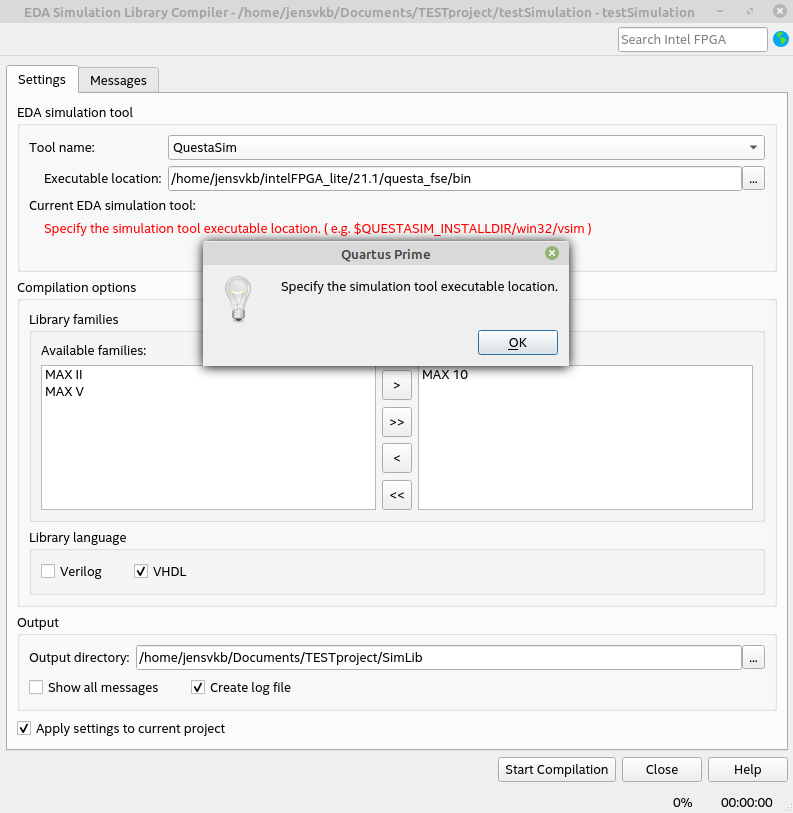
Googling this error message often gave the solution "you need to compile your simulation libraries". I thought "this is just Intel stuff, both the IP as the simulator, so that should already be done, but ok, I'll try it". So Tools->Launch Simulation Library Compiler. I set "Tool name" to "QuestaSim", since I'm using the Questa_fse simulator. I point "Executable location" to the path "/home/jensvkb/intelFPGA_lite/21.1/questa_fse/bin" where the vsim executable is located, give it an output directory and hit "Start Compilation". The problem here is, no matter what I give as "Executable location" it does not accept it! So I cannot compile the simulation libraries.
Any pointers on how to continue from here?
- YEan
The executable location has to close with '/ '. So, you have to use this " /home/jensvkb/intelFPGA_lite/21.1/questa_fse/bin/ " to start compilation.
- JensVkb
@YEan That did the trick indeed. I was relying on the automatically created .do file, but that one probably does not compile the IP files and hence cannot execute them. The main point of difference is sourcing the msim_setup.tcl file and calling the dev_com and com commands.
I could now simulate my dummy test project containing only one IP core. I'll now apply this for my real projects!
For future readers: these steps are also detailed in https://www.intel.com/content/www/us/en/docs/programmable/691278/21-3/quick-start.html , which I seem to have missed when starting my simulation process, hence leading to this agony.
PS: the link in step 2 detailed above, gives an "Access Denied".
- YEan
I didn't notice that I send a broken link. I apologize for that. The steps were the same as in Questa*-Intel® FPGA Edition Quick-Start.
Also, I’m glad that your issue has been resolved. I'll now transition this thread to community support. If you have a new question, feel free to open a new thread to get the support from Intel experts.