Forum Discussion

 New Contributor
Quartus GUI License Error
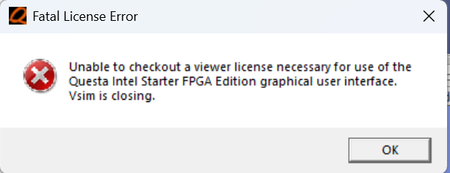
- 10 months ago
Could you check whether the NIC ID associated with the license file is correct? Also, can you confirm if this is a Fixed type license?
5.5.1. Identifying Host's NIC ID
Regards,
Richard Tan

 Super Contributor
Do you see any error message in the Questa Transcript Window?
Please search for "intelqsimstarter" within the .dat license file. If it is not found, you will need to generate a no-cost license from SSLC using the following selection: Questa* – FPGA Starter Edition
*Remember to update the environment variable (LM_LICENSE_FILE) with the newly generated license file. Please refer to the section titled "Setting Up the Questa*-Intel® FPGA Starter Edition Software License" in the user guide
5.1.2. Questa* Altera® FPGA Edition and Questa* Altera® FPGA Starter...
Regards,
Richard Tan
 JoelGiltrow10 months ago
During the questa launch I receive the following. I have looked at my license and it includes the 'intelqsimstarter' as shown in the black image - I am completely lost on what to do?
- RichardT_altera10 months ago
Could you check whether the NIC ID associated with the license file is correct? Also, can you confirm if this is a Fixed type license?
5.5.1. Identifying Host's NIC ID
Regards,
Richard Tan


