Forum Discussion

 New Contributor
Qartus command prompt flashing is unsuccessful throwing "Can't access JTAG chain" error message
We are from XPIV team covering automation for the PM and MSS. We were using the Quartus tool to flash the CPLD and we have the scripts in which the CPLD flashing is automated. While using the quartus_pgm tool for flashing we are getting the some error as posted below, Please support us in this regard.
The same flashing works fine if use the Quartus GUI
Quartus Pro 18.1 is used also Quartus Standard 20.1 tried both were throwing the same results
CLI Command used for flashing .pof
quartus_pgm.exe -c "USB-BlasterII" --mode=JTAG --operation="p;C:\SvShare\CPLD_Firmware\CPLD_WC_Main\pfr.pof"
Console Logs
Device: 10M16SAU324
Warning (210120): MAX 10 information is incomplete. The ISP clamp functionality will be disabled.
Info: *******************************************************************
Info: Running Quartus Prime Programmer
Info: Version 18.1.0 Build 222 09/21/2018 SJ Pro Edition
Info: Copyright (C) 2018 Intel Corporation. All rights reserved.
Info: Your use of Intel Corporation's design tools, logic functions
Info: and other software and tools, and its AMPP partner logic
Info: functions, and any output files from any of the foregoing
Info: (including device programming or simulation files), and any
Info: associated documentation or information are expressly subject
Info: to the terms and conditions of the Intel Program License
Info: Subscription Agreement, the Intel Quartus Prime License Agreement,
Info: the Intel FPGA IP License Agreement, or other applicable license
Info: agreement, including, without limitation, that your use is for
Info: the sole purpose of programming logic devices manufactured by
Info: Intel and sold by Intel or its authorized distributors. Please
Info: refer to the applicable agreement for further details.
Info: Processing started: Tue Jan 5 10:51:09 2021
Info: Command: quartus_pgm -c USB-BlasterII --mode=JTAG --operation=p;C:\SvShare\CPLD_Firmware\CPLD_WC_Main\pfr.pof
Info (213045): Using programming cable "USB-BlasterII [USB-1]"
Info (213011): Using programming file C:/SvShare/CPLD_Firmware/CPLD_WC_Main/pfr.pof with checksum 0x04B5BC4C for device 10M16SAU324@1
Info (209060): Started Programmer operation at Tue Jan 5 10:51:10 2021
Info (209017): Device 1 contains JTAG ID code 0x031830DD
Info (209060): Started Programmer operation at Tue Jan 5 10:51:11 2021
Error (209040): Can't access JTAG chain
Error (209012): Operation failed
Info (209061): Ended Programmer operation at Tue Jan 5 10:51:12 2021
Error (209012): Operation failed
Info (209061): Ended Programmer operation at Tue Jan 5 10:51:12 2021
Error: Quartus Prime Programmer was unsuccessful. 3 errors, 1 warning
Error: Peak virtual memory: 4635 megabytes
Error: Processing ended: Tue Jan 5 10:51:12 2021
Error: Elapsed time: 00:00:03
10 Replies
 YuanLi_S_Intel
Regular Contributor
Hi,
From the error message, it seems like the device part number is not the same between physical device and device selected in quartus. Can you please check on it?
Also, can you try to reduce the TCK frequency of USB Blaster II to 6MHz?
Thank You.
Regards,
Bruce
 tsramakx
Hello Bruce,
I believe an intermediate FLASH device is programmed, which in turn programs the main device. (I am not sure about this, please feel free to correct me about the flow, based on what I am summarizing below)
We put the target platform in S5 state.
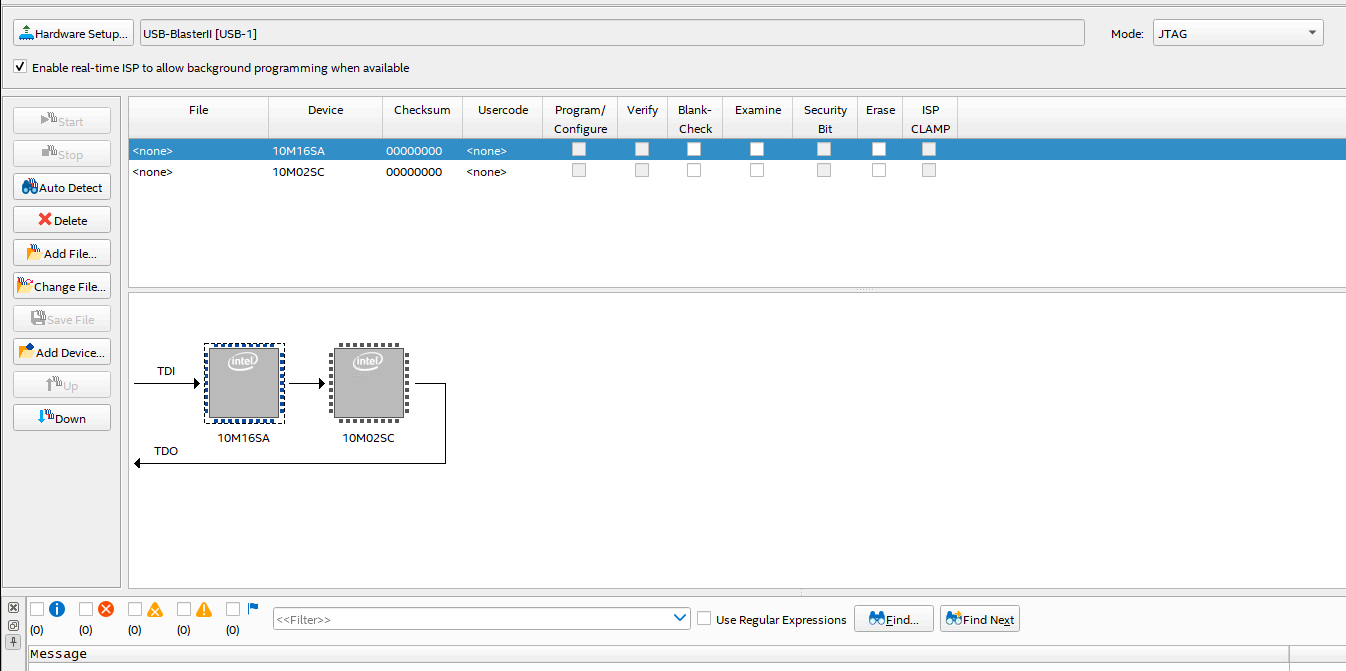
1) In GUI mode, by default, we select the primary device. Attachments: 1_Default_device_detection.png and 2_Initial_device_chain.PNG
2) We then select the required firmware (.pof) file, upon which we can see another device in the chain.
3) We then select the required options and then start programming the device.Attachment: 3_Additonal_device_in_chain.PNG
As you can see from "3_Additonal_device_in_chain.PNG", the 10M16SAU324 device is checked as the device (where TDI is fed) . This device ID appears to be the same as the device ID which is programmed from the logs which Meenak shared earlier.
We notice that with the above sequence, the device can be programmed successfully using the GUI.
I saved the associated cdf file as a reference (attachment: Chain1.txt -extension renamed to allow being attached here) , and then tried re-programming the device using the cdf file on the CLI.
Command: quartus_pgm -c "USB-BlasterII" Chain1.cdf //Chain1.cdf copied to quartus_pgm directory
This too failed with the same error as Meenak specified before.
Note: Going through the cdf file, we can see the primary device being programmed is 10M16SAU324. (Please correct me if I am wrong).
Note: I noticed that my target platform goes down and cannot be recovered using a reboot, when the attempted CLI based flashing fails. This also causes the JTAG chain to break, so that the CPLD firmware can be re-programmed to recover the platform.
I will try to recover the platform and try setting the TCK to 6 MHz and try programming via GUI first and then CLI.
 Meenak
Ram's Observation
Providing the data here, instead of posting on the community.
We reduced the JTAG programming clock frequency to 6 MHz and tried flashing the CPLD firmware. The issue still persists.
- Command to set clock frequency to 6 Mhz: jtagconfig --setparam "USB-BlasterII" JtagClock 6M (Attachment: 6Mhz.PNG)
- GUI based CPLD firmware flashing passed, platform booted fine. I saved the associated cdf as “Chain1_6M.cdf” (Attachment: Chain1_6M.cdf.txt)
- I then tried flashing the firmware using this CDF file, which failed, with the similar issue as before. (Attachments: CLI_Error.PNG and CLI_Error.txt)
Command that I used to try and flash the firmware: quartus_pgm -c "USB-BlasterII" Chain1_6M.cdf
Please let me know if I might be missing anything here.
- YuanLi_S_Intel
Hi Team,
Can you remove the unwanted device in the programmer and leave the programming device only? Also, have you try to program a SOF file instead of POF file? is it ok?
Thank You.
- tsramakx
Hello Yuanli, we have access to only the .pof file. Is there any tool/way to convert the .pof file to a .sof format?
- YuanLi_S_Intel
Hi,
We cant convert from POF to SOF. The SOF should be generated and allocated in output_file folder after assembly is compiled in the Quartus Prime.
Thank You.
Regards,
Bruce
- YuanLi_S_Intel
Hi, is there any update on this? is it working fine now?
- tsramakx
Hello YuanLi,
Unfortunately we do not have access to the HDL so that we may build it in .sof format. We might be looking at alternative solutions for this.
--
Ram
- YuanLi_S_Intel
Got it. Please let us know if there is another issue. I am closing this thread.
- Meenak
If it is .sof/.pof file issue then how come .pof file is getting flashed using the Quartus GUI. For command prompt do we always need .SOF file?