Forum Discussion

 New Contributor
Qartus command prompt flashing is unsuccessful throwing "Can't access JTAG chain" error message

 Regular Contributor
Hi,
From the error message, it seems like the device part number is not the same between physical device and device selected in quartus. Can you please check on it?
Also, can you try to reduce the TCK frequency of USB Blaster II to 6MHz?
Thank You.
Regards,
Bruce
 tsramakx5 years ago
Hello Bruce,
I believe an intermediate FLASH device is programmed, which in turn programs the main device. (I am not sure about this, please feel free to correct me about the flow, based on what I am summarizing below)
We put the target platform in S5 state.
1) In GUI mode, by default, we select the primary device. Attachments: 1_Default_device_detection.png and 2_Initial_device_chain.PNG
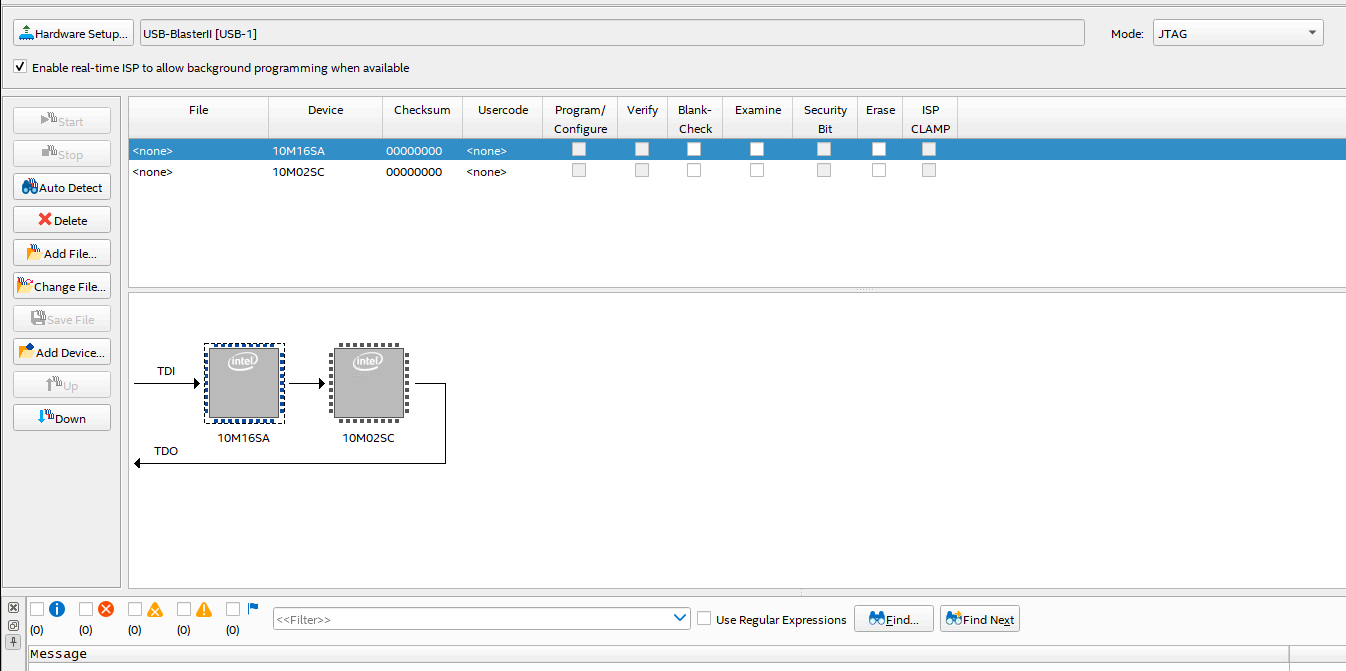
2) We then select the required firmware (.pof) file, upon which we can see another device in the chain.
3) We then select the required options and then start programming the device.Attachment: 3_Additonal_device_in_chain.PNG
As you can see from "3_Additonal_device_in_chain.PNG", the 10M16SAU324 device is checked as the device (where TDI is fed) . This device ID appears to be the same as the device ID which is programmed from the logs which Meenak shared earlier.
We notice that with the above sequence, the device can be programmed successfully using the GUI.
I saved the associated cdf file as a reference (attachment: Chain1.txt -extension renamed to allow being attached here) , and then tried re-programming the device using the cdf file on the CLI.
Command: quartus_pgm -c "USB-BlasterII" Chain1.cdf //Chain1.cdf copied to quartus_pgm directory
This too failed with the same error as Meenak specified before.
Note: Going through the cdf file, we can see the primary device being programmed is 10M16SAU324. (Please correct me if I am wrong).
Note: I noticed that my target platform goes down and cannot be recovered using a reboot, when the attempted CLI based flashing fails. This also causes the JTAG chain to break, so that the CPLD firmware can be re-programmed to recover the platform.
I will try to recover the platform and try setting the TCK to 6 MHz and try programming via GUI first and then CLI.
 Meenak5 years ago
Ram's Observation
Providing the data here, instead of posting on the community.
We reduced the JTAG programming clock frequency to 6 MHz and tried flashing the CPLD firmware. The issue still persists.
- Command to set clock frequency to 6 Mhz: jtagconfig --setparam "USB-BlasterII" JtagClock 6M (Attachment: 6Mhz.PNG)
- GUI based CPLD firmware flashing passed, platform booted fine. I saved the associated cdf as “Chain1_6M.cdf” (Attachment: Chain1_6M.cdf.txt)
- I then tried flashing the firmware using this CDF file, which failed, with the similar issue as before. (Attachments: CLI_Error.PNG and CLI_Error.txt)
Command that I used to try and flash the firmware: quartus_pgm -c "USB-BlasterII" Chain1_6M.cdf
Please let me know if I might be missing anything here.