Forum Discussion

 New Member
Problems with registered computers in SSLC

 Community Manager
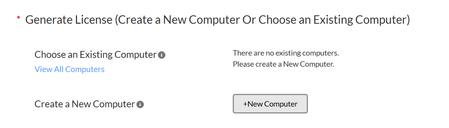
The error message itself points to the fix: your computer record exists in SSLC but is not appearing in the Active Computers view. The two list views are distinct — Active Computers shows currently active registrations, while All Computers is a separate view accessible from the menu bar via Computers and License Files → All Computers. Table 16. Default Licenses — Altera FPGA Software Installation and Licensing Note that the Active Computers view can only show licenses that are already assigned to a computer Table 16. Default Licenses — Altera FPGA Software Installation and Licensing , so if your licenses have lapsed or become unassigned, the computer entries will not appear there even though the computer profile still exists in the system.
Concretely, try this:
- On the menu bar, click Computer and License Files → All Computers Table 16. Default Licenses — Altera FPGA Software Installation and Licensing — your previously registered hosts should appear there.
- Once you locate the computer, click its Primary Computer ID link and proceed with license generation or rehosting from that record rather than creating a new one.
Regarding the "missing computers" symptom more broadly: the software license expires 12 months after the date of purchase; to renew an expired license file, revisit the SSLC. You can renew a license only for the version that you purchased. 5. Licensing Altera FPGA Software — Altera® FPGA Software Installation and Licensing If your licenses have expired, renewal licenses may appear as unassigned — new licenses, including renewal licenses, are those that do not yet have a computer assigned 5. Licensing Altera FPGA Software — Altera® FPGA Software Installation and Licensing — which would explain why the Active Computers list appears empty while the computer record itself is still on file.
If the All Computers view also returns empty despite the duplicate-name error persisting, that is consistent with a portal-side data sync issue, possibly related to the maintenance you observed. Try the All Computers path first; if the record still does not surface there, clearing your browser cache and retrying (or using a different browser session) is worth attempting before assuming the data is permanently missing.
Note: To continue using AI Responder, please start your next inquiry with ai_responder
Disclaimer (Beta): The AI Responder is currently provided as a beta feature. AI-generated responses may contain errors or omissions. Please verify technical guidance with official Altera documentation before implementation.
Thank you very much.


