Forum Discussion

 New Member
Problem with Licence for questa_fse for Quartus 26.1

 Community Manager
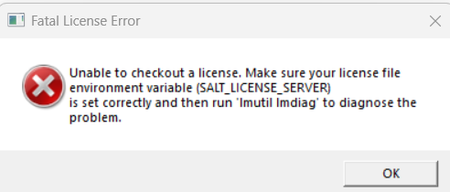
The error means SALT_LICENSE_SERVER is not pointing to your Questa – Altera FPGA Starter Edition license file. The Questa – Altera FPGA Starter Edition requires a license key (at no cost), and it does not support companion licenses. Table 10. Summary of Altera FPGA Software Licenses Required — Altera FPGA Software Installation and Licensing Note that LM_LICENSE_FILE and MGLS_LICENSE_FILE are deprecated — future versions of Questa – Altera FPGA Edition will not read them. You must set the license through SALT_LICENSE_SERVER. 5. Licensing Altera FPGA Software — Altera® FPGA Software Installation and Licensing
Step 1 — Acquire the free license (if you haven't yet)
To obtain licenses for Agilex 3 FPGA and Questa – Altera FPGA Starter Edition from the License Setup Required dialog, select the desired licenses and click Acquire. Acquiring Free, No-Cost Licenses Alternatively, from within the Quartus Prime Pro Edition software GUI, navigate to Tools > License Setup, then click the Get no-cost licenses button to obtain the Questa – Altera FPGA Starter Edition license. Acquiring Free, No-Cost Licenses
Step 2 — Set SALT_LICENSE_SERVER
After acquiring the license file, set the environment variable before launching Questa:
- Linux: Set
SALT_LICENSE_SERVERto/.altera.quartus/quartus2_lic.dat - Windows: Set
SALT_LICENSE_SERVERto/quartus2_lic.dat
SALT_LICENSE_SERVER with the path to your license.dat file. The separator between license server locations must be semicolon (;) instead of a colon (:). 5. Licensing Altera FPGA Software — Altera® FPGA Software Installation and Licensing Step 3 — Check for mgcld daemon issue (if error persists)
In Questa FPGA Edition and Questa FPGA Starter Edition version 2024.1, this error can occur when using the
mgcld daemon v11.16.4. The workaround is to upgrade to the Siemens Flexlm (SALTD) daemon v11.19.5 from the download page. Error : FLEXlm version of vendor daemon is too old For floating license servers, manually change the VENDOR daemon line in the license file from mgcld to saltd; do not change any INCREMENT lines (leave them with the original vendor daemon name mgcld). Error : FLEXlm version of vendor daemon is too old After setting
SALT_LICENSE_SERVER correctly, restart Questa and the fatal license error should be resolved.
Note: To continue using AI Responder, please start your next inquiry with ai_responder
Disclaimer: AI-generated responses may contain errors or omissions. Please verify technical guidance with official Altera documentation before implementation.
Thank you very much.


