Forum Discussion

HannesDE New Contributor
2 years agoNew ContributorOpen QuestaSim from Quartus Simulation does not work on Linux
Hello, i currently have problems running Questa to simulate FPGA-Projects My Setup: -Fedora OS Version 38 -Quartus Prime Lite Edition Version 22.1 (Working) -Questa Intel Starter FPGA Edition 64...

HannesDENew Contributor
2 years agoNew ContributorHi,
thanks for the reply.
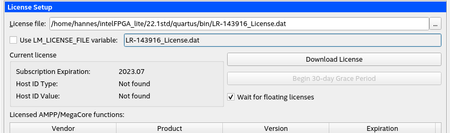
The path is set in the options settings see the picture below.
When changing the path to something different i will receive a different error message which says questas could not be found. So i think quartus is finding questas but not the license file
This is the error message that is reffered to in the error maybe this helps
================The following additional information is provided to help identify the cause of error while running nativelink scripts=================
Nativelink TCL script failed with errorCode:  issued_nl_message
Nativelink TCL script failed with errorInfo:  Can't launch Questa Intel FPGA Simulation software -- make sure the software is properly installed and the environment variable LM_LICENSE_FILE or MGLS_LICENSE_FILE points to the correct license file.
    while executing
"error "$emsg" "" "issued_nl_message""
    invoked from within
"if [ catch {exec $vsim_cmd -version} version_str] {
                set emsg "Can't launch $tool Simulation software -- make sure the software is properly installed..."
    (procedure "launch_sim" line 88)
    invoked from within
"launch_sim launch_args_hash"
    ("eval" body line 1)
    invoked from within
"eval launch_sim launch_args_hash"
    invoked from within
"if [ info exists ::errorCode ] {
                set savedCode $::errorCode
                set savedInfo $::errorInfo
                error $result $..."
    invoked from within
"if [catch {eval launch_sim launch_args_hash} result ] {
            set status 1
            if [ info exists ::errorCode ] {
                set save..."
    (procedure "run_sim" line 74)
    invoked from within
"run_sim run_sim_args_hash"
    invoked from within
"if [ info exists ::errorCode ] {
            set savedCode $::errorCode
            set savedInfo $::errorInfo
            error "$result" $savedInfo ..."
    (procedure "run_eda_simulation_tool" line 334)
    invoked from within
"run_eda_simulation_tool eda_opts_hash"


