Forum Discussion

 New Contributor
Node Finder Signal Tap

 Super Contributor
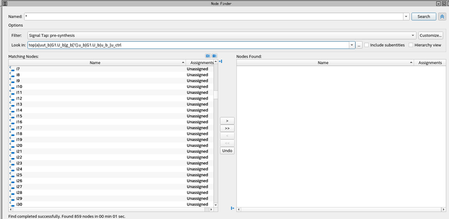
Where is the signal in your design hierarchy? You have a path filled in in "Look in" so it's only going to search at that level of your hierarchy. If you want to search there and below, turn on "Include subentities". Change "Look in" to your top-level design with "Include subentities" turned on to search the entire design. You should also turn on "Hierarchy view" because it makes it much easier to see where found nodes live in your design.
As for what you've found there, they are probably internal nodes created from your RTL. Scrolling around should show signals that you recognize. But adjusting "Look in" is probably your best bet.
 ee5552 years ago
The signal I'm searching for is declared inside the u_ctrl module in the path I have listed in "Look in". I verified this is the correct spot because I'm able to find other signals from u_ctrl module in node finder. Also, when I updated u_ctrl module to make the signals in question output ports, they appear again in the node finder under the same "Look in" path but I think there is a better way to find the signals I'm looking for.


