Forum Discussion

Altera_Forum's avatar
Altera_Forum
Icon for Honored Contributor rankHonored Contributor
10 years ago

Nativelink Error "can not find channel named ... no such file or directory"

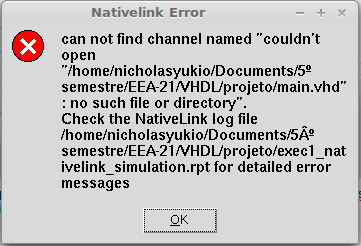
Hello, I am new to Altera products and VHDL and I have problem when I go to Tools > Run Simulation Tools > RTL Simulation. When I do this, after compiling with success a small sample of VHDL code, I get the following dialog box as a error:

http://www.alteraforum.com/forum/attachment.php?attachmentid=10543&stc=1

I learnt from somewhere in web that with the action Tools > Run Simulation Tools > RTL Simulation I would invoke ModelSim. Does anyone understands why I get this problem when in fact the file mentioned in the dialog box does exists (as I just finished writing it and can open it in a text editor) ? Another question: the ModelSim from Altera is totally dependent from Quartus and I must to open it from Quartus? I am using the Quartus II 32-bit 12.1sp1 Web Edition and ModelSim Starter Edition in Linux Mint Debian Edition.

I would be grateful to any help.

5 Replies

  • Altera_Forum's avatar
    Altera_Forum
    Icon for Honored Contributor rankHonored Contributor

    Hi,

    Seems like a missing link issue... Did you try open the report (*.rpt) and check what is the error?

    Also did you have the modelsim installed? Then make sure you also setup the modelsim directory in the tools.
  • Altera_Forum's avatar
    Altera_Forum
    Icon for Honored Contributor rankHonored Contributor

    Hi,

    You can invoke Modelsim independently without the need to open it through Quartus II. You may try to see if it can launch Modelsim this way? This could serve as workaround for the existing issue.
  • Altera_Forum's avatar
    Altera_Forum
    Icon for Honored Contributor rankHonored Contributor

    Hello,

    Sorry for the late reply. I was (in fact, I am) too busy these days and Gmail marked the altera forum notification as spam.

    kennyboy2020, the latest edition did not work in my system.

    ah_zhi02, I just read the .rpt but did not have too much additional information that I could understand. Here is the report:

    
    Info: Start Nativelink Simulation process
    Error : Can't open file -- /home/nicholasyukio/Documents/5º semestre/EEA-21/VHDL/projeto/main.vhd
    can not find channel named "couldn't open "/home/nicholasyukio/Documents/5º semestre/EEA-21/VHDL/projeto/main.vhd": no such file or directory"
    Error: NativeLink simulation flow was NOT successful
    ================The following additional information is provided to help identify the cause of error while running nativelink scripts=================
    Nativelink TCL script failed with errorCode:  TCL LOOKUP CHANNEL {couldn't open "/home/nicholasyukio/Documents/5º semestre/EEA-21/VHDL/projeto/main.vhd": no such file or directory}
    Nativelink TCL script failed with errorInfo:  can not find channel named "couldn't open "/home/nicholasyukio/Documents/5º semestre/EEA-21/VHDL/projeto/main.vhd": no such file or directory"
        while executing
    "eof $file_id "
        (procedure "get_ip_info" line 20)
        invoked from within
    "get_ip_info $full_file_name"
        (procedure "run_eda_simulation_tool" line 195)
        invoked from within
    "run_eda_simulation_tool eda_opts_hash"
    

    I did installed Modelsim but here in Linux enviroment but it did not created shortcuts in desktop nor in menus, so I thought its initialization was by Quartus.

    bfkstimchan: I tried to start Modelsim indenpedently (as stated above) but I did not have sucess.

    Any way, I gave up (at least for a while) in using Altera products in Linux Mint and installed in Windows 7 and I did not found the same problems. If anybody here currently uses Altera products in Linux (especially Mint) I would be happy to know how he/she succeed in the task (for instance, how to start Modelsim independently outside Quartus without shortcuts).

    I thank the help received.
  • Altera_Forum's avatar
    Altera_Forum
    Icon for Honored Contributor rankHonored Contributor

    Since it works in Windows 7, this might be due to Linux mint. Not sure if it is supported, but you can always submit a ticket to Altera guys and ask. Cheers!