Forum Discussion

 New Contributor
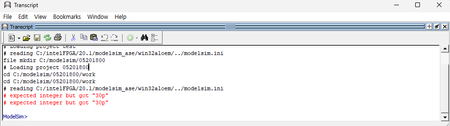
ModelSim Error: "expected integer but got '30p'" When Loading Project
- 1 year ago
You will need to set up the environment variable SALT_LICENSE_FILE in your PC. Questa read the environment variable to fetch the respective license .dat file.
Please checkout the user guide below.
https://www.intel.com/content/www/us/en/docs/programmable/683472/25-1/and-software-license.html
Regards,
Richard Tan

 Super Contributor
You will need to set up the environment variable SALT_LICENSE_FILE in your PC. Questa read the environment variable to fetch the respective license .dat file.
Please checkout the user guide below.
https://www.intel.com/content/www/us/en/docs/programmable/683472/25-1/and-software-license.html
Regards,
Richard Tan
 shcrshonhs1 year ago
First of all, thank you for providing a solution to my previous issue. However, even after accessing the link and loading the license on my computer, I am still experiencing problems. Could you please advise on what steps I should take next?My license is fixed computer license..(the keyword is "fixed"..)I remember i chose fixed between "fixed" and "float" and my computer name is shcrshonhs)
Here is what I have already tried:
1.I made sure the environment variable (LM_LICENSE_FILE or INTEL_LICENSE_FILE) points to the correct license file location.
2.I rebooted my computer.
Despite these efforts, the issue persists.
Could you please provide further assistance or let me know if there are any additional troubleshooting steps I should follow?Thank you for your support.
Best regards,
shcrshonhs
- shcrshonhs1 year ago
Thank you very much for helping me resolve the issue. Thanks to your support, Questa Intel Starter FPGA Edition is now working properly. The problem was caused by my mistake in entering the physical address of my computer in the license. I apologize for any confusion this may have caused, and I truly appreciate your prompt and helpful response.
Have a great day!Best regards,
shcrshonhs


