Forum Discussion

 New Contributor
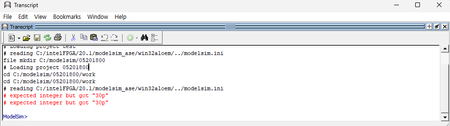
ModelSim Error: "expected integer but got '30p'" When Loading Project
- 1 year ago
You will need to set up the environment variable SALT_LICENSE_FILE in your PC. Questa read the environment variable to fetch the respective license .dat file.
Please checkout the user guide below.
https://www.intel.com/content/www/us/en/docs/programmable/683472/25-1/and-software-license.html
Regards,
Richard Tan

 Super Contributor
Does the behaviour occur recently? Does the simulator tool run succefully before?
You might try to delete the Modelsim registry entries and see if the issue resolves.
*WARNING: If you use Registry Editor incorrectly, you may cause serious problems that may require you to reinstall your operating system. Use in caution and check the reference link below before performing the steps below.
- Shut down ModelSim
- Start Registry Editor by enter regedit in the Start menu.
- In the Registry Editor, Edit > Find, to search for a folder named "Model Technology Incorporated"
- Using the Registry menu, export the selected registry key to make a backup. Store the .reg file in a safe location in case you need to import it at a later date.
- Delete the entire folder.
- Launch ModelSim
If the issue still persists, could you try to use Questa Intel FPGA Starter Edition instead of Modelsim Intel FPGA Starter Edition.
As stated in the KDB: https://www.intel.com/content/www/us/en/support/programmable/articles/000088418.html
The Modelsim* - Intel® FPGA Edition (including Starter Edition) will be replaced by the Questa* - Intel® FPGA Edition (including Starter Edition) starting from the Intel® Quartus® Prime Pro Edition Software version 21.3 and Intel® Quartus® Prime Standard Edition Software version 21.1 onwards.
If there is no concern for you to upgrade the design to the latest Quartus version, we always recommend the users to use the latest supported tool and its latest version.
Regards,
Richard Tan
 New Contributor
Dear Intel Team,
I would like to express my sincere gratitude for providing a solution to my problem.
I truly appreciate your professionalism and the considerate assistance you have given me throughout this process. I look forward to maintaining a strong and positive relationship with Intel in the future.
Thank you once again for your valuable support.
Best regards,
shcrshonhs


