Forum Discussion

saadche New Contributor
2 years agoNew ContributorModelsim Doesnt include submodules
Hey everyone, I have an issue where When I compile to generate waveforms, modelsim launches but doesnt compile or carry over any of my submodules. Is there a setting that ive missed? I didn't play...
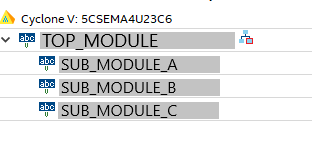

saadcheNew Contributor
2 years agoNew Contributorfor those who may read this in the future, I found two methods to solve it.
A. (manual and incorrect way IMO)
- In Quartus toolbar, Processing -> Start -> "Start analysis and synthesis"
- In Quartus toolbar, Processing -> Start ->"compile"
- Once Modelsim launches, manually add/compile each submodule you need
- In the toolbar compile -> compile the files in this order: submodules -> top module -> testbench
- In Modelsim toolbar, simulate -> start simulation -> select your desired testbench file
- In Modelsim toolbar, simulate -> Run -> Run-all
B. (correct and fast way)
- in Quartus, click "Start analysis and synthesis"
- in Quartus toolbar, Tools -> Run Simulation Tools -> RTL Simulation
- Modelsim **should** now launch with all the files
Honestly I cant explain why just clicking "Compile" doesn't launch Modelsim with the included submodules
I'm open to hearing any feedback and if anyone has any other suggestions.


