Forum Discussion

PiyushM New Contributor
1 year agoNew ContributorIssue in Quartus 16.1 with Windows 11 Pro
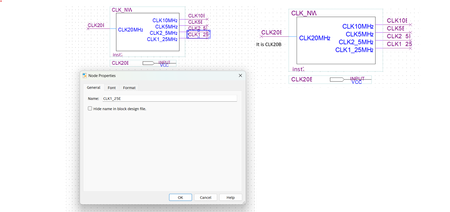
IssueHi, I am using Quartus Prime 16.1 Standard Edition and utilize schematic entry to create .bdf file. OS is Windows 11 Pro. I am facing issue to view 1) Block & Symbol names 2) Instance, ...
 1 year ago
Hi,
As mentioned, version 16.1 is not supported in Window 11.
Thanks,
Regards,
Sheng

PiyushMNew Contributor
1 year agoNew ContributorHi,
I changed the Display scaling to custom value 110% and all display related problem is solved.

DrRussMeierMSOENew Contributor
1 year agoNew Contributor@PiyushM :
Exactly. The standard response on these forums is "its not compatible." Sorry for your frustrations but you have nailed the solution.
- Windows 11 recognizes very high definition displays at installation and may default the display scale to 150 or 200% to make text easier to read. While this works well in many applications. Quartus isn't auto-scaling based on the display settings. This makes the display text push into the symbol.
- I have my students display at 100% while they are working in Quartus. This fixes all of the text issues. When they are done using Quartus, they can then rescale display settings if desired.
