Forum Discussion

 New Contributor
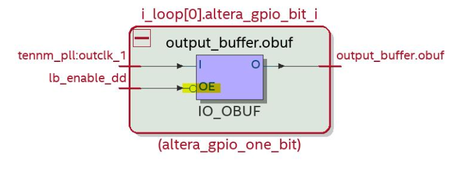
IO_OBUF polarity not matching RTL

 Super Contributor
Hi,
Sorry for delay reply,
Engineering had confirmed that the behaviour is correct check below:
The bubble is to indicate the inversion to compensate for the active low oe port of the obuf. So, what you see in the tech map view is actually correct.
I see the RPI is not set for out1 to invert the core signal to OE. However, we use RBC to set the programmable invert for the OE inside fm_gpio to compensate for OE being active low. So, it should work fine.
And we also have BCM simulation of a design similar to the sample test design and it is working fine.
set up running BCM simulation for design tri_test.zip.
Looking at the result, the behaviour of the OE is expected.
The RTL is:
assign out1 = (en1) ? clk1 : 1'bz;
The simulation waveform is:
You can see when en1 is low, out1 is Z regardless of clk1.
You can also see when en1 is high, out1 follows clk1.
 Super Contributor
@ShengN_Intel
"The bubble is to indicate the inversion to compensate for the active low oe port of the obuf. So, what you see in the tech map view is actually correct."
Active low port unfortunately isn't indicated in the symbol, otherwise it would be designated nOE, OE# or similar. I see what you mean, but technology map schematic doesn't comply with commonly understood logic symbol presentation, although it's used "since ever" in Quartus. It's prone to misunderstanding as shown by this thread.
Best regards
Frank
- ShengN_altera1 year ago
Hi @FvM
The resource property viewer shows it's an active low oe check screenshot below:
Thanks,
Regards,
Sheng
- FvM1 year ago
@ShengN_Intel
I have no problems to find out what the actual logic function is. Problem is that logic symbol in technology map schematic is wrong. The "!" inversion indicator isn't reflected.- ShengN_altera1 year ago
It needs to zoom in to the resource property viewer to see the inversion indicator.
It wouldn't shown in technology map viewer logic symbol. I think this causes the confusion.
