Forum Discussion

 New Contributor
IO_OBUF polarity not matching RTL

 Super Contributor
Hi,
in initial post of this thread, it's stated that Quartus is implementing wrong en signal polarity for tri-stated outputs. In following discussion, actual device behaviour is never mentioned, instead only wrong technology map is shown.
I see now that all Quartus versions (Std and Pro), up to most recent have wrong polarity of en port in technology map viewer, as seen below for Quartus Std. 24.1
module tri_test0 (
input  logic      in1,
input  logic	  en1,
output logic      out1
);

assign out1  =  (en1) ? in1 : 1'bz;

endmodule
RTL Viewer
Technology Map Viewer
Implemented hardware is however behaving according to RTL description, the fault is only in technology map viewer.
Inverting en1 in code flips all polarities, RTL map and hardware behaviour are still correct, technology map is wrong.
module tri_test0 ( input logic in1, input logic n_en1, output logic out1 ); assign out1 = (!n_en1) ? in1 : 1'bz; endmodule
I have no Agilex 7 board at hand to check if it shows wrong hardware behaviour as claimed in post #1, either with previous or recent Quartus Pro versions.
I feel that Intel should clarify if there actually has been wrong hardware behaviour of tri-state output with Agilex 7 or other devices in any Quartus version. And also if obviously wrong polarity display in technology map viewer is planned to be fixed.
Regards
Frank
 ShengN_altera1 year ago
Hi,
Sorry for delay reply,
Engineering had confirmed that the behaviour is correct check below:
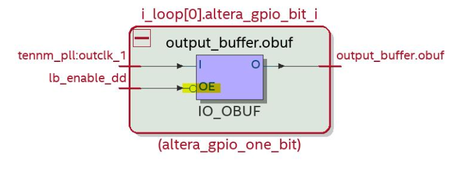
The bubble is to indicate the inversion to compensate for the active low oe port of the obuf. So, what you see in the tech map view is actually correct.
I see the RPI is not set for out1 to invert the core signal to OE. However, we use RBC to set the programmable invert for the OE inside fm_gpio to compensate for OE being active low. So, it should work fine.
And we also have BCM simulation of a design similar to the sample test design and it is working fine.
set up running BCM simulation for design tri_test.zip.
Looking at the result, the behaviour of the OE is expected.
The RTL is:
assign out1 = (en1) ? clk1 : 1'bz;
The simulation waveform is:
You can see when en1 is low, out1 is Z regardless of clk1.
You can also see when en1 is high, out1 follows clk1.
- FvM1 year ago
@ShengN_Intel
"The bubble is to indicate the inversion to compensate for the active low oe port of the obuf. So, what you see in the tech map view is actually correct."
Active low port unfortunately isn't indicated in the symbol, otherwise it would be designated nOE, OE# or similar. I see what you mean, but technology map schematic doesn't comply with commonly understood logic symbol presentation, although it's used "since ever" in Quartus. It's prone to misunderstanding as shown by this thread.
Best regards
Frank- ShengN_altera1 year ago
Hi @FvM
The resource property viewer shows it's an active low oe check screenshot below:
Thanks,
Regards,
Sheng
