Forum Discussion

 New Contributor
How to know if questa is correctly installed in my linux system?
- 1 year ago
Check the error message and see what it complain about.
The "#Error error loading design" seems to indicate that the Questa is unable to find the design files.
Check if the path to the file being loaded is incorrect, or the path contains a space character, or the file does not exist.
Check the line 12 in the ...msim_gate_vhdl.do file and see what is it about.
Do you run a full compilation in the Quartus prior to launch the Questa to run gate level simulation?
Regards,
Richard Tan

 New Contributor
After
sudo ln -s /lib/ld-linux.so.2 /lib64/ld-lsb-x86-64.so.3
The instaler worked, although I'm not sure if this lib is exactly the same stuff.
Now running /opt/lmutil lmdiag returns
lmutil - Copyright (c) 1989-2024 Flexera. All Rights Reserved.
FlexNet diagnostics on Mon 12/23/2024 19:51

-----------------------------------------------------
License file: /usr/local/flexlm/licenses/LR-209063_License.dat
-----------------------------------------------------
But running ~/intelFPGA_lite/23.1std/questa_fse/linux_x86_64/lmutil lmdiag returns
bash: /home/marco/intelFPGA_lite/23.1std/questa_fse/linux_x86_64/lmutil: Accessing a corrupted shared library
I still get
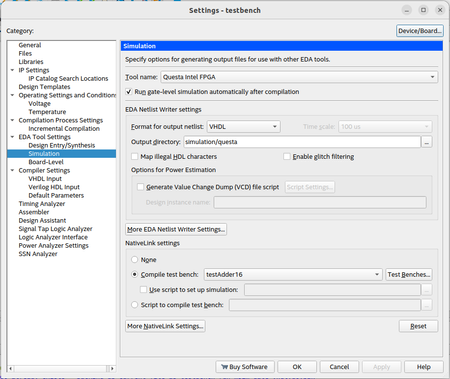
Error: Error: Can't launch Questa Intel FPGA Simulation software -- make sure the software is properly installed and the environment variable LM_LICENSE_FILE or MGLS_LICENSE_FILE points to the correct license file.
From my compilation testbench. From the difference in the error messages I have a feeling that quartus is not even complaining about the license file being misconfigured but it's simply not finding it.
The modified part of the license file now reads:
# - License Expires 18-Dec-2025
################################################################################
SERVER hivemind F4A4750520B7 <port-number>
VENDOR alterad /home/marco/intelFPGA_lite/23.1std/quartus/linux64/alterad
VENDOR saltd /opt/Siemens/LicenseServer/saltd
USE_SERVER
################################################################################
# FEATURE START
Is that correct?
- ocraM1 year ago
I think I was able to advance a little bit more. The service file:
[Unit]
Description=Magical service. Makes things work and such and such
After=network.target

[Service]
Environment="LM_LICENSE_FILE=/usr/local/flexlm/licenses/LR-209063_License.dat"
WorkingDirectory=/opt/flexlm
Type=forking
ExecStart=/bin/bash -c "/opt/flexlm/lmgrd"
Restart=on-failure
User=marco
Group=marco
StandardOutput=journal

[Install]
WantedBy=multi-user.target
Does what I need. The forking component is essential for it to work. Of course, the environment variable LM_LICENSE_FILE also. I'm not sure if the other options are essential but after trying several combinations this is the one that worked and I'm a bit tired to improve the file.
I have one last question: when I launch, I get the screen shown in image:
On the lower bottom there is an error message and the testbench does not proceed. Indeed, I'm expecting to see a test regarding a component called Adder16. I have no idea how it should look like.
Is the error message some software configuration problem or is it a problem with the testbench? Should I close this question since saltd seems to work and open another one?


