Forum Discussion

 New Contributor
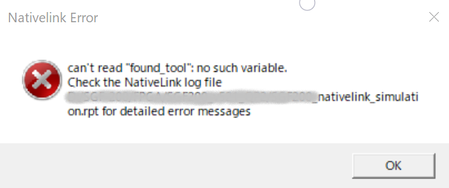
Cannot start Quartus Prime RTL Simulation
- 2 years ago
Perhaps this could be a bad installation. Try to uninstall and reinstall both the Quartus and the Questa Intel FGPA Starter Edition.
Regards,
Richard Tan

 Super Contributor
We noticed that we haven't received a response from you regarding the latest previous question/reply/answer, and will now transitioning your inquiry to our community support. We apologize for any inconvenience this may cause and we appreciate your understanding.
If you have any further questions or concerns, please don't hesitate to let us know.
Thank you for reaching out to us!
Best Regards,
Richard Tan
 New Contributor
Sorry for my late responce.
I tried old (18.1) Quartus version and could do simulation.
(actually, It did not work at Modelsim-Atrera selection. I selectd Modelsim and worked good.)
I do not find reason of this, But anyway, I can run Modelsim execution from Quartus now.
- RichardT_altera2 years ago
It appears that you've switched to ModelSim-Altera Edition instead of Questa.
Hmm... there might be an issue with the environment or possible incompatibility.
If you're comfortable using 18.1 as a workaround, then you're good to go.
Enjoy your simulation!
Regards,
Richard Tan


