Forum Discussion

 New Contributor
Cannot start Quartus Prime RTL Simulation
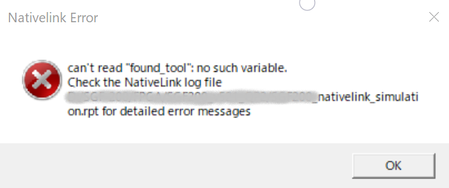
- 2 years ago
Perhaps this could be a bad installation. Try to uninstall and reinstall both the Quartus and the Questa Intel FGPA Starter Edition.
Regards,
Richard Tan

 New Contributor
>Could you try to run the quick start simulation flow and see if the issue persist?
>https://www.intel.com/content/www/us/en/docs/programmable/703090/21-1/simulation-quick-start.html
>You may compare the modelsim.tcl at the \intelFPGA\23.1\quartus\common\tcl\internal\nativelink with mine one.
>See if there is any difference.
Thank you for your information.
I tryed and compared .tcl files, but can't find no difference.
So,
I presume nativelink has some error, I tried to execute vsim.exe not from Quarus bur from console,
simulator had worked normmally.
I think my PC's nativelink executing enviroment( path or resistory?) has gone BAD after Windows Update. (I have no idea of reason, however.)


