Forum Discussion

 New Contributor
Cannot start Quartus Prime RTL Simulation
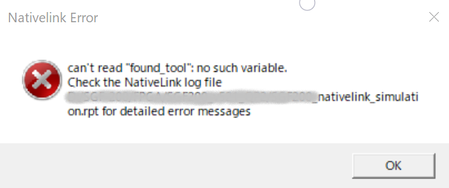
- 2 years ago
Perhaps this could be a bad installation. Try to uninstall and reinstall both the Quartus and the Questa Intel FGPA Starter Edition.
Regards,
Richard Tan

 Super Contributor
Yes, the "found_tool" is from the tcl script but I dont advise user to modify it. Have you modify it before?
I try to simulate nativelink but not able to duplicate the error.
Quartus: 23.1 standard build 991
Questa Starter: 23.1std.0.991
Could you try to run the quick start simulation flow and see if the issue persist?
https://www.intel.com/content/www/us/en/docs/programmable/703090/21-1/simulation-quick-start.html
You may compare the modelsim.tcl at the \intelFPGA\23.1\quartus\common\tcl\internal\nativelink with mine one.
See if there is any difference.
Regards,
Richard Tan
 New Contributor
>Yes, the "found_tool" is from the tcl script but I dont advise user to modify it. Have you modify it before?
No, I did not edit tcl files. I just installed Qualtus Prime and compled and tried to run simulation.
I had traced modelsim.tcl file of Quartus-II before, So I noticed "found_file" is variavle name.
>Could you try to run the quick start simulation flow and see if the issue persist?
>https://www.intel.com/content/www/us/en/docs/programmable/703090/21-1/simulation-quick-start.html
>You may compare the modelsim.tcl at the \intelFPGA\23.1\quartus\common\tcl\internal\nativelink with mine one.
>See if there is any difference.
Thank you for your advice. I will try.


