Forum Discussion

 New Contributor
Cannot start Quartus Prime RTL Simulation
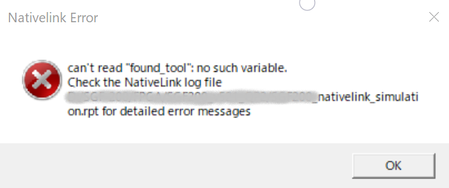
- 2 years ago
Perhaps this could be a bad installation. Try to uninstall and reinstall both the Quartus and the Questa Intel FGPA Starter Edition.
Regards,
Richard Tan

 Super Contributor
It seem like the quartus complain that they can't find the simulation tool.
Have you specify the location of the tool executable for questa? Tools > Option> EDA Tool Options.
You may check this user guide on how to "Setting Up NativeLink Simulation":
Regards,
Richard Tan
 New Contributor
Thank you for your reply.
>>It seem like the quartus complain that they can't find the simulation tool.
I found "vsim.exe" in c:/intelfpga_lite/23.1std/questa_fse/win64/ , so I think settings are correct.
(following phots are settings)
If you know another setting, I'm very happy to know that.
I think this error comes from tcl script execution...


