Forum Discussion

Altera_Forum Honored Contributor
11 years agoHonored Contributorbuild issue with EDS
hi all,
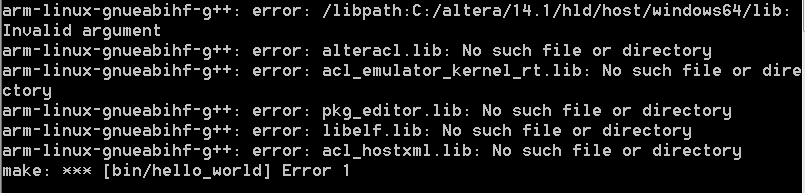
I built hello_world through make -f Makefile command, but it showed"arm-linux-gnueabinf-g++: error : /libpath:C:/altera/14.1/hld/host/windows64/lib/: Invalid argument", "arm-linux-gnueabinf-g++: error :alteracl.lib: no such file or directory" ...... It seems the path C:/altera/14.1/hld/host/windows64/lib/ is invalid on windows. this path seems to be modified to /cygdrive/c/altera/14.1/hld/host/windows64/lib/ ? and which file should I modify? or solve it in another way. Thanks8 Replies
 Altera_Forum
If I must build host application on linux ?
- Altera_Forum
I got this to compile on my windows 7 machine by making a small change to the makefile.
replace: AOCL_LINK_CONFIG := $(shell aocl link-config) with: AOCL_LINK_CONFIG := $(shell aocl link-config --arm) - Altera_Forum
Thanks to your answer, I will try.
- Altera_Forum
Hi,
To let you know I had exactly the same issue, and the proposed workaround resolved the issue. - Altera_Forum
I is beginner in this OpenCL theme and in yesterday has download the last version of HelloWorld, install last version of Quartus Std 17.1 & SDK for OpenCL with ARM DS-5, my board is c5soc, OS Win7 Prof.
And I see the same problem with "--arm" key in downloaded Makefile as is recommended from craueralt ! Where are trouble ? My output errors is:
The command "aocl linkflags" says:/libpath:D:/intelFPGA/17.1/hld/host/windows64/lib: Invalid argument OpenCL.lib: No such file or directory
In D:/intelFPGA/17.1/hld/host/windows64/lib I see the normal file OpenCL.lib. How repair this bug ?/libpath:D:/intelFPGA/17.1/hld/host/windows64/lib OpenCL.lib - Altera_Forum
A problem is in "invisible" key "--arm" for command in Makefile after "shell aocl link-config", which must return a list of ARM linker parameters instead x64.
If manually edit Makefile, clear AOCL_LINK_CONFIG, set to LIB_DIRS list of library directories and add to LIBS all need libs, then examples is compiled and runned after successful. - Altera_Forum--- Quote Start --- I is beginner in this OpenCL theme and in yesterday has download the last version of HelloWorld, install last version of Quartus Std 17.1 & SDK for OpenCL with ARM DS-5, my board is c5soc, OS Win7 Prof. And I see the same problem with "--arm" key in downloaded Makefile as is recommended from craueralt ! Where are trouble ? My output errors is:
The command "aocl linkflags" says:/libpath:D:/intelFPGA/17.1/hld/host/windows64/lib: Invalid argument OpenCL.lib: No such file or directory
In D:/intelFPGA/17.1/hld/host/windows64/lib I see the normal file OpenCL.lib. How repair this bug ? --- Quote End --- hi! I have the same problem,have you solved it? I want to change the output of "aocl link-config",how can I implement this? By the way,do you know the output of "aocl link-config" depends on which variable's value ???/libpath:D:/intelFPGA/17.1/hld/host/windows64/lib OpenCL.lib ygao15
New Contributor
I have the same problem as you,do you solved it? I am looking forward to your help.