Forum Discussion

 New Contributor
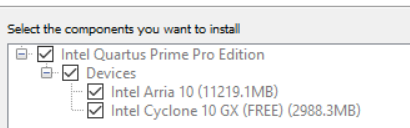
Arria 10 Not Found in Project Wizard

 Super Contributor
Here are troubleshooting steps that you may check:
1. Before you download and install the software, please check that your machine system must meet minimum Hardware and Software Requirements. Ensure that your Operating System is supported. https://www.intel.com/content/www/us/en/docs/programmable/683472/current/system-requirements-and-prerequisite.html
2. Check that the disk space is sufficient for the installation of the Intel FPGA software.
3. If you are running antivirus software, try to temporarily disable the antivirus software during the Quartus Prime software download and installation process.
4. Install with Administrator privileges.
5. Check that the installation files .tar is not corrupted by checking the checksum.
6. Try to install using the new Quartus Prime Pro Edition Installer (EXE)
Regards,
Richard Tan


