Forum Discussion

 Occasional Contributor
Nios Ethernet elf download error
Hi there ,
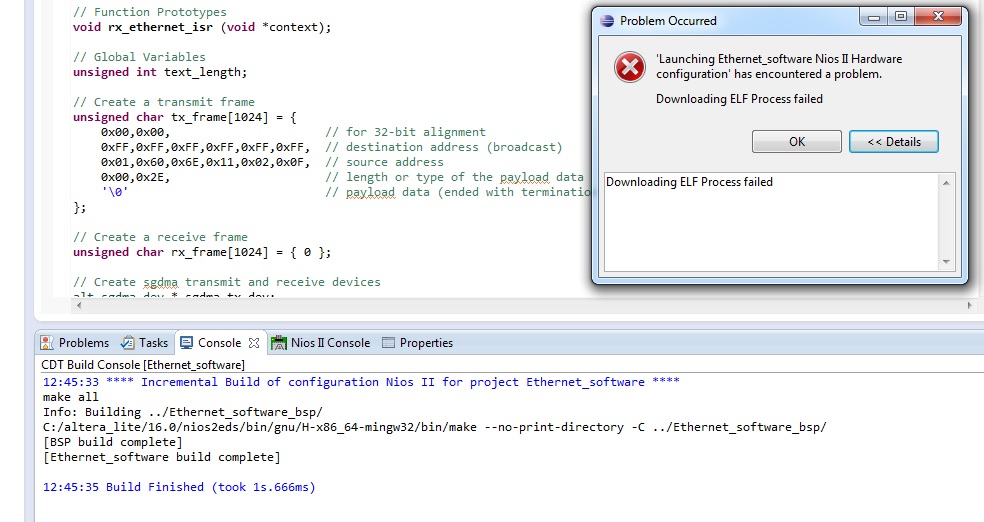
I am trying to run a simple loopback design using Triple Speed Ethernet on DE2-115 board . following this doc "Using Triple-Speed Ethernet on DE2-115 Boards".
When i try to download and run the Nios app i get this error "Elf download failed" , from the previous threads on this subject i checked that my sys reset is connected to the locked output of PLL , which get high ( logic 1 ) right after .soc download , so no problem there .
Also i have connected set_10_n to en_10 and set_1000 to en_mode_n , because as i have read in Triple-Speed Ethernet Intel® FPGA IP User Guide, Updated for Intel® Quartus® Prime Design Suite: 19.4'IP Version: 19.4.0 .
That : @ page 109 :
set_1000 = Gigabit mode selection. Can be driven to 1 by an external device, for example a
PHY device, to set the MAC function to operate in gigabit. When set to 0, the MAC
is set to operate in 10/100 Mbps. This signal is ignored when the ETH_SPEED bit in
the command_config register is set to 1.
Same for set_10 .
I am using Quartus ver 16.0 . See project attached .
Regards , Ahmed
6 Replies
 ZKhan1
I have also tried to delete the Nios Workspace and Nios software folder and generated a new Nios project , several times to get rid of this error , but it didnt work ???
Any clues ??
 EricMunYew_C_Intel
Frequent Contributor
Hi, Khan
did you load the FPGA bitfile?
- ZKhan1
you mean .sof file yes , i always downloaded that first before running Nios app from Ecplise
- EricMunYew_C_Intel
Can you try Quartus 16.1.
- EricMunYew_C_Intel
can you uncheck initialize memory content of your on-chip RAM.
 RadicalExponent
New Contributor
Hey,
I am experiencing the same problem with my project at the moment.
Using Quartus 18.0 (but also tried earlier versions like 16.0, 15.0, 13.0, standard each).
I came to recognize that, for a short while, there is an error message referencing some wrapper script
as can be seen in the image.
Trying to download only one file results in the same error.
EDIT: Little sidenote: Using the Nios II Command Shell and the command nios2-download worked fine...