Forum Discussion

 New Contributor
create-this-bsp - mkdir: cannot create directory: No such file or directory
Hey,
I'm trying to get the Nios® II Hardware Development Design Example running for hours now, but I'm still running into errors while trying to create a project in Nios II EDS an Windows 10. I fixed a lot of errors by using the advice from this forum, but now I'm finaly stuck and I realy hope that someone can help me.
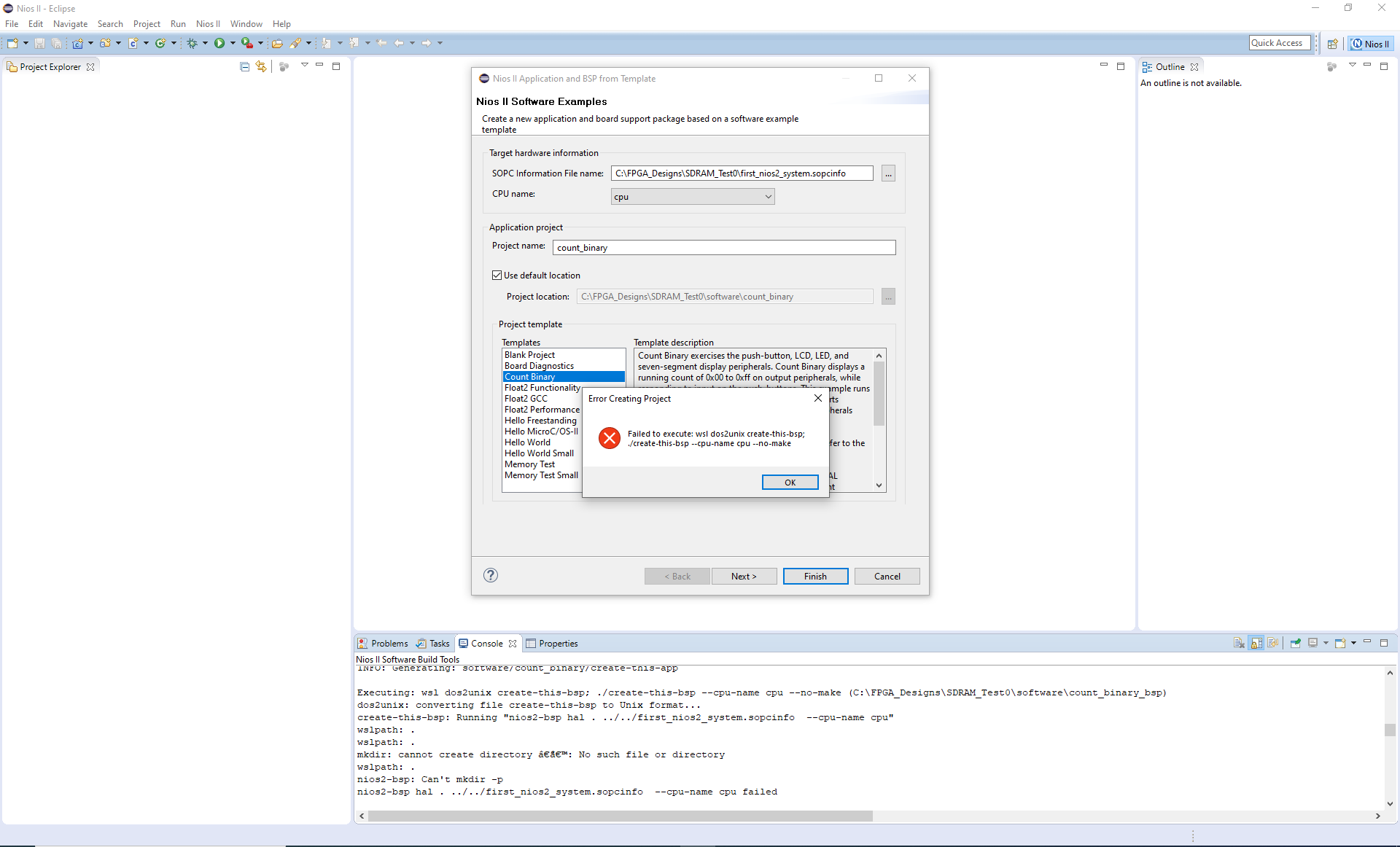
When I create a project via "File -> New -> Nios II Application and BSP from Template" I get the following error:
Executing: wsl dos2unix create-this-bsp; ./create-this-bsp --cpu-name cpu --no-make (C:\FPGA_Designs\SDRAM_Test0\software\count_binary_bsp)
dos2unix: converting file create-this-bsp to Unix format...
create-this-bsp: Running "nios2-bsp hal . ../../first_nios2_system.sopcinfo --cpu-name cpu"
wslpath: .
wslpath: .
mkdir: cannot create directory ‘’: No such file or directory
wslpath: .
nios2-bsp: Can't mkdir -p
nios2-bsp hal . ../../first_nios2_system.sopcinfo --cpu-name cpu failed
please find attached a screenshot
Here some additional information, I hope that something is relevant:
- the project folder is C:\FPGA_Designs\SDRAM_Test0\software, which is accessible as "/mnt/c/FPGA_Designs\SDRAM_Test0\software" within ubuntu
- installed software versions:
Quartus Prime Version 22.1sts.0 Build 915 10/25/2022 SC Lite Edition
Eclipse Mars.2 Release 4.5.2
Nios II EDS V 22.1.0.20221026-1422
> wsl -v -l
WSL-Version: 1.0.3.0
Kernelversion: 5.15.79.1
WSLg-Version: 1.0.47
MSRDC-Version: 1.2.3575
Direct3D-Version: 1.606.4
DXCore-Version: 10.0.25131.1002-220531-1700.rs-onecore-base2-hyp
Windows Version: 10.0.19045.2486
> wsl -l -v
NAME STATE VERSION
* Ubuntu-18.04 Running 1
Thank you in advance!
Best regards
Hi to all.
"wslpath" command behaviour has been changed.So workaround is to patch a "intelFPGA\22.1std\nios2eds\sdk2\bin\nios2-bsp" script:
adjust_path() {
if [ "${_IS_WSL}" = "1" ] && [[ ! $1 =~ ^\/mnt\/* ]]; then
- echo "$(wslpath -u "$1")" #Line 44
+ echo "$(wslpath -u -a "$1")"
else
echo "$1"
fi
6 Replies
 kornev_online
Hi to all.
"wslpath" command behaviour has been changed.So workaround is to patch a "intelFPGA\22.1std\nios2eds\sdk2\bin\nios2-bsp" script:
adjust_path() {
if [ "${_IS_WSL}" = "1" ] && [[ ! $1 =~ ^\/mnt\/* ]]; then
- echo "$(wslpath -u "$1")" #Line 44
+ echo "$(wslpath -u -a "$1")"
else
echo "$1"
fi djordje200179
One more guy with exactly same issue
 AnonymousNot applicable
Hi.
Seen this problem on two different computers while it is working on others.
It appears to be a problem with running the "dos2unix" under wsl
''failed to execute :wsl dos2unix create-this-bsp''
Executing: wsl dos2unix create-this-bsp; ./create-this-bsp --cpu-name cpu_lab6 --no-make (C:\<project_path>\software\my_hello_world_bsp)
dos2unix: converting file create-this-bsp to Unix format...
create-this-bsp: Running "nios2-bsp hal . ../../DE2_115_SOPC.sopcinfo --cpu-name cpu_lab6"
wslpath: .
wslpath: .
mkdir: cannot create directory ‘’: No such file or directory
wslpath: .
nios2-bsp: Can't mkdir -p
nios2-bsp hal . ../../DE2_115_SOPC.sopcinfo --cpu-name cpu_lab6 failedWhat's with the wierd "‘’" directory name?!?!?
Could it be regional language settings (here it is Scandinavian language)
Why is the wslpath seemingly empty?
Any ideas?
Best regards
Nikolay
- AnonymousNot applicable
Sorry, this did not solve my problem.
NiosII EDS still reports ''failed to execute :wsl dos2unix create-this-bsp''....
 blckp8nt
Hey Nikolay,
for me the workaround as described by kornev_online worked. I added the "-a" option to 'wslpath' command as he described. This seems to "force the result of wslpath to absolute path format".
To your question: What's with the wierd "‘’" directory name?!?!?
I found this table:
Looks like an empty path described by those two characters '' gets passed to mkdir. Maybe wslpath gets confused by relative paths, I dont know.
Thank you all for your help and kornev_online for your solution! I would have never solved this problem.
Best regards
 Do_Cong_Tru
Hi to all.
I aggregated the way to solve this trouble. When I have done all, problem was over.
Here is the way to solve this error1. Install Wsl:2.a/ Run Ubuntub/ Run sudo nano /etc/wsl.conf' (for editing file wsl.conf)c/ Replace the following[automount]options = "metadata"d/ Save the file.3.Create a new environment variable in Windows:Name: WSLENVValue: SOPC_KIT_NIOS2/p4.Workaround is to patch a "intelFPGA\22.1std\nios2eds\sdk2\bin\nios2-bsp" script:adjust_path() {if [ "${_IS_WSL}" = "1" ] && [[ ! $1 =~ ^\/mnt\/* ]]; then- echo "$(wslpath -u "$1")" #Line 44+ echo "$(wslpath -u -a "$1")"elseecho "$1"fi5.Restart your PC and check again