Forum Discussion

 Contributor
Ashling RISC Free IDE fails to download ELF file

 New Contributor
Hi Dr Barry H,
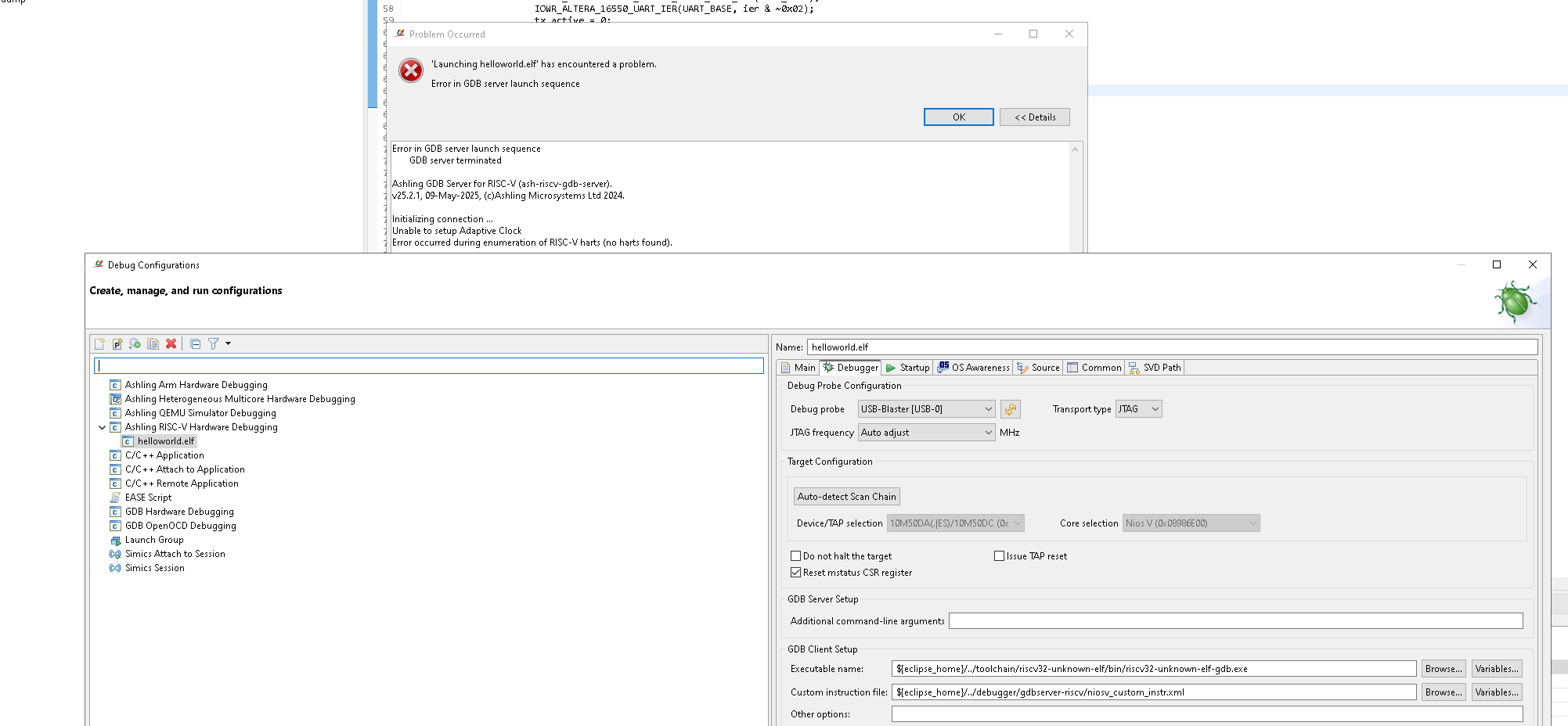
Given that 'Auto-detect Scan Chain' is working well, JTAG access is not broken. A second look at the error message suggests Ashling RiscFree is unable to communicate with the Nios V core, which can happen if the core is the being held in reset state (or otherwise not running/responding).
To further analyse the issue, could you please collect and share the following:
1. Share low level probe logging file generated by Ashling RiscFree:
In the 'Debugger' tab of the launch configuration, add the following to 'Additional command-line arguments' field.
--probe-log-level 7 --probe-log-path <path\to\store\log\file>Then re-launch the debug session. A log file (*.bin) should be generated at the specified location; please share that file.
2. Share 'jtagconfig' output:
From the Nios V shell, please run:
jtagconfig -d…and share the full output.
Regards,
Rejeesh
 Contributor
Hello Rajeesh,
Thanks for the extra help. I will try this out. I Have discovered one problem was that the Windows 10 PC i was working with had Norton 360 AV installed, and even though it never reported any blocking events, ad all logs appeared to suggest it was not interfering with the debugger and Compiler, i must have been doing something., because today i uninstalled it all, rebooted, and tried running the debugger again, and it got a lot further:
Here is the log now :
Ashling GDB Server for RISC-V (ash-riscv-gdb-server).
v25.2.1, 09-May-2025, (c)Ashling Microsystems Ltd 2024.
Initializing connection ...
Unable to setup Adaptive Clock
Connected to target device with IDCODE 0x31050dd using USB-Blaster-2 (2) via JTAG at adaptive speed.
Info : Active Harts Detected : 1
Info : Core[0] Hart[0] halted
Info : [0] System architecture : RV32
Info : [0] Debug version : v1.00
Info : [0] Number of hardware breakpoints available : 1
Info : [0] Number of program buffers: 8
Info : [0] Number of data registers: 2
Info : [0] Memory access -> Program buffer
Info : [0] Memory access -> Abstract access memory
Info : [0] CSR & FP Register access -> Abstract commands
Waiting for debugger connection on port 63780.
Press 'Q' to Quit.
Got a debugger connection from 127.0.0.1 on port 63780.
Then from the Debug Terminal i see this and it crashes:
GNU gdb (GDB) 13.2
Copyright (C) 2023 Free Software Foundation, Inc.
License GPLv3+: GNU GPL version 3 or later <http://gnu.org/licenses/gpl.html>
This is free software: you are free to change and redistribute it.
There is NO WARRANTY, to the extent permitted by law.
Type "show copying" and "show warranty" for details.
This GDB was configured as "--host=x86_64-w64-mingw32 --target=riscv32-unknown-elf".
Type "show configuration" for configuration details.
For bug reporting instructions, please see:
<https://www.gnu.org/software/gdb/bugs/>.
Find the GDB manual and other documentation resources online at:
<http://www.gnu.org/software/gdb/documentation/>.
For help, type "help".
Type "apropos word" to search for commands related to "word".
Warning: Instruction specification contains imm field
Warning: Instruction specification contains imm field
Warning: Instruction specification contains imm field
...Then it crashes ...ends up here :
void break_operation (void) {
#ifdef ALT_CPU_HAS_DEBUG_STUB
NIOSV_EBREAK();
#else // ALT_CPU_HAS_DEBUG_STUB
while(1) ;
#endif // ALT_CPU_HAS_DEBUG_STUB
}
Main never opens.....i assume something in the build went wrong but not sure what or why because it seemed to build OK.
LINUX BUILDS: I have also tried building your designs on my UBUNUT PC, and after doing all the configurations for the linux tools and the environment setup, get the following error messages from the Ashling IDE, i assume something is still not quite right in the Linux project configuartion, how do i tell it where the CMakecache.txt file is please ?:
Compile log from Ubuntu 24.04:
Description Resource Path Location Type
File CMakeCache.txt does not exist, unable to build project bsp CMakecache.txt Problem could not load cache bsp C/C++ Problem
Project 'bsp' has no explicit encoding set bsp /bsp No explicit project encoding
Project 'app_iperf' has no explicit encoding set app_iperf /app_iperf No explicit project encoding
File '/home/drbarryh/VAREX_Projects/25.1std_max10_package/software/bsp/build/default/compile_commands.json' was not created in the build. Your workbench will not know all include paths and preprocessor defines. bsp org.eclipse.cdt.jsoncdb.core.CompileCommandsJsonParser JSON compilation database
Thanks, Dr Barry H