Forum Discussion

 New Contributor
Regarding the TX settings of MIPI CSI2 IP
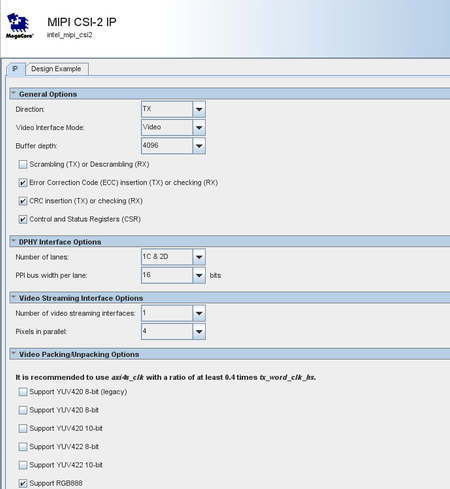

 Regular Contributor
Hi ,
Based on what you describe, Your MIPI CSI-2 TX's ready will stay low unless the core and PHY are fully initialized, out of reset, and properly configured. Please try to check resets, clocks, core/PHY ready signals, and configuration.
The most common issue is the DPHY not being ready or the core not being enabled.
I would suggest to try generate the design example by default and try it again.
There is ready MIPI design example available, perhaps you can try out that https://github.com/altera-fpga/agilex-ed-camera-ai
Regards,
Wincent
 New Contributor
Hi ,
After modification, CSI2 TX's axi stream tready signal ability is high, TPG->CSI2 TX's number is normal.
However, this is also a new problem that has appeared, CSI2 T2X IP good image has been lost, but the reason is that the reason is that the signal tap is taken and the waveform is shown.
Is there any other construction?
Thx.
- Wincent_Altera9 months ago
Hi,
From your description and the SignalTap capture:- AXI-Stream tready toward CSI-2 TX is now asserted “high ability” (i.e., backpressure looks cleared and TPG→CSI2 TX throughput is normal).
- Despite that, the CSI-2 TX IP no longer outputs a “good image.”
- The waveform shows HS word clocks toggling, but most of the CSI-2 TX control/status signals (e.g., word-valid, hs requests, lane enables) appear stuck low, and stop-state lines look static. That suggests the CSI-2 TX isn’t entering HS transmission, or packetization isn’t being triggered.
Below are checks that typically isolate CSI-2 TX “no output” behaviors after AXI-side changes.
There is few things I suggest to check- First and the fastest way is to compare with the example design that I provided earlier.
- Else you may check the AXI-Stream side - ensure that it is match AXI input width to CSI-2 TX configured data width and pixel format.
- CSI-2 packetizer - Set correct data type (RAW/YUV/RGB) and virtual channel and heck status registers for underrun/overflow and frame/line detected.
- Resets/clocks - ensure the CDC/FIFO widths and enables correct.
Regards,
Wincent_Altera
- STATEABC9 months ago
Hello,
Thank you very much for your suggestion.
I generated a project based on https://github.com/altera-fpga/agilex-ed-camera-ai?tab=readme-ov-file and compared it. Unfortunately, I found that the project you provided only has examples for MIPI RX and DPHY RX, and not the MIPI CSIX TX related parts. However, I can confirm that my MIPI RX part works because my other project can output images via CAMERA->MIPI DPHY->MIPI CSI2 RX->HDMI.
Furthermore, I checked AXI-Stream, and the AXI input width and CSI-2 TX configuration data width are both 24 bits, with the data type being RGB888. (The previous CSI2 configuration screenshot showed that Pixels in parallel was changed from 4 to 1.)
Below is my mipi.qsys
The MIPI DPHY settings are shown in the image.
Are there any other relevant suggestions or reference examples?
Any help is appreciated.
- Wincent_Altera9 months ago
Hi STATEABC ,
Initially the MIPI CSI2 TX axi stream ready signal remains low, and it doesn't process axi stream data from the TPG. After modification, CSI2 TX's axi stream tready signal ability is high, TPG->CSI2 TX's number is normal.
>> Do you mind to share with me what change had been make to enable back the TX AXI signal ?
>> Just wondering what could potential make the image lost
However, this is also a new problem that has appeared, CSI2 T2X IP good image has been lost, but the reason is that the reason is that the signal tap is taken and the waveform is shown.
>> Do you means in previously before modifying , when the MIPI CSI2 TX axi stream ready signal remains low, the image look good ?
Sorry I am bit confuse , just trying to understand better the problem so that I can provide an accurate answer to your queries. Looking forward to hear back from you soon.
Regards
Wincent
- STATEABC9 months ago
Hello,
Thank you very much for your suggestion.
I generated a project based on https://github.com/altera-fpga/agilex-ed-camera-ai?tab=readme-ov-file and compared it. Unfortunately, I found that the project you provided only has examples for MIPI RX and DPHY RX, and not the MIPI CSIX TX related parts. However, I can confirm that my MIPI RX part works because my other project can output images via CAMERA->MIPI DPHY->MIPI CSI2 RX->HDMI.
Furthermore, I checked AXI-Stream, and the AXI input width and CSI-2 TX configuration data width are both 24 bits, with the data type being RGB888. (The previous CSI2 configuration screenshot showed that Pixels in parallel was changed from 4 to 1.)
Below is my mipi.qsys
The MIPI DPHY settings are shown in the image.
Are there any other relevant suggestions or reference examples?
Any help is appreciated.
- STATEABC9 months ago
Hello,
Thank you very much for your suggestion.
I generated a project based on https://github.com/altera-fpga/agilex-ed-camera-ai?tab=readme-ov-file and compared it. Unfortunately, I found that the project you provided only has examples for MIPI RX and DPHY RX, and not the MIPI CSIX TX related parts. However, I can confirm that my MIPI RX part can work because my other project can output images via CAMERA->MIPI DPHY-MIPI CSI2 RX->HDMI.
Furthermore, I checked AXI-Stream, and the AXI input width and CSI-2 TX configuration data width are both 24 bits, with data type RGB888. (The previous CSI2 configuration screenshot shows that Pixels in parallel was changed from 4 to 1.)
Below is my mipi.qsys
The MIPI DPHY settings are shown in the image.
Are there any other relevant suggestions or reference examples? Any help is appreciated.


