Forum Discussion

 Occasional Contributor
one of the 'Timing Optimization Advisor' recommendations for my design is to define a list of clocks as Global Clock in the Assignment editor. how do i do that?
i have tried to enter one of the clocks to the 'Assignment Editor' list in the 'To' column, i selected 'Global Signal' in the 'Assignment Name' column, i selected 'Global Clock' in the 'Value' column. compiling the design i get a message "136021 Ignored assignment GLOBAL which contains an invalid node name THE_NAME_OF_THE_CLOCK_FROM_THE_RECOMMENDATIONS_LIST" so i guess i do not configure it right.
13 Replies
 sstrell
Super Contributor
The To column must be the exact name of your clock. Click the little browse button in the To column cell to open up the Node Finder and search for and select the name of your clock to apply the assignment to.
#iwork4intel
 OLevy1
thanks for the answers but what i get in the report are names that can not be found by the Node Finder.
for example (one of the clocks i get in the report):
'crm_inst|freeclk_pll_inst|pll_inclk50mhz_normal_inst|altera_pll_i|general[0].gpll~FRACTIONAL_PLL|vcoph[0]'
i have found 'crm:crm_inst|pll_inclk50MHz_normal:freeclk_pll_inst|outclk_0' in the Node Finder. configured it as 'Global Signal' in the 'Assignment Name' column and 'Global Clock' in the 'Value' column.
and after the compilation i still get the same line in the report (Node Name - crm_inst|freeclk_pll_inst|pll_inclk50mhz_normal_inst|altera_pll_i|general[0].gpll~FRACTIONAL_PLL|vcoph[0], Global Resource Used - No)
 KennyT_altera
usually, if the name was correct after doing the above suggestion. You will find a green tick there in the assignment editor.
- OLevy1
thanks for the answers but what i get in the report are names that can not be found by the Node Finder.
for example (one of the clocks i get in the report):
'crm_inst|freeclk_pll_inst|pll_inclk50mhz_normal_inst|altera_pll_i|general[0].gpll~FRACTIONAL_PLL|vcoph[0]'
i have found 'crm:crm_inst|pll_inclk50MHz_normal:freeclk_pll_inst|outclk_0' in the Node Finder. configured it as 'Global Signal' in the 'Assignment Name' column and 'Global Clock' in the 'Value' column.
and after the compilation i still get the same line in the report (Node Name - crm_inst|freeclk_pll_inst|pll_inclk50mhz_normal_inst|altera_pll_i|general[0].gpll~FRACTIONAL_PLL|vcoph[0], Global Resource Used - No)
- sstrell
That "vcoph" signal is a tap of the VCO of the PLL. You can't put it on a global.
https://www.intel.com/content/www/us/en/programmable/support/support-resources/knowledge-base/solutions/rd01182013_427.html
#iwork4intel
- KennyT_altera
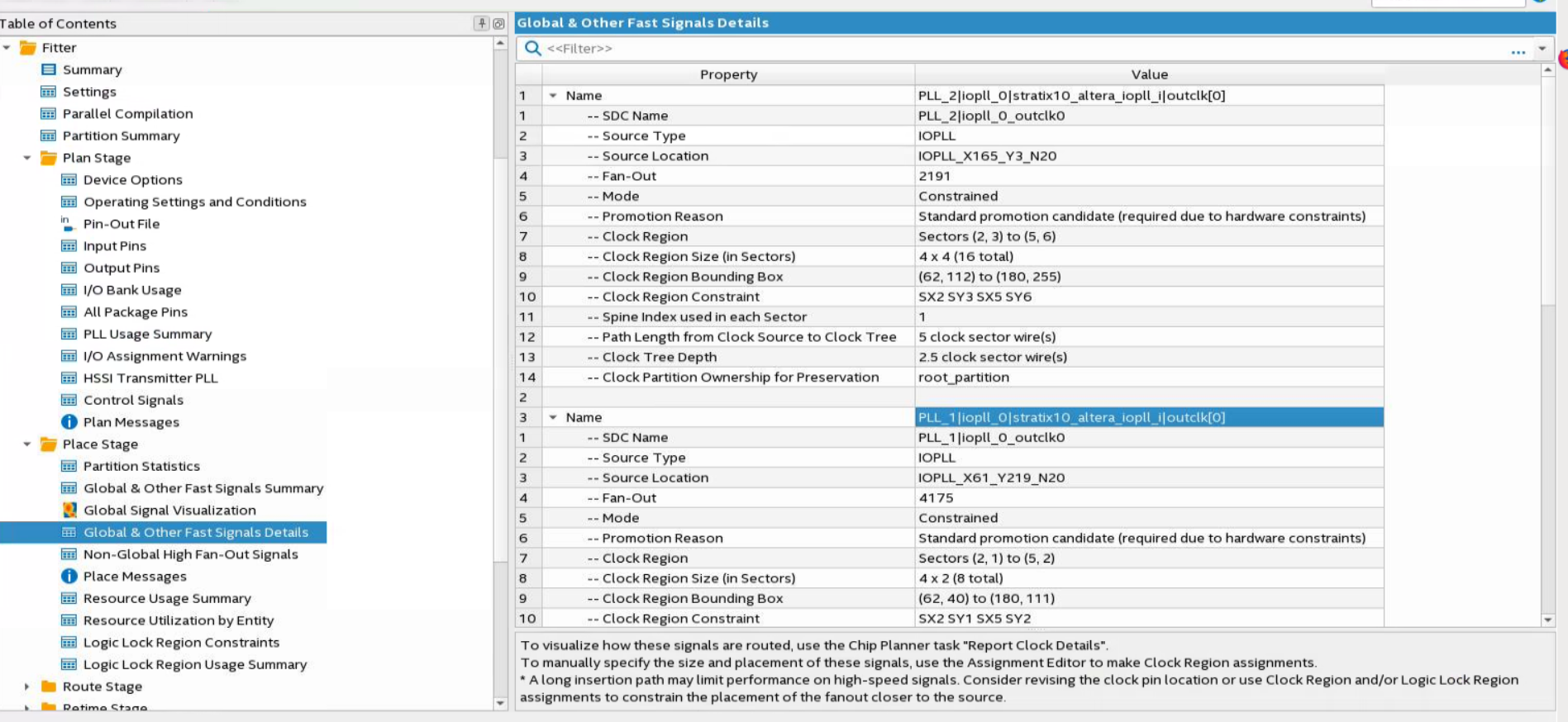
You can always look into your reports files to check on the correct name to look for in your assignment editor. got to processing -> compilation report.
- OLevy1Hi, I have checked the ‘Compilation report - > TimeQuest Timing Analyzer -> Clocks’ and the names are the same to what I see in the ‘Timing Optimization Advisor’ recommendations. Do you have any other ideas? Thanks, Oren
- KennyT_altera
It should fall under fitter report. Can you try to look over there?
- KennyT_altera
Did you manage to find the name? If no, I will attached a screenshot.
- OLevy1Hi, No I didn’t. Can you please attach the screenshot? Thanks, Oren
- KennyT_altera
- KennyT_altera
Does the screenshot help you?
- OLevy1Yes Thanks a lot