Forum Discussion

Altera_Forum's avatar
Altera_Forum
Icon for Honored Contributor rankHonored Contributor
17 years ago

Altera FFT Vs Matlab FFT. Strange Results

Hi,

I’m testing some FFT Altera Core using those parameters:

1)Single Streaming or Burst 16K length FFT

2)12-14-16 bits input REAL data (pseudorandom code {-1,1})

3)same bits for twiddle (12-14-16)

The input is a pseudorandom function of ONLY two symbol -1 and 1. I put 0 constant as Imag input. Using 16 bit the exponent is 0, with 14 bit the exponent is -1 and for 12 the exponent is -3.

I tested the output both in DSP Builder environment (Simulink) and using pure Matlab script after generating the Core. The results are totally wrong respect the (correct) built in FFT in Matlab (FFTW). In attachment I put the input file, the Altera output and the Matlab output.

Thanks for the support

Gabriele

18 Replies

  • Altera_Forum's avatar
    Altera_Forum
    Icon for Honored Contributor rankHonored Contributor

    Sorry, i'm new here, and i couldn't insert the image..

    Anyway, can anyone find a reason for for the output be 0?? i think is because of input signals control, but i'm looking to FFT UG and i'm following from there but the output doesn't change..
  • Altera_Forum's avatar
    Altera_Forum
    Icon for Honored Contributor rankHonored Contributor

    Hi,

    I faced that problem before. But for me, I was able to see outputs after i decrease my clock period from 10ns to 1ns. Maybe you could try that.
  • Altera_Forum's avatar
    Altera_Forum
    Icon for Honored Contributor rankHonored Contributor

    --- Quote Start ---

    Hi,

    I faced that problem before. But for me, I was able to see outputs after i decrease my clock period from 10ns to 1ns. Maybe you could try that.

    --- Quote End ---

    1ns clk period means 1000MHz(1GH). Too good to be true for any fpga. I am afraid you are on the wrong path.
  • Altera_Forum's avatar
    Altera_Forum
    Icon for Honored Contributor rankHonored Contributor

    Hi,

    It seems that I am having the same issue.

    My fft_sink_ready signal (called out_sink_ready) is being set to 0 after being asserted to 1 a couple of cycles before. I do not know why this is happening. Any help with this matter will be greatly appreciated.

    Furthermore, since I am aware of the scaling issue in the streaming implementation, I ensured that the real input is FFFF (16 bits) - the largest number possible.

    Thank you!
  • Altera_Forum's avatar
    Altera_Forum
    Icon for Honored Contributor rankHonored Contributor

    --- Quote Start ---

    Hi,

    It seems that I am having the same issue.

    My fft_sink_ready signal (called out_sink_ready) is being set to 0 after being asserted to 1 a couple of cycles before. I do not know why this is happening. Any help with this matter will be greatly appreciated.

    --- Quote End ---

    I had this problem, too. Go to the wizard you created the IP-core with. Check the checkbox including the global clock enable signal. Apply a logical high level signal to the input. Then the IP-core should not stop working after the first cycles.
  • Altera_Forum's avatar
    Altera_Forum
    Icon for Honored Contributor rankHonored Contributor

    Hi,

    I am trying to use FFT Megacore function and got a different result from MATLAB

    Following is my code

    
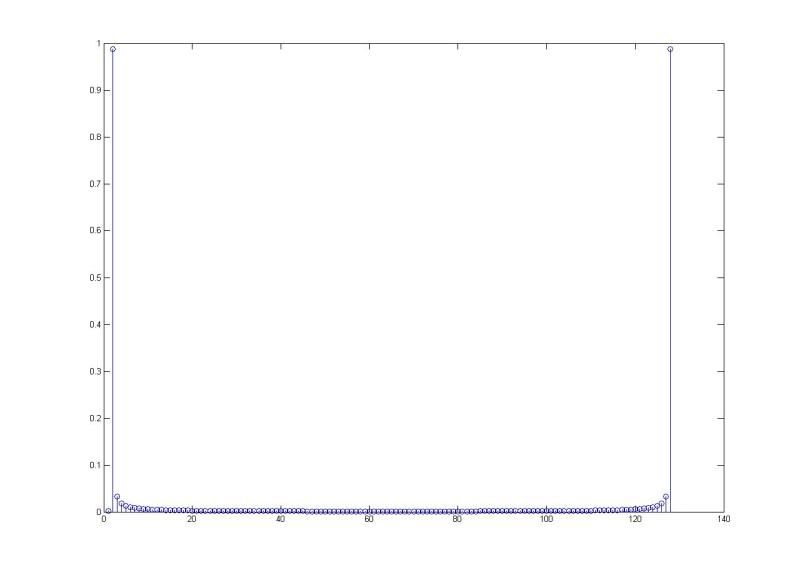
    t=0:0.001:0.127; 
    y=2*sin(2*pi*8*t);
    Yfft=fft(y);
    stem(abs(Yfft)/128); 
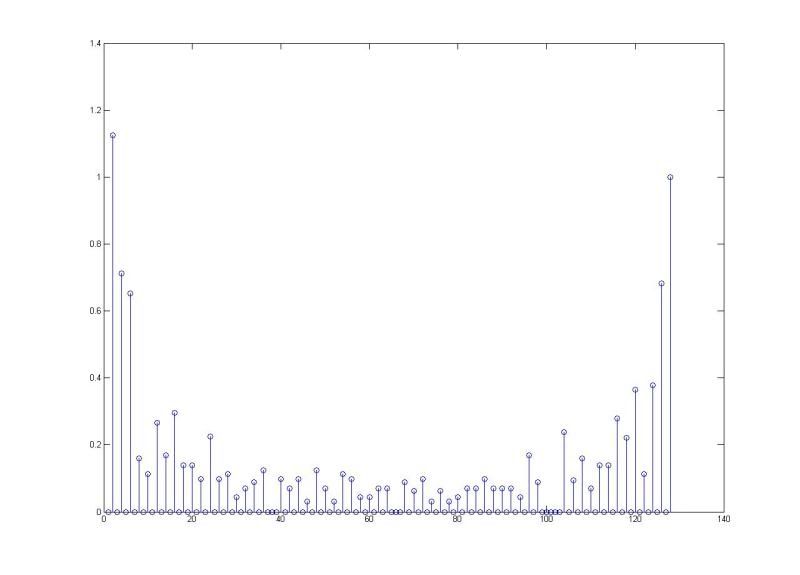
     = MegacoreFFT_VHDL_model(y,128,0);
    ymega_change=abs(ymega)*2^2/128; %exponent = -2 and I normalize to 128
    stem(ymega_change);
    
    Here are the 2 graphs: 1st one is MATLAB FFT, 2nd is MegaFFT

    Am I making any mistakes ?

    http://i111.photobucket.com/albums/n126/leejongfan/FFT.jpg

    http://i111.photobucket.com/albums/n126/leejongfan/MegaFFT.jpg
  • Altera_Forum's avatar
    Altera_Forum
    Icon for Honored Contributor rankHonored Contributor

    --- Quote Start ---

    I have several suggestions and also want to point out that it is not quite fair to compare Altera's FFT to Matlab's FFT.

    First of all, Matlab's FFT implementation (the fft function) is actually a floating point DFT implementation- and we don't really have control over twiddle precision within the fft function. So that wouldn't exactly be a fair comparison...

    Also one thing I found about Altera's FFT core (especially with the older architectures that utilize block floating point representation: i.e. streaming, burst and buffered burst), it is best if you scale up your data (so you are using all of the dynamic range). I presume it is due to the block floating point structure (the data is scaled after each stage of butterfly... therefore if you are not using enough precision, it is very possible that your data would completely disappear somewhere within the FFT core).

    Please see my attached .zip file for detail. In the zip file, you will find three files:

    - in.mat (this is your original input)

    - FFT_Altera_model.m -> this is the bit-accurate matlab simulation model generated by Altera's FFT megacore, version 8.0 (here I am using a streaming FFT core)

    - FFT_Altera_tb.m -> this is my testbench comparing Altera's result with matlab fft's result (using your input)...

    Two things to note:

    1. by scaling up the input prior to altera's fft function and then scaling the output back, we see that altera's fft generates similar output to matlab's fft function. the bigger the data and twiddle resolution, the smaller the difference between altera's and matlab's fft spectrum. the difference can be attribute to the fact that matlab uses floating point representation.

    2. Also your Altera's fft output is really = data_out*2^(-exp_out) -> see appendix in FFT UG. Did you remember to do this?

    3. Without properly scaling the input data prior to Altera's fft function.... the difference is pretty big.... I imagine this is what you're seeing...

    Also if you are using the FFT core, you do need to pay attention to the sink_ready signal... make sure you don't input data while sink_ready is low... That gave me some trouble before...

    Anyhow, hope this helps...

    --- Quote End ---

    Hi,

    Could you please explain more about the scaling part. I am not very clear why does it helps

    In fact, it does ! If I scale up my input by multiply to 2^15-1, then the difference between Megacore and MatLAB are less than 10^-5

    Your support would be much appreciated !

    Dennis